Jun 6

WidsMob AI Retoucher 3.11


Description:
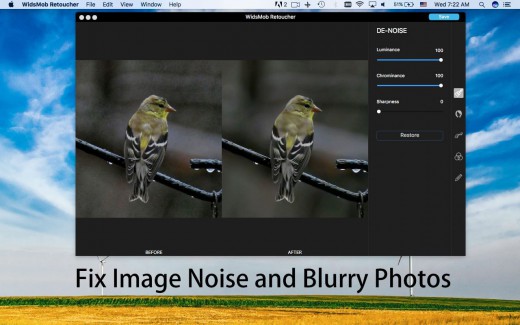
WidsMob Retoucher is a photo editor which allows you to discover the magic of artistic photo effects. It is noise reduction software to fix blurry photos first. WidsMob Retouch eliminates image noise while preserving image detail. What is more, WidsMob Retoucher also removes some selfie imperfections, such as minimize freckles, whiten teeth, and smooth skins. It also provides dozens of revolutionary camera profiles to rediscover the magic of stunning

What’s New

Version 3.11:

  • Release notes were unavailable when this listing was updated.

Release Name: WidsMob AI Retoucher 3.11
Size: 336.60 MB
Links: HOMEPAGE – NFO – Torrent Search

Download: UPLOADGiGNiTROFLARERAPiDGATOR

6 Comments
Jun 6

FinalShot 2.4

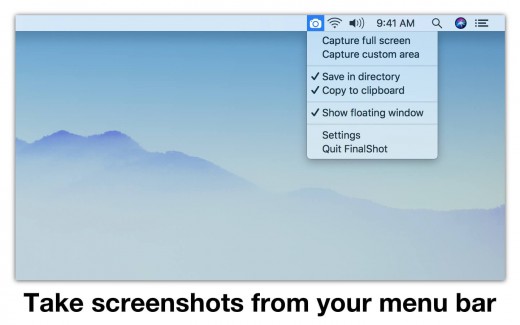
Description: FinalShot locates itself in your menu bar, and it’s always there when you need it – 2 clicks, and your screenshot is taken! FinalShot can save your screenshots into a folder you choose or copy your screenshots into your clipboard so that you can paste them into any other app. You can screenshot your full screen or a specific area. To screenshot a specific area, simply select the top left corner and drag your cursor to the bottom right corner to outline the area to be captured. FinalShot stores your screenshots as PNG or JPEG files and you can lower the quality if you need smaller files.


What’s New

Version 2.4:

  • Bugfixes

Release Name: FinalShot 2.4
Size: 10 MB
Links: HOMEPAGE – NFO – Torrent Search

Download: UPLOADGIG – NiTROFLARE – RAPiDGATOR

4 Comments
Jun 3

iThoughtsX 9.1

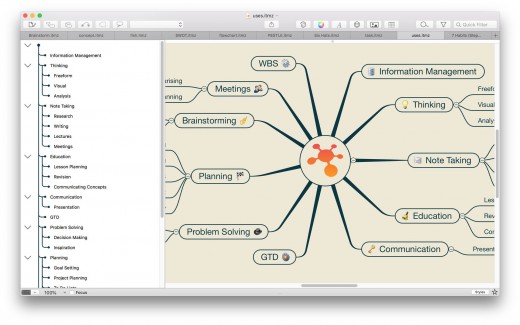
Description: iThoughtsX enables you to visually organise your thoughts, ideas and information.

Typical Uses

  • Course notes/revision
  • Summarising.
  • Project planning
  • Task lists
  • Brainstorming
  • Goal setting
  • WBS
  • Meeting notes
  • GTD

What’s New

Version 9.1

New Features:

  • Outline Layout Style

Tweaks:

  • Import/Export Browser Bookmarks

Fixes:

  • Various bug fixes and performance improvements.

Release Name: iThoughtsX 9.1
Size: 35.29 MB
Links: HOMEPAGE – NFO – Torrent Search

Download: UPLOADGiG – NiTROFLARE – RAPiDGATOR

4 Comments
Jun 3

start 5.7.1

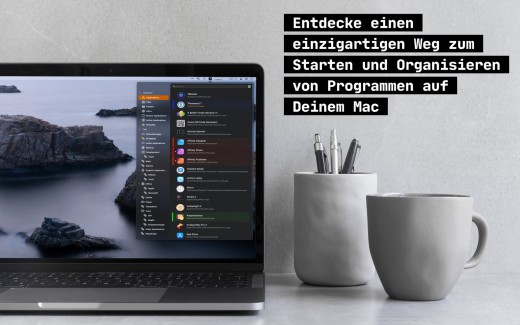
Description: innovative::bytes’ start is an unique launcher for macOS that allows you to open applications, documents or folders quickly and easily. Create tidiness in your Dock and start items with the smart launcher app start instead.

start supports you and your workflow with a well planned organizational system for your items and quick access to what you need.

Features:

  • Tag it and love it! Use tags to create collections for your applications, frequently used folders, scripts or any other file. It has never been so easy to organize and sort items on macOS. Save a lot of time – searching was yesterday!
  • Comments and notes! Add comments and small notes to your items to describe them in more detail. The comments will remind you what the items can do for you. Small notes with big effect – so you always keep track!
  • Highlight your items as you like! With just a few clicks you can highlight your items with colors and find them even faster. Choose colors for more clarity and organization – effective and visually appealing!
  • Start with a simple keystroke! Assign a key combination to your individual items and start them immediately from anywhere with a customizable keyboard shortcut. Your workflow is no longer disturbed – you’ll love the hotkeys!

What’s New

Version 5.7.1:

  • Small update for bug fixing and optimization.

Release Name: start 5.7.1
Size: 16.57 MB
Links: HOMEPAGE – NFO – Torrent Search

Download: UPLOADGiG – NiTROFLARE – RAPiDGATOR

5 Comments
Jun 3

Dropzone 4 Pro 4.3.5

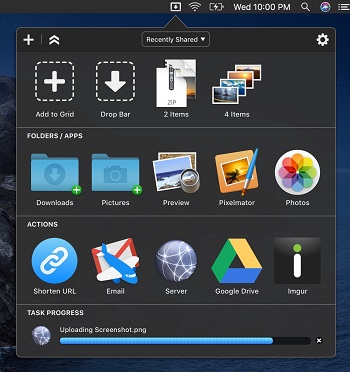
Description: Dropzone makes it faster and easier to copy and move files, open applications and share files with many different services. Dropzone is a unique and amazing app that’s like nothing you’ve ever used before. We’ve paid fanatical attention to every detail and built an app that looks and feels like an integral part of macOS.

Dropzone ships with a powerful scripting API and with a little programming knowledge you can modify any of your actions or even create entirely new ones. This gives Dropzone unlimited extendability and utility. We’re always thinking up new actions so Dropzone will become even more useful over time.

Dropzone also includes Drop Bar – Drop Bar makes it easy to stash files you know you’ll need later. Just drop files on the Drop Bar icon in the grid and they will stick there until you’re ready to use them.

Features

  • Open applications, move and copy files faster than ever before.
  • Shorten URLs quickly using Tinyurl shortener. Just select a URL to shorten and press Ctrl+Option+Cmd+S and the shortened URL is automatically copied to the clipboard.
  • AirDrop integration lets you drop files or folders from any app and share them with your other Macs over the network.
  • Imgur integration lets you share images fast and get a link for pasting.
  • Upload files to Amazon S3 (Dropzone Pro feature).
  • Upload files to your FTP server (Dropzone Pro feature).
  • Upload files to your Google Drive (Dropzone Pro feature).
  • Download and install add-on actions that let you upload to services like Google Drive, YouTube and many others (Dropzone Pro feature).
  • Powerful multi-tasking engine allows you to run multiple tasks at once and track the progress of each one through the in-grid task status area.
  • See how tasks are progressing at a glance in the animated menu item.
  • Launch Dropzone actions with the newly added keyboard shortcuts feature (Dropzone Pro feature).
  • Add applications, folders or actions to your grid easily by dragging and dropping them on the Add to Grid area.
  • Develop your own actions using the updated and massively improved Ruby or Python API (Dropzone Pro feature).

Release Name: Dropzone 4 Pro 4.3.5
Size: 62.20 MB
Links: HOMEPAGE – NFO – Torrent Search

Download: UPLOADGiG – NiTROFLARE – RAPiDGATOR

4 Comments
Jun 3

Capture One 22 Pro 15.2.2.4

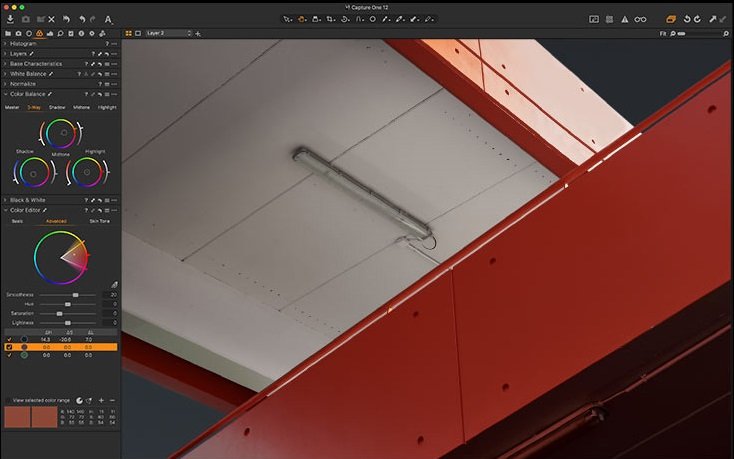
Description: Capture One continues to lead the way in RAW file image editing. Expertise from creating customized color profiles for more than 400 cameras, combined with our relentless dedication to creative freedom has brought recognition to Capture One’s workflow, our exceptional color handling, and precision editing tools. We develop our software with the ambition of enabling you to achieve your creative vision through a smooth, efficient workflow; making it the professional’s choice in imaging software.

Feature :

  • All About Color
  • Workflow and Performance
  • Asset Management
  • Details and Lens Profiles
  • Full Control

Release Name: Capture One 22 Pro 15.2.2.4
Size: 655.77 MB / 655.77 MB
Links: HOMEPAGE – NFO – Torrent Search

Download: UPLOADGiG – NiTROFLARE – RAPiDGATOR

Download Enterprise: UPLOADGiGNiTROFLARERAPiDGATOR

8 Comments
Jun 3

Keep It 2.0.6

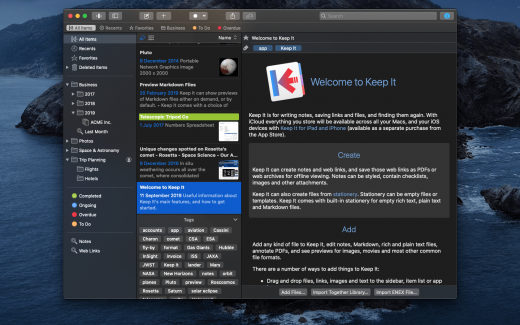
Description: Keep It is for writing notes, saving web links, storing documents, and finding them again. Available on Mac, and as a separate app for iPhone and iPad, changes are automatically made available to all your devices with iCloud. Keep It is the destination for all those things you want to put somewhere, confident you will find them again later.

Features

  • Create, edit, view and save:
  • Notes with styles, checklists and attachments that look good and read well on all your devices
  • Web links with live previews, or saved as PDFs for offline viewing
  • Rich and plain text files, and Markdown documents
  • Add any other kind of file, and see previews for most images, documents, web pages, and more
  • See summaries and thumbnails in the list for most files
  • Use the Recents list to see things you’ve added or viewed lately
  • Share items with iCloud
  • Organize:
  • Folders let you organise things hierarchically – select a folder to see everything it and its subfolders contain
  • Use bundles to gather items into one place – items can be in more than one bundle at a time
  • Use labels to color-code items for quick visual recognition
  • Add searchable tags and comments
  • Make items favorites and drag lists to the Favorites Bar for quick access
  • Search and Filter:
  • Search everything in Keep It: names, tags, file contents, dates, kinds and more
  • Choose suggestions as you search to create complex searches with ease
  • Use keywords and natural language for dates while searching
  • Save searches for later reuse
  • Use the Tag Filter to see all items with a tag and any other relevant tags; choose another tag to drill down further
  • Use Keep It with other apps:
  • Compact Mode reduces the app to a single column, ideal for using alongside other apps
  • Drag pretty much anything to Keep It
  • Copy clickable links to items in Keep It
  • Share extension can add links, text, images and other files, and append text to notes from within other apps
  • Save files to Keep It’s folders to automatically add them to the library
  • Use a bookmarklet to add links from web browsers that don’t use Share extensions

*** You need to disable the System Integrity Protection (SIP) to perform the selected Application.

What’s New

Version 2.0.5:

Summary:

  • Finder integration – See Keep It as a location in the Finder and work with files there
  • Quick Open lists and items by their name
  • Quick File items by searching for lists by their name
  • Reorder folders, bundles and nested saved searches in the sidebar
  • Favorites at the top of the items list
  • New item list design – longer names, larger thumbnails, better use of space
  • Duplicate items in the list
  • Instant search suggestions – go beyond searching for items with text
  • Search for checklists and highlighted text in notes, text files, and PDFs
  • Adjustable display margins for notes, rich text and Markdown documents
  • Edit paragraph attributes for note styles
  • Easily insert a link to an item or list in any note or editable text file
  • Word count floats over text
  • Automatically constrain width when text editor windows made full screen
  • Tasks lists in Markdown previews
  • See related items in the Info view and Show In menu
  • Reader mode for web links and web pages
  • Save web pages minimally, like Reader mode
  • Convert web links and web pages to editable notes
  • Navigate PDFs by thumbnails or outline, and reorder, rotate and remove pages

Release Names: Keep It 2.0.6
Size: 27.88 MB
Links: HOMEPAGE – NFO – Torrent Search

Download: UPLOADGiG – NiTROFLARE – RAPiDGATOR

4 Comments
Jun 3

Artstudio Pro 4.0.14

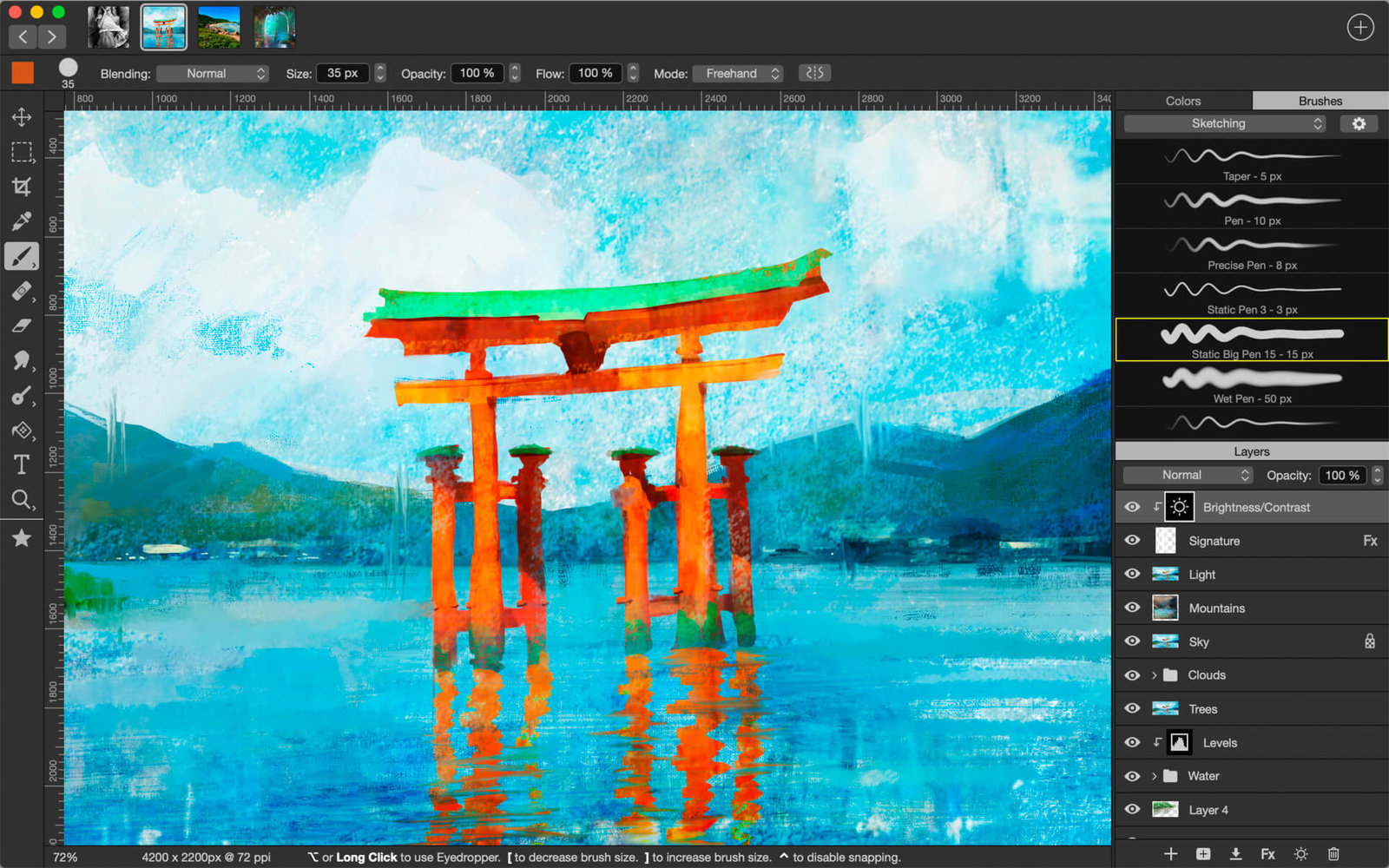
Description: Introducing Artstudio Pro, the most powerful painting and photo editing app available for both macOS and iOS . The successor to our famous ArtStudio app has been redesigned bringing many new features and improvements taking full advantage of the latest technologies Metal, iCloud Drive, and optimized for 64-bit multi-core processors to achieve the smoothest possible workflow.

Hundreds of assets are included and users have the ability to import resources in the most popular formats (ABR, TPL, PAT, GRD, ASE, ACO) giving instant access to millions of brushes, patterns, gradients, color swatches and fonts. It will boost your creativity and help you bring your ideas to life quickly and easily.

New engine
The powerful GPU accelerated ArtEngine developed by Lucky Clan is 5-10 times faster than the previous engine. It allows working with multiple documents, supports large canvas sizes and an unlimited number of layers. Incredible optimization ensures smooth work even with large canvases.

  • Multiple open documents
  • Canvas size: 256Mpix
  • Unlimited layers
  • 27 tools: Move, Select, Crop, Eyedropper, Paint, Wet Paint, Eraser, Bucket/Pattern/Gradient Fill, Smudge, Dodge, Burn, Sponge, Text, Heal, Clone, and more

Release Name: Artstudio Pro 4.0.14
Size: 234.49 MB
Links: HOMEPAGE – NFO – Torrent Search

Download: UPLOADGiG – NiTROFLARE – RAPiDGATOR

5 Comments
Jun 3

Deflection Pro 6.1.0

Description: Deflection is the most interactive, fast, and precise app available for structural beam analysis. Design visually and obtain engineering results, graphs, and equations instantaneously!

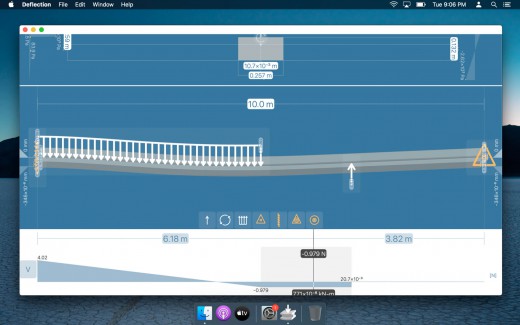
Simply place loads and supports on the beam, and see how it bends. Find a cross section in the built-in library, or define a custom shape. Deflection, internal stresses, and other useful results are automatically updated.

This software is the result of over six years of continuous development and innovation aimed at mechanical engineering, civil engineering, and structural engineering. This tool will help you apply beam elastic theory from day 1 as you are learning Mechanics of Materials, and it will be your go-to pocket reference any time in the future.

RESULTS

Obtain design results and diagrams in real-time.

  • Shear force
  • Bending moment
  • Deflection distance
  • Internal bending stress
  • Internal shear stress

CROSS SECTION DATABASES

Specify values directly, or find common shapes and materials using the built-in databases.

  • United States
  • Europe
  • Japan
  • India
  • Russia
  • Great Britain
  • Canada
  • Australia

CROSS SECTION EDITOR

Edit built-in cross sections. Shape properties are automatically calculated.

  • Moment of inertia
  • Area

UNLIMITED LOADS AND SUPPORTS

Simply drag any load or support on the beam.

  • Concentrated point loads
  • Distributed loads
  • Moment loads
  • Simple supports
  • Fixed supports
  • Fixed hinges
  • Floating Gerber hinges

OTHER FEATURES

  • Apply beam self-weight optionally
  • Automatic detection of local maxima and minima in diagrams
  • Unlimited design files
  • Quick-start templates
  • Metric and standard measurement units

What’s New

Version 6.1.0:

Release notes were unavailable when this listing was updated.

Release Name: Deflection Pro 6.1.0
Size: 22.57 MB
Links: HOMEPAGE – NFO – Torrent Search

Download: UPLOADGiG – NiTROFLARE – RAPiDGATOR

4 Comments
Jun 3

WavePad Audio Editor Pro 16.41

Description: WavePad is a full-featured professional sound editor. It lets you make and edit music, voice and other audio recordings. When editing audio files you can cut, copy and paste parts of recordings and, if required, add effects like echo, amplification and noise reduction. WavePad works as a wav editor or mp3 editor but it also supports a number of other file formats including vox, gsm, real audio, au, aif, flac, ogg and more.

  • Sound editing functions include cut, copy, paste, delete, insert, silence, autotrim and more.
  • Audio effects include, amplify, normalize, equalizer, envelope, reverb, echo, reverse, sample rate conversion and more.
  • Supports a number of file formats including wav (multiple codecs), mp3, vox, gsm, real audio, au, aif, flac, ogg and many more.
  • Batch processing supports up to 32000 files allowing you to apply effects and/or convert your files as a single function.
  • Tools include spectral analysis (FFT) and speech synthesis (text-to-speech).
  • Many more features.

What’s New

Version 16.41:

  • Release notes were unavailable when this listing was updated.


Release Name: WavePad Audio Editor Pro 16.41
Size: 10 MB
Links: HOMEPAGE – NFO – Torrent Search

Download: UPLOADGiG – NiTROFLARE – RAPiDGATOR

5 Comments