Mar 23

Mitti 2.1.2 macOS

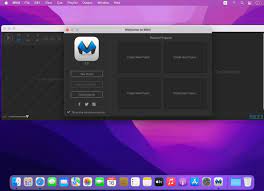
Description: Easy-to-use video-cue solution. Mitti is a modern, feature-packed but easy-to-use pro video cue playback solution for theatre, audiovisual shows, performances, and exhibitions. Mitti has a clear, intuitive, uncluttered user interface with an easy to learn and use workflow,

on top of the modern, 64bit, low-latency audio and a really powerful GPU-accelerated video playback engine driven by it’s robust, SMPTE-time-speaking internal clock.

Supported Operation Systems
macOS 10.14 or later (Apple Silicon compatible)

Release Name: Mitti 2.1.2 macOS
Size: 13 MB
Links: HOMEPAGE – NFO – Torrent Search

Download: UPLOADGiG – NiTROFLARE – RAPiDGATOR

5 Comments
Mar 23

A Better Finder Attributes 7 v7.18 macOS

Description: A Better Finder Attributes is the ultimate file-tweaking tool for OS X. It combines photo-shooting date and file date changing along with a few unique tricks of its own.

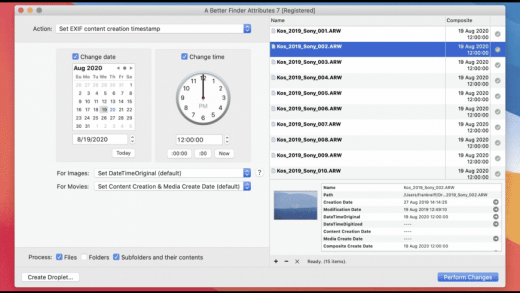
• Change EXIF Timestamps at Will – A Better Finder Attributes 5 allows you to manipulate JPEG, CR2, NEF, ARF CRW and CIFF EXIF timestamps at will by setting them to specific times or batch adjusting them by adding and removing time (useful for correcting the timestamps of images taken with a digital camera with a incorrectly set clock and to compensate for timezone changes).
• Correct Finder Sorting for JPEG EXIF and RAW Photo – A Better Finder Attributes 5 also allows to synchronize the file creation and modification dates with the shooting dates of JPEG EXIF as well as a wide variety of RAW formats, so that files sort properly in the Finder and other systems.
• Total File and Folder Creation and Modification Date Control – A Better Finder Attributes 5 gives you total control over file creation and modification dates, setting them to specific times and dates, adding or removing time or simply removing them altogether.
• Automate with Droplets – A Better Finder Attributes 5 allows you to save frequently used settings to separate “droplet” applications. Drag-and-drop files onto the droplet application to apply the changes stored in it. Double click the droplet to edit the stored settings.

Other Noteworthy Features

• Batch operation
• Drag-and-drop into the file list or onto the application icon
• Select files in the Finder and activate A Better Finder Attributes 5 via the Finder context menu or via a hot key
• Automatically deals with file date consistency rules
• Separate processing for files and folders, batch processing of sub-folders
• Additionally, A Better Finder Attributes 5 gives you control over
• Whether or not file extensions appear in the Finder
• Batch locking or unlocking of files
• Setting or removing legacy creator and type codes
• Removing invisible files
• Seeing invisible files in the Finder
• Batch setting of Finder labels
• Forcing the Finder to update its information about files and folders

Supported Operation Systems
macOS 10.11 or later (Apple Silicon compatible)

Release Name: A Better Finder Attributes 7 v7.18 macOS
Size: 16 MB
Links: HOMEPAGE – NFO – Torrent Search

Download: UPLOADGiG – NiTROFLARE – RAPiDGATOR

5 Comments
Mar 23

Xversion 1.3.8 macOS

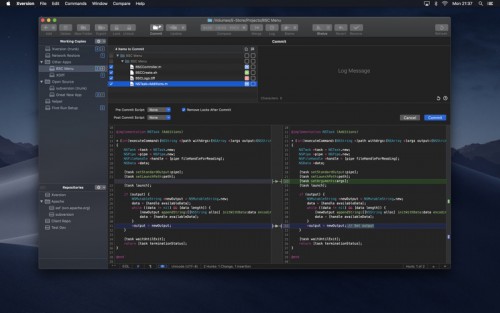
Description: Xversion, providing super-easy enterprise-class version control, is packed with features, blazing fast, and beautifully designed. From starting out creating repositories to checking out, editing properties, advanced merge and compare, resolving conflicts, committing, updating, and lots more, Xversion has you covered.

Features
Work simultaneously with versions 1.6, 1.7, 1.8, and 1.9
Supports all URL types: HTTP, HTTPS, SVN, SVN+SSH and file
Authenticate using basic, digest, user certificate, SSH, and SASL
Built-in compare viewer editor
Powerful filtering by status, name, author, and more
Upgrade working copies
Drag-and-drop move, copy, import, and export
Synchronize, Reintegrate, Cherry-Pick, and Two-URL merge
Automatic conflict resolution
View and edit file and folder properties
Issue-tracking integration
Use system HTTP proxy and exceptions

Supported Operation Systems
macOS 10.10 or later (Apple Silicon compatible)

Release Name: Xversion 1.3.8 macOS
Size: 59 MB
Links: HOMEPAGE – NFO – Torrent Search

Download: UPLOADGiG – NiTROFLARE – RAPiDGATOR

5 Comments
Mar 23

ForkLift 3.5.6 macOS

Description: ForkLift is a powerful file manager and ferociously fast FTP client clothed in a clean and versatile UI that offers the combination of absolute simplicity and raw power expected from a well-executed Mac software.
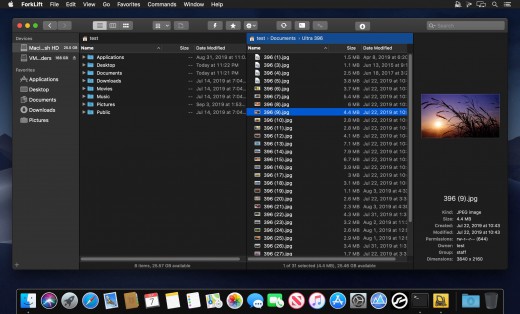
ForkLift will connect to any remote server SFTP, FTP, WebDAV, Amazon S3, Backblaze B2, Google Drive, Rackspace CloudFiles, SMB, AFP and NFS shares on your local network,- pretty much anything you can plug into or hook up to a Mac. ForkLift also carries a complete toolbox for managing your files, including Folder Synchronization, Multi-Rename, Archive handling, Application deleter, editing files over remote connections and many more. All these power features are packaged into a Finder-like, dual-pane interface that delivers superior workflow while remaining absolutely familiar to use, along with Quick Look, Spotlight search and all.

Features:
Completely rewritten entirely in Swift
ForkLift Mini
Two-way Sync
Preview
Quick Open
Multi Rename
Dark Mode
Dual Pane split vertically or horizontally
Favorite Sync via Dropbox
Dropbox Support
Transfer bandwidth throttling
Tags Support
Disklet
Sync Browsing
Tabs
Search by name, extention, kind, tags, or content
Quick Select
App Deleter
Remote Editing
Archive Management
Keyboard Control
Workspaces
FXP Copy
Tools
Git Support
Open in Terminal, iTerm, or Hyper
Hidden Files
Share
Possible to set as default file viewer
File Compare with FileMerge, Kaleidoscope, Beyond Compare, and Araxis Merge support
Multilingual: English, German, Hungarian, Polish, Russian, and Ukrainian

Supported Operation Systems
macOS 10.11.6 or later (Apple Silicon compatible)

Release Name: ForkLift 3.5.6 macOS
Size: 51 MB
Links: HOMEPAGE – NFO – Torrent Search

Download: UPLOADGiG – NiTROFLARE – RAPiDGATOR

5 Comments
Mar 23

Posterino 3.11.7 macOS

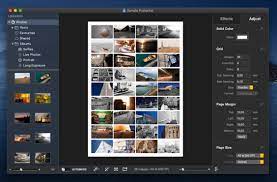
Description: Posterino lets causal users and professional photographers create beautiful photo collages from postcard to poster size. The only limit of this ideal photo app is your imagination.

COLLAGE YOUR MEMORIES WITH POSTERINO

Design collages in minutes. Our innovative interface enables a large degree of customization through a variety of templates featuring grid, tiled, circular and random layouts. Adjust frames, filters and backgrounds to your liking. The result is a beautiful collage ready to be printed and displayed.

* Create posters, calendars, postcards, photo frames or contact sheets
* Enjoy a variety of gorgeous templates, frames, backgrounds, and caption styles
* Get creative with easy custom calendars
* Sleek user interface with large workspace is especially suited for MacBook
* Edit your document in full-screen mod

Supported Operation Systems
macOS 10.10 or later (Apple Silicon compatible)

Release Name: Posterino 3.11.7 macOS
Size: 96 MB
Links: HOMEPAGE – NFO – Torrent Search

Download: UPLOADGiG – NiTROFLARE – RAPiDGATOR

7 Comments
Mar 23

Pixelmator Pro 2.3.7 macOS

Description: Pixelmator Pro is an incredibly powerful, beautiful, and easy to use image editor designed exclusively for Mac.

With a wide range of professional-grade, nondestructive image editing tools, Pixelmator Pro lets you bring out the best in your photos, create gorgeous compositions and designs, draw, paint, apply stunning effects, design beautiful text, and edit images in just about any way you can imagine. And thanks to its intuitive and accessible design, Pixelmator Pro is delightfully easy to use — whether you’re just starting out with image editing or you’re a seasoned pro.

New Interface

  • The modern, single-window interface is designed exclusively for working with images on a Mac
  • An intuitive and accessible design makes it easy for anyone to edit images — from complete beginners to design professionals

Professional Tools

  • Enhance your existing images and create new ones using every image editing tool you could ever need
  • Edit nondestructively, adjusting individual changes whenever you like
  • Easily move, resize, and arrange objects to create stunning compositions
  • Adjust the colors in images with a collection of nondestructive color adjustments
  • Enjoy superior support for RAW files, editing RAW images right inside Pixelmator Pro without having to preprocess them
  • Create digital or traditional paintings using a collection of handcrafted, fully-customizable, dual-texture brushes with full support for digital graphics tablets
  • Combine the built-in effects in Pixelmator Pro to create any artistic or special effects you can imagine
  • Nondestructively customize the look of layers in your image using layer styles
  • Save the adjustment, effect, and layer style combinations your create, use them in any of your images, and share them with others
  • Magically remove small imperfections or entire objects, seamlessly clone parts of your photos, lighten or darken precise areas, and more using a full set of retouching tools
  • Use the reshaping tools to easily change the shape of any object or area in your images, create striking artistic effects or make subtle changes to portrait photos
  • Pick out and edit precise parts of your images or copy objects from one image to another using a range of pixel-accurate selection tools
  • Add high-quality, customizable vector graphics designed by the Pixelmator Team
  • Create your own vector graphics using the Pen and Freeform Pen tools
  • Easily design great-looking text with a full set of typography tools

Image Editing Enhanced by Machine Learning

  • Automatically give descriptive names to the layers you add
  • Intelligently straighten images using horizon detection
  • Magically remove objects, recreating image areas with stunning realism
  • Quickly make accurate selections with ease

Compatibility

  • Open and edit images in all the most popular image formats, including JPEG, TIFF, PNG, PSD, PDF, GIF, BMP, TGA, JPG-2000
  • Open and edit Photoshop images with layers
  • Import HEIF images
  • Launch Pixelmator Pro directly from the Photos app and save edits back to the original image in your library
  • Share your images to the Photos app, Twitter, Facebook, Flickr, and other locations right from Pixelmator Pro

Built Exclusively for Mac
Designed exclusively for macOS, Pixelmator Pro supports almost every major macOS feature and integrates seamlessly with macOS High Sierra. Simply put, it’s the ultimate Mac app. With a design that is totally and completely Mac, Pixelmator Pro feels instantly familiar from the moment you first launch the app.

Release Name: Pixelmator Pro 2.3.7 macOS
Size: 434 MB
Links: HOMEPAGE – NFO – Torrent Search

Download: UPLOADGiG – NiTROFLARE – RAPiDGATOR

6 Comments
Mar 23

Outline 3.2203.1 macOS

Description: Outline is an intuitive note-taking application for OS X with convenient structure resembling real paper books: notebooks, sections, groups of sections and pages help to keep order in notes, regardless of their complexity.

ONENOTE’S BEST FRIEND
– Give your OneNote notes a new start beyond OneDrive or SharePoint
– Export to OneNote, just in case
– Go beyond import/export and do a real time collaboration on notes with colleagues who use OneNote (your Mac and their PCs)

STORAGE
– Choose where you want to store your notes: Dropbox, iCloud, WebDAV, Box, or OneDrive
– Consider a no-cloud option too: some notes need offline and cloud-free privacy
– Mind the coming-soon: SharePoint, OneDrive for Business / Office 365

UI
– Find everything a note needs by the hand: text, lists, tables, images, checkboxes, hyperlinks, and more
– Put that stuff anywhere in a note and then move around / re-size / edit it all, the way you like
– Keep notes structured in a natural hierarchy of pages, sections, and notebooks
– Access a note fast via recents, search, and note links
– Manage font size and color, apply styles and highlighting
– Attach files and insert printouts, to collect documents in one place

IMPORT
– From OneNote
– From Circus Ponies
– From Evernote

Supported Operation Systems
macOS 10.13 or later (Apple Silicon compatible)

Release Name: Outline 3.2203.1 macOS
Size: 85 MB
Links: HOMEPAGE – NFO – Torrent Search

Download: UPLOADGiG – NiTROFLARE – RAPiDGATOR

7 Comments
Mar 23

Slidepad 1.3.2 macOS

Description: An iPad style slide over window for your web apps. No more hassle of window switching. Unlike other similar apps, there is no limit on what can be placed on Slidepad. You can type any keywords, URLs like what you do in common browsers!

An iPad slide over window
By slide in and slide out, Slidepad brings iPad style multitasking to your Mac. Using Slidepad is as easy as using your dock.

A simple sidebar to switch between apps
Slidepad borrowed the concept of sidebar from Franz and Station. It is much smoother than tabs, and it helps you quickly switch between different web apps.

An omnibox lets you open any websites, tutorials or PDFs
Unlike other similar apps, there is no limit on what can be placed on Slidepad. You can type any keywords, URLs like what you do in common browsers!

More Features

• Minimal-style sidebar
• Corner snapping
• Developer tool enabled
• Customizable sound setting
• Mobile/Desktop user-agent switching
• Display badge when receive new notifications
• On/Off live notifications
• Multi-screen support
• Drag/drop support
• Picture in Picture support
• Quicklook icon support
• Dark theme support (MacOS 10.14+)
• Global keyboard shortcut support

Supported Operation Systems
macOS 10.13.4 or later (Apple Silicon compatible)

Release Name: Slidepad 1.3.2 macOS
Size: 12 MB
Links: HOMEPAGE – NFO – Torrent Search

Download: UPLOADGiG – NiTROFLARE – RAPiDGATOR
6 Comments
Mar 23

iCompta 6.0.54 macOS

Description: iCompta is an application that lets you manage your accounts with ease. Keep track of your income and expense, schedule your bills, stay in line with your budget and finally know where all your money goes thanks to beautiful charts.

MAIN FEATURES

• Manage multiple accounts with multiple currencies
• Sort and filter your transactions to make statistics on your income and expense
• Keep track of your income and expense thanks to budgets
• Monitor your portfolio
• Manage shared expenses : you can finally know who owes what to who
• Beautiful reports and charts
• Transfers
•Download your transactions from your bank in just one click if your bank supports OFX direct download or with just a few more clicks using the embedded browser
• Easy import / export of transactions in QIF, OFX, CSV, XML and JSON formats
• Full synchronization between iCompta 6 on Mac and iCompta 6 on iPhone / iPad using iCloud, Dropbox or local network
• Modify many transactions at once using batch editing or the powerful rules engine
• Professional features : handle taxes, manage clients and make invoices
• Check transactions on your bank statements to avoid mistakes
• Password protection

Supported Operation Systems
macOS 10.10 or later (Apple Silicon compatible)

Release Name: iCompta 6.0.54 macOS
Size: 28 MB
Links: HOMEPAGE – NFO – Torrent Search

Download: UPLOADGiG – NiTROFLARE – RAPiDGATOR

5 Comments
Mar 23

Infuse Pro 7.3.7 macOS

Description: Ignite your video content with Infuse – the beautiful way to watch almost any video format on your iPhone, iPad, Apple TV, and Mac. No need to convert files! Infuse is optimized for macOS 12, with powerful streaming options, Trakt sync, and unmatched AirPlay & subtitle support. Gorgeous interface. Precise controls. And silky-smooth playback.

– PLAY MORE VIDEO TYPES
A powerful video player that plays just about anything, including the standard MP4, M4V and MOV – plus MKV, AVI, WMV, MTS, ISO, VIDEO_TS, FLV, OGM, OGV, ASF, 3GP, DVR-MS, WebM, and WTV. Includes fully certified Dolby® Digital Plus (AC3/E-AC3), DTS® and DTS-HD® audio.

Top In-App Purchases : Full Version – included.

Supported Operation Systems
macOS 10.10 or later (Apple Silicon compatible)

Release Name: Infuse Pro 7.3.7 macOS
Size: 65 MB
Links: HOMEPAGE – NFO – Torrent Search

Download: UPLOADGiG – NiTROFLARE – RAPiDGATOR
6 Comments