Feb 11

Chaos Vantage 2.2.2 (x64)

Description: Explore your most complex 3D production scenes ray traced in real-time. With Chaos Vantage, there are no time-consuming conversions. Simply drag and drop your complete V-Ray scene into Vantage and start exploring. There’s also a direct live link available from 3ds Max, so you can use it just like a viewport.

Chaos Vantage requires an NVIDIA RTX series GPU.

Features

Zero setup
Drag and drop your V-Ray scene into Chaos Vantage and start exploring. Unlike other real-time solutions, there’s no geometry to optimize, UVs to unwrap, or lighting to bake.
a
Go big!

Chaos Vantage is built to handle huge scenes and billions of polygons. It’s the fastest way for you to see your most detailed V-Ray scenes in real-time.

Easy to navigate

Navigating your scene is easy. Use controls similar to your 3D app, or move around just like playing a game. Walk up stairs and avoid walking through walls with automatic collision detection.

100% ray-traced quality
With fully raytraced and real-time rendering, Chaos Vantage uses physically based cameras, lights, materials, and global illumination for the most realistic results.

Simple and fast animation

Perfect for previsualization, you can create, edit, and render animation right from Chaos Vantage. Easily animate between cameras, apply transitions, arrange your sequence in the Animation Editor.

Live link
Get a live raytraced view of your scene with a live link from 3ds Max. Changes you make in your 3ds Max scene will instantly appear in Chaos Vantage.

System Requirements:
OS: Microsoft® Windows® 10 RS5 (version 1809), update from October 2018, build 17763 or later
– DXR compatible GPU: NVIDIA RTX® series GPU with NVIDIA® driver 436.02 or newer; recommended version 457.09 or 452.57
– System memory should exceed GPU memory (minimum 8 GB RAM)

Release Name: Chaos Vantage 2.2.2 (x64)
Size: 462.4 MB
Links: HOMEPAGE – NFO – Torrent Search

Download: FiKPERNiTROFLARERAPiDGATOR

6 Comments
Feb 11

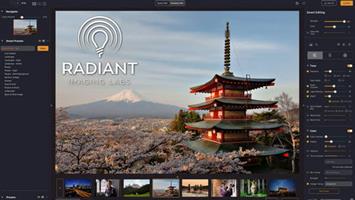
Radiant Photo 1.3.0.398 (x64) Multilingual

Your photos deserve to be radiant. Get superior quality finished photos with perfect color rendition, delivered to you in record time. Your photos — simply RADIANT. The way they are meant to be.

Amazing images. No sweat.
Getting great results with Radiant Photo couldn’t be easier!

The Radiant Photo image pipeline — Enhancement Tools

– Graduated Filter
A linear or a radial gradient can apply adjustments to only part of your image.

– Portrait Tools
Enhance the beauty of your subject with natural edits that enhance eyes, skin, and much more.

– Color Grading
LOOKs offer intelligent style recipes for your photos. Quickly editable for a personal style.

– Finishing Tools
Fine-tuning adjustments that can be applied last in the image pipeline.

The Radiant Photo image pipeline — Quick Edit

– Scene Detection
AI recognizes the content of the photo, as well as analyzes each pixel and chooses the ideal starting point.

– Smart Presets
A starting edit is applied to the photo from our collection, or use your own AI presets. Smart tools automatically adapt to every photo.

– Quick Edit Controls
Refine the edit quickly with seven essential controls – for most, the image is ready to print or share.

The Radiant Photo image pipeline — Detailed Edit

– Radiant Tone
Enhance the dynamic range of the scene without clipping. Get perfect exposure every time.

– Radiant Color
Photo color correction that matches how the human eye sees color — true to life.

– Radiant Details
Enhance sharpness, reveal lost details, and eliminate noise with smart tools. The Radiant Photo image pipeline — Enhancement Tools

System requirements
Hardware: Windows-based hardware PC with mouse or similar input device
Processor: CPU Intel® Core™ i5 or better
OS version: Windows® 10 or Windows® 11 (64-bit editions)
RAM: 8 GB RAM or more (minimum) / 16+ GB RAM (recommended)
Disk space: 1 GB free space; SSD for best performance
Display: 1280 x 800 display (minimum) / 1920 x 1080 display (recommend)
Plugin hosts: Photoshop CS6 or Photoshop Creative Cloud, Lightroom 6 or Lightroom Classic, Corel PaintShop Pro X6, X7, X8, or X9 V22

Release Name: Radiant Photo 1.3.0.398 (x64) Multilingual
Size: 208.3 MB
Links: HOMEPAGE – NFO – Torrent Search

Download: FiKPERNiTROFLARERAPiDGATOR

7 Comments
Feb 11

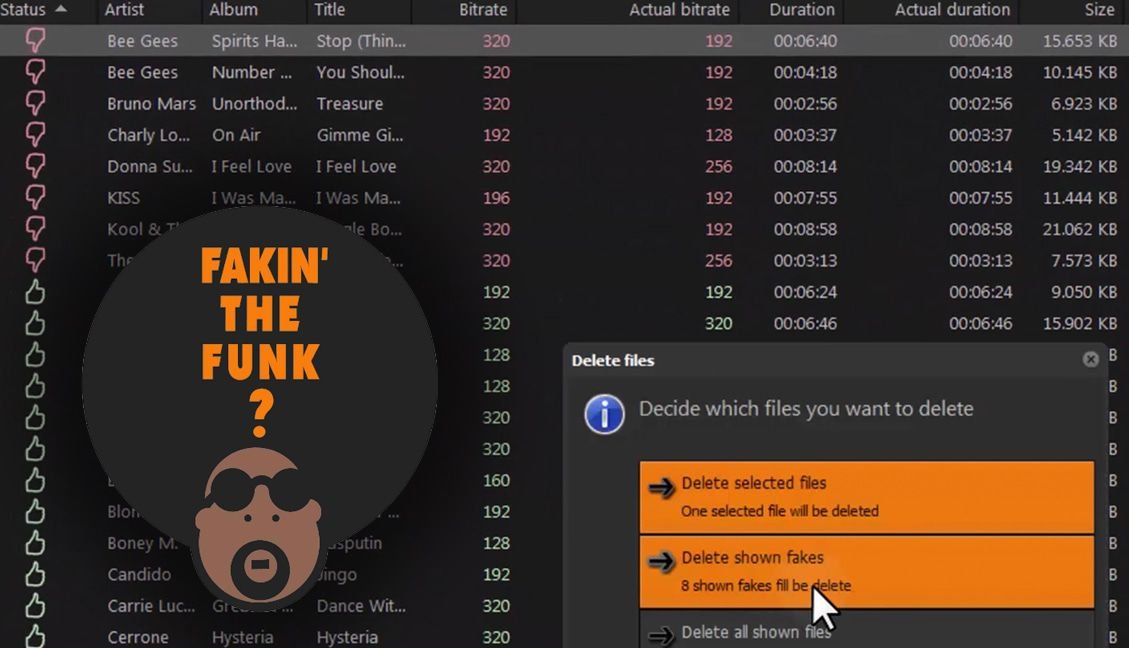
Fakin’ The Funk? 5.5.0.159 (x64) Multilingual

Description: Fakin’ The Funk? is a tool that helps you to detect the true quality of your audio files in one batch. Nowadays you can download tunes from anywhere. But what is the real quality of these files? What if you could check those tunes to see if they’re really that good, and not upscaled 128kbps to 320kbps MP3s? You could batch-process them all without having to manually check them 1-by-1 using a spectrum analyzer?

Feature :
– Automated batch-processing
– Easy-to-use interface
– Free (for the 1st 100 detected fake files)
– Cannot be fooled by audio-optimizers like Platinum Notes
– Besides fake files, it detects corrupted & unreadable files as well
– Supports all popular lossy & lossless audio file formats
– Ultra-fast processing using multiple threads to speed up the analysis
– Drag-&-drop support e.g. to Mp3Tag or Explorer
– Shows frequency cut-off, using its built-in Spectrum analyzer
– Listen to audio files directly, using its built-in player
– Translated manually into English, Spanish, German, Italian, Dutch, French, Swedish & Polish
– Supports 24 bit formats & samplerates above 48 kHz
– Tag-editor for the most common ID-tags incl. search & replace feature
– Optional clipping detection
– Configurable toolbuttons to search songs online (Amazon, iTunes, etc.)

Release Name: Fakin’ The Funk? 5.5.0.159 (x64) Multilingual
Size: 18.2 MB
Links: HOMEPAGE – NFO – Torrent Search

Download: FiKPERNiTROFLARERAPiDGATOR

5 Comments
Feb 11

AccessAgility WiFi Scanner 2.9.0.544

Description: WiFi Scanner has all the tools and integrations you need for access point discovery, channel planning, speed testing, remote scanning, and packet capture analysis. Finally, a WiFi Scanner that’s both powerful and easy to use.

Simple, fast wireless network discovery of 802.11 a/b/g/n/ac/ax access points. Use WiFi Scanner to select the best configuration for your WiFi access point / router and optimize network speed.

Also includes upload and download speed testing to quickly measure and analyze WiFi Internet performance problems.

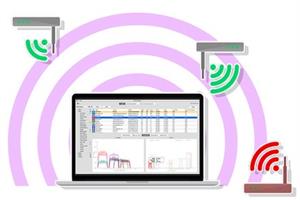
Using WiFi Scanner you’ll see nearby wireless access points and their details, including channels, signal levels (RSSI), noise, channel width, and MAC address, signal quality, maximum data rate, encryption, and much more.wifi-scanner-mock

WiFi Scanner is great for determining the best position for an access point at home or in the office. After selecting the best position, the optimal channel to use can be determined by selecting the least used channel resulting in improved WiFi speeds.

Key Features
– Simple, fast wireless network discovery of 802.11 a/b/g/n/ac/ax access points.
– Full support for both 2.4 and 5 GHz networks (Mac OS WiFi Scanner)
– Full support for both 2.4, 5 GHz, 6 E / 6 GHZ WiFi networks (Windows WiFi Scanner using 6E adapters )
– Support for all channel bandwidths (20, 40, 80, and 160 MHz)
– Display detailed wireless network parameters: network name (SSID), signal level (RSSI), MAC address (BSSID), signal quality, channel, maximum data rate, encryption, etc.
– Display changes in signal level over time in graphical form.
– Filter list of detected wireless networks by specified parameters (SSID/network name, channel, channel band, signal strength)
– Display wireless connection statistics in the form of graphs and tables.
– Give each access point a custom label
– Export results to comma separated value (CSV) files
– Generate summary reports in HTML format
– WLAN Pi, WLAN Pi Pro, and WLAN Pi CE support as remote sensors / scanners
– Any Linux device / Raspberry Pi as remote sensors / scanners

WiFi Speed Testing
– Upload and download WiFi speed testing
– Use speed testing feature to troubleshoot WiFi networks
– Auto run speed test when client roams to different access point
– Auto repeat speed test with wait time between tests

Advanced Features (supported by some access points)
– Display access point name if configured by network administrator
– Display number of devices connected to each access point
– Display channel utilization
– Display if 802.11r is enabled and type
– Display if WiFi protection mechanisms are enabled
– 6E / 6 GHz frequency (tri-band consumer and enterprise WiFi access points and routers)

WiFi Scanner is the most feature rich and complete WiFi analyzer for Windows.


Release Name: AccessAgility WiFi Scanner 2.9.0.544
Size: 27.1 MB
Links: HOMEPAGE – NFO – Torrent Search

Download: FiKPERNiTROFLARERAPiDGATOR

6 Comments
Feb 10

CrossOver 24.0.0 Beta2

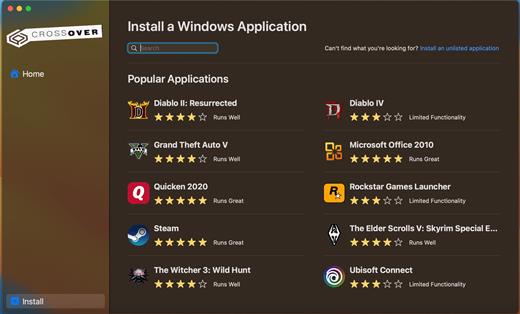
CrossOver allows you to install many popular Windows applications on your Mac. Your applications integrate seamlessly in OS X; just click and run. No rebooting, no switching to a virtual machine, and no Windows Operating System license required.

CrossOver is capable of running a wide range of Windows software. To see if your favorite application works with CrossOver, please check What Runs, or search for it using the search box at the top of this page.

Easy Installs! Many Windows titles can be installed using our CrossTie technology. If you have CrossOver installed, and have the installer for your Windows software, simply click the button in our Compatibility Database, and CrossOver will automatically install your application for you!

*** NOTE: Before installing the Crossover 24.0.0, it is necessary to read README.pdf from the Extra folder

What’s New

Version 24.0.0:

  • Release notes were unavailable when this listing was updated.

Compatibility

macOS 10.13 or later
Apple Silicon or Intel Core processor


Release Name: CrossOver 24.0.0 Beta2
Size: 394.5 MB
Links: HOMEPAGE – NFO – Torrent Search

Download: FiKPERNiTROFLARERAPiDGATOR

5 Comments
Feb 10

Mimestream 1.2.6

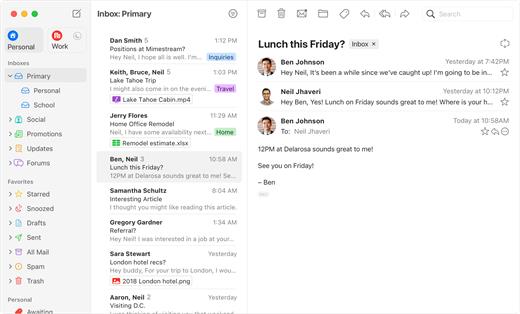
Mimestream combines your favorite Gmail features with the power of a native macOS app so you can move through your email effortlessly

Made for Mac, optimized for Gmail

As a native app written in Swift, Mimestream leverages the full power of macOS to deliver a lightning-fast and instantly familiar experience. Instead of using the IMAP protocol, Mimestream utilizes the Gmail API to enable an enhanced set of features that let you work with ease.

Work smarter, email faster

  • Rise above the noise and focus on the work that matters most. Mimestream makes it easy to keep your inbox organized with confidence.
  • Categorized Inbox – with support for Gmail’s categories, focus on what matters most and triage the rest at your leisure.
  • Multiple Accounts
  • Label Management

Committed to Privacy

Your data and credentials are stored only on your device, and the app only makes direct connections to Gmail. There are no intermediary servers, and Mimestream does not collect or sell your email.

Key Features

  • Lightweight and Fast – Mimestream is built for speed, and only uses a minimal amount of disk space to cache recent messages
  • Offline Access – Fully functional when offline and on the slowest connections-perfect for business travelers and whenever you’re on the go
  • System Notifications – Receive macOS system notifications when you receive new messages, so you never fall behind on important threads
  • Aliases – Your email aliases are automatically synced from Gmail without any setup and are used for replies when appropriate
  • Signatures – Signatures set up in Gmail are automatically synced with Mimestream
  • Robust Search – Enter any Gmail search query into Mimestream and get consistent results. Search while offline, too
  • Swipe Gestures – Use familiar macOS swipe gestures to quickly triage and archive your email
  • Tracking Prevention – Read your email privately – Mimestream blocks tracking pixels from 50+ of the most common tracking services
  • Keyboard Shortcuts – Triage your email quickly using keyboard shortcuts, including the option to use familiar Gmail or Apple Mail shortcut sets

Note:

If you don’t want to enter a password, Try searching “Mimestream” in KeyChain Access and delete the related password.

 Improved

  • Additional tuning of address autocomplete suggestion rankings

 Fixed

  • Crash during background syncing in some circumstances
  • Crash when viewing message with event attachments in some circumstances
  • Crash when switching messages in some circumstances
  • Child labels can be renamed to an empty string

 Cleanup

  • Sanity checks added to trap a rare problem with reply message selection

Compatibility

macOS 10.15.0 or later


Release Name: Mimestream 1.2.6
Size: 11.8 MB
Links: HOMEPAGE – NFO – Torrent Search

Download: FiKPERNiTROFLARERAPiDGATOR

3 Comments
Feb 10

VueScan Pro 9.8.26 DC 09.02.2024 Multilingual

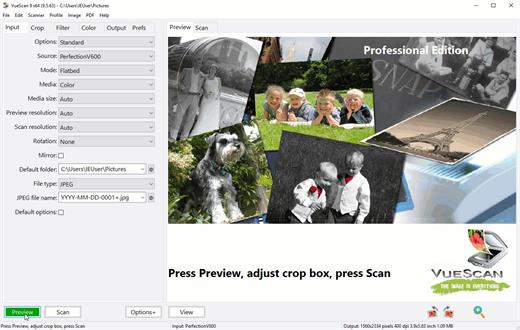
Description: VueScan, the world’s most popular scanner software, is used extensively by photographers, home users, scanning services and corporations. VueScan is a scanning program that works with most high-quality flatbed and film scanners to produce scans that have excellent color fidelity and color balance. It is very easy to use, and also has advanced features for restoring faded colors, batch scanning and other features used by professional photographers. VueScan changes nothing on your system, installs nothing in your operating system and all other scanner software will continue to function. VueScan increases your productivity and saves you money. VueScan has advanced scanning options, powerful features, and greatly improves your scans with superior color accuracy and better color balance. VueScan supports more than 700 scanners and 209 digital camera raw files and takes about 5 minutes to download and install.

Features:
• Works with 1200 flatbed and film scanners
• Runs on Mac OS X, Windows and Linux
• Improves your productivity and quality of scans
• Has been downloaded more than 5 million times
• Create raw scan files
• ICC profiles and color spaces
• IT8 color calibration

Release Name: VueScan Pro 9.8.26 DC 09.02.2024 Multilingual
Size: 72.5 MB
Links: HOMEPAGE – NFO – Torrent Search

Download: FiKPERNiTROFLARERAPiDGATOR

3 Comments
Feb 10

Techsmith Camtasia 2023 v23.4.3.51521 (x64) Multilingual

Description: Start Creating Amazing Videos Today. Make professional-quality videos quickly and easily with Camtasia. Record your screen or upload an existing video, then bring the “Wow!” with effects, music, and much more.

Video software that works for you
Whether you make videos for marketing and sales, internal training, customer success, virtual or in-person learning, demonstrations, social media, or pretty much anything else, Camtasia helps make your vision a reality.

Inspire, educate, and excite your audience
We know that creating videos may seem like a daunting task, especially if you don’t have any experience. That’s why we created Camtasia – your all-in-one screen recorder and video editing solution. In virtually no time, you can create awesome videos that truly connect with your audience.

Educate
Sharing your knowledge has never been easier! Start by uploading a presentation or existing footage, then capture your screen, camera, and microphone to craft a pro-quality video that makes complex ideas simple, demonstrates a new process, trains people on a new skill, and much more.

Inspire
Ready to “WOW!” your audiences? Camtasia has everything you need to create incredible videos in record time. Easily add pop and pizazz to your videos with effects, transitions, music, and more. Best of all, they’re incredibly easy to find, use, and customize, leaving you more time to create.

Excite
Keep your audience focused on the action with text, shapes, animations, and more. Zoom in to highlight details. Draw attention with a customized cursor. Add effects to transition ideas or just add some extra flair. The options are as limitless as your imagination!

Complete video projects up to 40% faster
A great video starts with great audio — and great audio starts with Audiate. Edit your voice over just like text and generate captions automatically. Plus, instantly remove hesitations and all those “ums” and “uhs.” You can even edit your video as you edit your audio.

You can with Camtasia
Your video, your way. Camtasia’s intuitive interface and drag-and-drop features help anyone create professional-quality video.

The world’s most powerful screen recorder
Leave boring screen recordings behind. In addition to high-resolution screen capture, Camtasia records your microphone, system audio, camera, and cursor so you can edit them separately or all at once. Your editing will be faster and easier and the results will be incredible.

Camera
Capture your camera as you record to add personality to your videos. Position your camera video anywhere on the canvas.

Microphone
Great audio is an essential element to your video. Camtasia makes it easy to capture your microphone for crystal-clear voice over.

System Audio
Need to share the sounds generated by your software or computer? Now your viewers can hear what you hear.

Cursor Data
Your mouse cursor can help highlight important features or UX elements. Capture this data to make it easier to edit later.

Make your creative spark a wildfire
Sometimes, getting started on a new video can be intimidating. Fortunately, Camtasia offers hundreds of templates, assets, and text effects to help kindle your creative spark. Making professional looking videos has never been easier!

System Requirements:
Microsoft Windows 10 (64-bit) 20H2 version or later (Recommended: Microsoft Windows 11 (64-bit) 22H2 version or later)
Intel® 6th Gen or newer CPU – or AMD Ryzen™ 2000 Series or newer CPU (Recommended: Intel® 12th Gen or newer CPU – or AMD Ryzen™ 4000 Series or newer CPU)
8GB RAM minimum (Recommended: 16GB RAM or more)
4GB of available disk space (Recommended: SSD with 4GB of available disk space)
Display dimensions of 1366 x 768 or greater (Recommended 1920 x 1080 or greater)
Microsoft .NET 4.7.2 or later (included), WebView2 Runtime (included), Microsoft Visual C++ 2019 Redistributable (included), Windows N requires the MediaFeature pack for Windows N. (Recommended: Microsoft .NET 4.7.2 or later (included), WebView2 Runtime (included), Microsoft Visual C++ 2019 Redistributable (included), Windows N requires the MediaFeature pack for Windows N.)
2GB of video memory available (integrated or dedicated GPU) (Recommended: 4GB of video memory available (integrated or dedicated GPU))
Internal microphone (Recommended: USB or other external microphone for voice recording)


Release Name: Techsmith Camtasia 2023 v23.4.3.51521 (x64) Multilingual
Size: 297.9 MB
Links: HOMEPAGE – NFO – Torrent Search

Download: FiKPERNiTROFLARERAPiDGATOR

3 Comments
Feb 10

Aphalina Animator 1.5

Description: Flash developers created animations in visual tools for ages. In a brave new world of html5, in order to create fast and beautiful animation that works across all devices and browsers you need to use hi-performance jscript animation library such as GSAP. This means you need to write your html, svg and jscript code manually. We need to stop this madness!

SVG
True resolution independent SVG-based animations. Unlike canvas-based solutions, svg animations will look crisp on all types of displays including ultra hi-dpi\retina, no matter what zoom factor is used in browser. Believe it or not, but modern browsers are heavily optimized for drawing svg, so in many cases this animation will be faster.

GSAP
GSAP (GreenSock animation) is a legendary js library that provides best possible performance and browser compatibility. To our best knowledge, Aphalina Animator is the first general purpose animation tool that generates GSAP code for animated Svg drawings.

Clean code
Clean, compact, human-readable js\svg\html output. Forget about typical cryptic mess that you usually get from visual editors. Our generated code is easy to read, understand, debug and modify as if it was written by a human.

Keyframes
Sophisticated timeline editor – control key frames for every property (including all transform components) independently with separate easing and timing

Timelines
Unlimited number of timelines per scene, full control of timelines playback from the element events (such as click, mouseover, etc)

Transforms
Independent transform and opacity animations for a group and its elements: unlimited nested elements – unlimited possibilities

Scenes
Organize project as a series of scenes

Actions
Trigger any actions on shape events

Clip
Any geometric shape can be used as a clip. Both clip shape and clipped content can be animated in any way.

Publish everywhere
Create beautiful animated illustrations, inforgraphics, icons, banners and use in your blog-posts, web pages. All jscript code, images and graphics are embedded in single html file. The only external dependence is GSAP library from official CDN. It’s easy to deploy, maintain and can be loaded very fast in single server request. Can be used as standalone html page or included in any web page using iframe.

– Publish HTML5
– Render video
– Save as animated GIF

System Requirements
– OS: Windows 10 version 16299.0 or higher
– Architecture: x86, x64


Release Name: Aphalina Animator 1.5
Size: 15.1 MB
Links: HOMEPAGE – NFO – Torrent Search

Download: FiKPERNiTROFLARERAPiDGATOR

3 Comments
Feb 10

CrystalMaker 11.0.1.300 (x64)

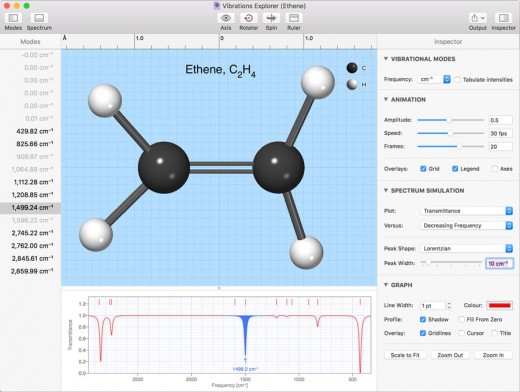
Description: CrystalMaker is the most-efficient way to visualize crystal and molecular structures. Its interactive design lets you “see the wood for the trees” and build your own visual understanding of complex materials. CrystalMaker transcends traditional crystallography software, letting you create dynamical visualizations with rotatable animations. Energy-modelling tools let you design and relax new structures, predict their vibrational properties, and explore how they interface with other materials.

What’s New in CrystalMaker X?
All-new – rewritten from scratch!
Fast 64-bit multi-core architecture
Industry-leading graphics
Streamlined interface
Multi-structure visualization
Rotatable animations
Volumetric visualization
Multiple lattice planes
New atom and bond styles
Concave polyhedra with curved faces
Packing Explorer
Symmetry Explorer
Loads 40 different file formats
Powerful new energy modelling
Vibrational modes & IR spectra
Integrated library: 1000+ structures

System requirements:
Requires a 64-bit PC with an OpenGL 3.3-capable graphics card (with latest drivers installed), running Windows 7, 8 or 10 and .NET Framework 4.6 or later.

Release Name: CrystalMaker 11.0.1.300 (x64)
Size: 99.2 MB
Links: HOMEPAGE – NFO – Torrent Search

Download: FiKPERNiTROFLARERAPiDGATOR

5 Comments