Feb 7

UnlockGo 6.0.0

All-in-One iPhone Lock Removal Tool. Remove Various Locks on iPhone/iPad in Minutes.
Instantly unlock your iPhone/iPad’s passcode
iToolab UnlockGo allows you to easily bypass iPhone passcode and gain full access to the device. It works on the following scenarios, and all kinds of passcodes are fully supported.

All types of passcodes are fully supported
UnlockGo supports to remove all types of passcodes easily including the 4-digit code, the 6-digit code, custom numeric code, alphanumeric code, Touch ID or Face ID.
Note: The removal of passwords for business purposes is illegal and prohibited.

• Forgot iPhone password
• iPhone is disabled
• Face/Touch ID is not available
• Passcode expired
• Second-hand iPhone
• Broken screen

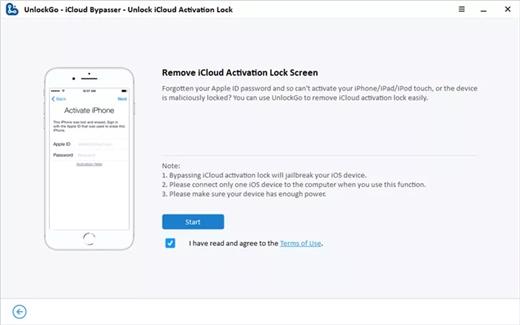
Bypass iCloud activation lock without password
UnlockGo enables you to turn off the iCloud Activation Lock without password easily, if your device is stuck in the “Activation Lock” screen.

• Remove activation lock after restore
• Remove activation lock of lost iPhone
• Could not activate iPhone
• Unable to activate

Get access to the device after iCloud Activation Lock removal
Once Activation Lock is disabled, you can enjoy the following
• Gain access to your device.
• Use a new Apple ID for iTunes Store & App Store.
• The device won’t be tracked by the previous Apple ID.
• The device won’t be remotely erased by the previous Apple ID.
• The Activation Lock won’t appear again even if you restart the device.

Remove Apple ID without password
Forgot Apple ID password or it has been disabled? iToolab UnlockGo helps you delete Apple ID account with no restrictions. By creating a new account, you can then obtain access to all iCloud services and Apple ID features once more.

Get complete control over your iPhone after Apple ID removal
No specialist knowledge is required to remove Apple ID from locked iOS devices, so you’ll be able to take advantage of all of the following features on iPhone/iPad in no time.

• Switch to another Apple ID or set up a new one.
• Take advantage of all iCloud and Apple ID functionality.
• Easily switch off Find My iPhone/iPad.
• Remove the previous Apple ID’s tracking.

No password required to disable Find My iPhone. UnlockGo is the best choice on how to turn off Find My iPhone.
You can access to your iPhone/iPad/iPod touch, but you don’t know your Apple ID account password? Simply switch off FMI with UnlockGo.

• Find My iPhone can be disabled with no Apple ID or password necessary.
• Delete the previous Apple ID completely and avoid being tracked by the device’s previous owner.
• Your iOS device can be used as a brand new one!
• Take advantage of all the iOS features and iCloud services with no limitations.
• Even if you restart or factory reset your iOS device, the activation lock will no longer be displayed after you disable Find My iPhone.

Supported devices & iOS versions
Remove Screen Passcode
• All iPhone, iPad, iPod touch
• iOS 7.0 and later

Bypass iCloud Activation Lock
• iPhone 5s – iPhone X
• iOS 12.0 and later

Remove Apple ID
• All iPhone, iPad, iPod touch
• iOS 11.4 and later

Turn Off FMI
• iPhone 6s – iPhone 12 Pro Max
• iOS 13.0 – 14

What’s New

Version 6.0.0:

  • Release notes were unavailable when this listing was updated.

Compatibility

macOS 10.10 or later


Release Name: UnlockGo 6.0.0
Size: 172 MB
Links: HOMEPAGE – NFO – Torrent Search

Download: FiKPERNiTROFLARERAPiDGATOR

6 Comments
Feb 7

Note-C 2.5.8

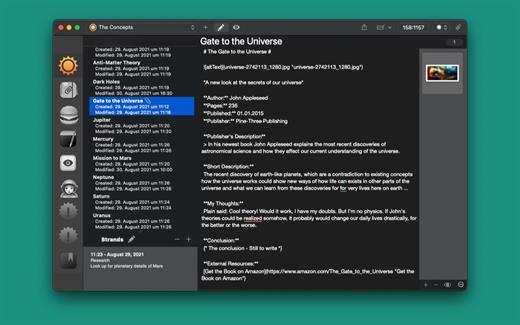
Note-C is an easy to use program for writing, collecting and processing notes and texts. Note-C offers a rich set of features for working with text, support for popular markup languages ​​such as MultiMarkdown, Markdown (Extra), Textile and others, and a flexible export manager.

Special features of Note-C

“Open” storage of your texts Each entry is stored in a separate file and you can freely choose the location where your entries should be stored. Note-C automatically creates a corresponding, clear folder structure in which you also can quickly find your entries outside of Note-C.

By choosing the location of your choice, you can also conveniently sync your entries through a cloud service using your cloud directory as the storing-location.

In addition, the entries are saved in the open txt format so that you can easily open your entries with other text editors. You keep full control over your entries at any time.

Alternatively, you can also save your entries in the open Textbundle-package-format, which combines all the data of an entry in a file. This is done by a single click in the preferences of Note-C. All information about the Textbundle-format can be found at www.textbundle.org.

Creating Multiple Notebooks

Note-C allows you to create as many notebooks as you like, so that you can save your entries, for example. thematically separated from each other.

Special Editor and Full-Screen Modes

The Note-C editor has many useful features that make writing more efficient and eliminating the need using the mouse, such as automatic list recognition (* and – characters) or moving text passages using keyboard shortcuts. Furthermore, Note-C offers a built-in Tab-Action-Manager, where you can define texts that are inserted into your entries by a keyword and the Tab-key. In addition, you can visually adjust the editor to your needs in many areas: colors of font and background, font size and type, line spacing and other options.

In addition, Note-C also offers a distraction-free mode in addition to the well-known full-screen mode, where you can concentrate completely on the text.

Markup Support

Note-C supports the following markup languages: Markdown, MultiMarkdown, MarkdownExtra, Textile, BBCode, Wikitext, HTML and Smark. All languages ​​supported by Note-C have a rich set of keyboard shortcuts that allow you to efficiently format your texts. In addition, Note-C offers a built-in preview mode to view your formatted entries.

Collecting External Files

You can create a collection of files for each entry. These files are stored in a separate folder for each entry. Note-C offers the possibility to view many of these files directly in Note-C. Note: Files can not be inserted directly into the text of entries, but you can add images using markup.

Exporting Entries

Note-C provides its own Export-Manager, which allows you to export your typed entries into various text formats. The supported formats are plain text, RTF (text only), RTFD, HTML, Doc (text only), ODT (text only), Textbundle, Textpack and PDF. In addition, the export manager of Note-C offers the possibility to export the desired entries as an ePub eBook file.

What’s New

Version 2.5.8:

  • Release notes were unavailable when this listing was updated.

Compatibility

macOS 10.10 or later.


Release Name: Note-C 2.5.8
Size: 7.9 MB
Links: HOMEPAGE – NFO – Torrent Search

Download: FiKPERNiTROFLARERAPiDGATOR

5 Comments
Feb 7

UnlockGo (Android) 7.6.0

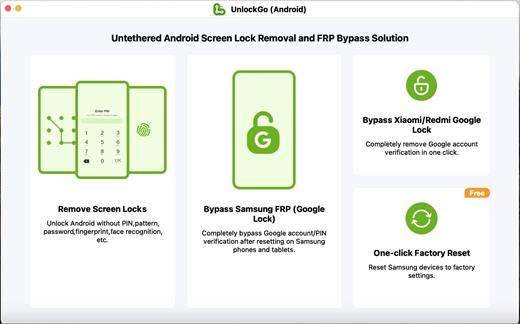
Samsung/Mi/vivo/OPPO FRP Bypass. Master Key of Android Screen Locks. Are you stuck on the Google account verification after factory resetting your Samsung? Are you asked for an unknown previous PIN or pattern to verify? Are you struggling with disconnected sellers and FRP lock? Take it easy.

UnlockGo (Android), a powerful FRP lock removal tool, helps you disable factory reset protection entirely in a few clicks.

Features

  • Bypass Samsung FRP, remove Google/PIN verification up to Android 12/13.
  • Completely bypass FRP on Xiaomi, Redmi, vivo, OPPO. new
  • Unlock Android phones/tablets without password, pattern, PIN, fingerprints, face recognition.
  • One-click factory reset Samsung phones and tablets. free
  • Unlock Samsung devices without losing data or factory reset (Before S7).
  • Handy Android unlocker for Samsung, Motorola, Huawei, Google, LG, etc.

What’s New

Version 7.6.0:

  • Release notes were unavailable when this listing was updated.

Compatibility

macOS 10.12 or later


Release Name: UnlockGo (Android) 7.6.0
Size: 36.7 MB
Links: HOMEPAGE – NFO – Torrent Search

Download: FiKPERNiTROFLARERAPiDGATOR

5 Comments
Feb 7

Typora 1.8.10

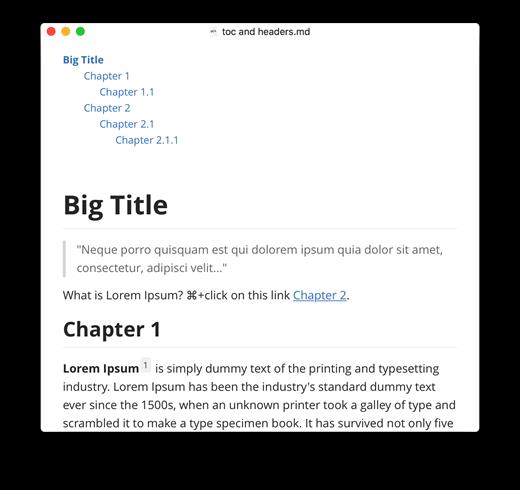
Typora gives you a seamless experience as both a reader and a writer. It removes the preview window, mode switcher, syntax symbols of markdown source code, and all other unnecessary distractions, replacing them with a real-time preview to help you concentrate on the content itself.

Features:

  • Markdown support including tables, code fences with syntax highlight, LaTeX, table of contents
  • Cross-platform
  • The real-time preview and WYSIWYG features
  • Beautiful interface and custom CSS theme support
  • Easy export

What’s New

Version 1.8.10:

  • Release notes were unavailable when this listing was updated.

Compatibility

macOS 10.13.0 or later, 64-bit processor


Release Name: Typora 1.8.10
Size: 18.6 MB
Links: HOMEPAGE – NFO – Torrent Search

Download: FiKPERNiTROFLARERAPiDGATOR

5 Comments
Feb 7

Boxy SVG 4.23.5

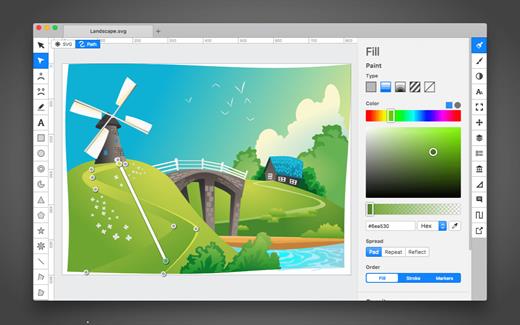
SVG is the standard format for storing vector graphics such as icons, banners, charts and illustrations.

Boxy SVG project goal is to create the best SVG editor for non-technical users as well as for professional designers and developers.

CORE FEATURES

• Clean and intuitive UI heavily inspired by Inkscape, Sketch and Adobe Illustrator
• Extensive support for on-canvas editing of object geometry, transform, paint and other properties
• Save to SVG and SVGZ formats, export to PNG, JPG, WebP, PDF and HTML5
• Open Clip Art Library integration with thousands of free stock vector arts
• Google Fonts integration with hundreds of free fonts
• Configurable keyboard shortcuts for over 100 commands
• Manual guides, smart guides and grid
• Path operations (unite, intersect, subtract, exclude, close, reverse, etc.)
• Arrangement operations (align to, rotate, flip, order, group, etc.)

FOR WEB DEVELOPERS

• Chromium-based rendering engine
• SVG and CSS code inspector similar to Chrome Dev Tools
• Clean SVG output that preserves IDs, classes, titles and other metadata
• SVG sprites editing support

What’s New

Version 4.23.5:

  • Release notes were unavailable when this listing was updated.

Compatibility

macOS 10.15 or later


Release Name: Boxy SVG 4.23.5
Size: 179.5 MB
Links: HOMEPAGE – NFO – Torrent Search

Download: FiKPERNiTROFLARERAPiDGATOR

6 Comments
Feb 7

SystemTools Hyena 15.2.0

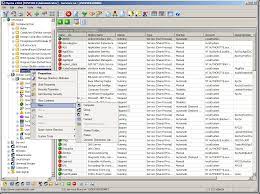
Description: Hyena 11 is known throughout the industry as one of the top Windows management utilities. Using the built-in Windows administration tools to manage a medium to large Windows 200x network or Active Directory environment can be a challenge. Add multiple domains, hundreds or thousands of servers, workstations, and users, and before you know it, things can get out of hand. Hyena is designed to both simplify and centralize nearly all of the day-to-day management tasks, while providing new capabilities for system administration. This functionality is provided in a single, centralized, easy to use product. Used today by tens of thousands of system administrators worldwide, Hyena is the one tool that every administrator cannot afford to be without.

Hyena 11 uses an Explorer-style interface for all operations, including right mouse click pop-up context menus for all objects. Management of users, groups (both local and global), shares, domains, computers, services, devices, events, files, printers and print jobs, sessions, open files, disk space, user rights, messaging, exporting, job scheduling, processes, and printing are all supported.

Hyena 11 also includes full exporting capabilities and both Microsoft Access and Excel reporting and exporting options. All of these features are part of the Standard Edition of Hyena.

The Enterprise Edition adds support for:
• Terminal Server user properties and session administration.
• Exchange 2000/2003/2007*/2010/2013 Server mailbox integration and properties management.
• WMI integration.

Hyena 11 Features:
• View your entire Windows or Active Directory network from one easy to use Explorer-style interface and make management a snap!
• Audit your system configuration and quickly find security holes that need to be plugged.
• Quickly generate reports for meetings or to use for further research to determine problem spots.
• Change passwords for local administration accounts on multiple computers at once.
• Find out which services are running and quickly show startup information; make changes to those services on all computers at once!
• Go beyond the limits of Microsoft’s MMC and help you manage Windows 200x and Active Directory quickly and easily.
• Control popular remote control programs, including VNC, with one utility.

Release Name: SystemTools Hyena 15.2.0
Size: 39.3 MB
Links: HOMEPAGE – NFO – Torrent Search

Download: FiKPERNiTROFLARERAPiDGATOR

5 Comments
Feb 7

Perfectly Clear WorkBench 4.6.0.2638 (x64) Multilingual

Spend less time in front of your computer.
With Perfectly Clear, you’ll get results faster so you can spend more time behind the camera and less time in front of the computer. Take advantage of intelligent image analysis to find and fix numerous camera flaws automatically. Plus, you can quickly add your favorite finishing touch with our stylized LOOKs.

Take complete control.
Our presets are just the starting point. Easily apply only the adjustments you need for the perfect image. Use our powerful sharpening and noise reduction, which goes beyond what other tools can do, to unlock a whole new image. Keep an eye on your color and exposure with a dynamic histogram that tracks exposure and color clipping.

A custom experience.
Every photographer is different, and so is Perfectly Clear. Our adaptive interface lets you hide tools you don’t need while you work, allowing you to focus on your image. Plus, you can make and manage your own presets, which intelligently adapt to each photo.

Why change your workflow?
Rather than move your entire image library or change your workflow, we’ll make your existing workflow better. We support several platforms and have more coming soon. With powerful batch processing and up to 30 corrections in one click, we’ll make everything better.

We’ve got image correction down to a science.
Creating our award-winning technology took more than a decade of R&D, multiple patented processes, and over a dozen unique algorithms. We cracked the code on correcting every pixel independently. The proof is in your pictures.

What’s New in Perfectly Clear 3:

You have better ways to spend your day than laboring over manual edits
You became a photographer to go out and capture the beauty of the world, not sit inside at an editing desk. We invented our automatic image corrections to take away the tedium and give you back your freedom. So let Perfectly Clear handle the editing chores while you devote your day to doing what you do best—creating incredible images.

– Up to 20 auto corrections with one click
– Batch process 1000s of images in minutes
– Stay within your workflow
– Unlock the details in every image
– Tap into professionally created presets
– Save countless hours of manual editing
– Fine tune details with precise controls

We’ve got image correction down to a science
Creating our award-winning technology took more than a decade of R&D, multiple patented processes, and over a dozen unique algorithms. We cracked the code on correcting every pixel independently. That’s how we make a 12-megapixel photo look like it was taken with 12 million separate apertures. The proof is in your pictures.

Investing, innovating and improving every year
At Athentech, we’re committed to solving problems faced by photographers. Every year, we continue to innovate with R&D work by our team of physicists, engineers, and photographers. Every day, we invest in making your photos look their best.

Lighting.
– Perfect Exposure. More effective than traditional brightness, Perfect Exposure lets you maintain Real Color Photography™ without clipping or washing out. Our technology overcomes the distortions caused by a single aperture by replicating the way your eye gathers light and correcting your exposure pixel by pixel.
– Depth. Brings out the contrast in a photo without messing up the other colors. Perfectly Clear uses a patented algorithm that manages the dynamic range in a unique way, revealing the detail needed to produce this kind of depth.
– Light Diffusion. Perfectly Clear lets you create a softer look with warmer tones and captures the perfect portrait even in broad daylight.
– Skin & Depth bias. For realistic lighting on skin.

Color.
– Photoshop is powerful, but for Full Color Spectrum, Light Diffusion, automatic red-eye removal, you have to turn to Perfectly Clear.
– Vibrancy. Perfectly Clear mimics how the eye adjusts saturation, providing a color-vibrant photo. Sometimes digital cameras can cause photos to look washed out/faded because they have a linear response to light. But our solution overcomes this problem by looking at each channel independently.
– Fidelity. We reproduce the full visual spectrum of colors seen by the eyes, enabling you to capture purples properly every time.
– Tint. In the days of film, you had to carry around different films and filters for different times of day—all to get the lighting source correct. To remove nasty tints—from tungsten, fluorescent, incandescent, IR—Perfectly Clear searches for an abnormal tint, then reveals the great photo underneath.

Clarity.
– Sharpening. Traditional sharpening methods also sharpen weak signal and introduce halos. Perfectly Clear only searches for strong signal and creates sharp, clear photos with zero artifacts.
– Noise removal. Perfectly Clear automatically reduces noise 2-3 stops with one click (unlike Ps or Lr which requires multiple slider bar adjustments). ISO 1600 is effectively reduced to ISO 200-400 without blurring or losing details.

Eyes.
– Red-eye. We sourced this technology from our wonderful partner FotoNation, which is embedded in hundreds of millions devices. It detects and corrects imperfections as quickly as 5 images per second with no manual intervention.
– Unlike Photoshop, Perfectly Clear not only removes red eye automatically, it also includes Eye Enhance, Eye Enlarge, Dark Circle removal, and the ability to automatically add 5 different Catchlights.

Skin.
Perfectly Clear lets you smooth and tone skin, adjust blush, and remove infrared, shine and blemishes. Our robust, automatic correction uses advanced facial detection techniques to identify age, gender and key facial features including texture and skin tone. As a result, we’re able to determine the precise amount of corrections to apply automatically. All of our Beautify corrections are much faster than doing this manually in Ps or Lr which will takes minutes per image instead of seconds.

Face.
Perfectly Clear lets you whiten teeth for the perfect smile and saves a painful trip to the dentist. Plus, it can sharpen the look of your lips and tone your face shape for a more slender and youthful appearance.

System Requirements:
• Windows 7, 8 or 10 (64-bit only)
• Photoshop CS6 or Creative Cloud
• Photoshop Elements 13,14,15
• Corel PaintShop Pro X6, X7, X8, X9
• Lightroom 4 or newer, including v6 and CC
• 4 GB RAM or more

Release Name: Perfectly Clear WorkBench 4.6.0.2638 (x64) Multilingual
Size: 221.8 MB
Links: HOMEPAGE – NFO – Torrent Search

Download: FiKPERNiTROFLARERAPiDGATOR

6 Comments
Feb 7

KeepStreams 1.2.1.3 (x64) Multilingual

Description: KeepStreams specializes in providing services for downloading videos and converting music for users worldwide. Our innovative product range includes advanced video downloaders and high-quality music converters that cater to the diverse needs and preferences of our customers.

Our video downloader service is fully compatible with multiple platforms, enabling users to quickly and easily download their favorite videos from popular websites such as Netflix, Disney Plus, Prime Video, HBO Max, and many more. Moreover, our music converter tool empowers users to download and convert audio files from music streaming services like Spotify, Amazon Music, and Apple Music into various formats, ensuring seamless enjoyment of their favorite music on any device or operating system.

Enjoy Playing Any Music You Want
KeepStreams is compatible with the vast majority of music streaming services, and we provide excellent assistance to guarantee the highest quality of your music downloads.

Dive into the World of Entertainment
KeepStreams support most OTT platforms and movie streaming services, we offer great service to maintain the best video download experience.

Watch TV Anywhere, Anytime, and Any Moment
KeepStreams support most TV streaming service, we offer great solutions for our users to download and watch live TV offline.

Explore the Fun of Anime
KeepStreams also offers support for Anime streaming services like Funimation and Crunchyroll. Watch anime series offline with us.

Dive into the World of Live Streams and Broadcasting
KeepStreams enables you to download live streaming services like Twitch and ESPN Plus, you won’t miss out on any game with KeepStreams.

Save Playlists and Videos from Social Networks
KeepStreams can be your best social network video downloader, which supports various social networks like YouTube, Facebook, Instagram, Twitter, and more.

Release Name: KeepStreams 1.2.1.3 (x64) Multilingual
Size: 386.2 MB
Links: HOMEPAGE – NFO – Torrent Search

Download: FiKPERNiTROFLARERAPiDGATOR

6 Comments
Feb 7

iZotope Dialogue Match 1.2.0 (x64)

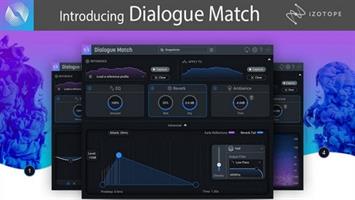
Description: Match sonic profiles for dialogue and ADR A revolution in dialogue editing. The makers of RX bring you the next indispensable tool for post production. Keep your audience in the moment with seamless dialogue recordings.

Key Features
Match EQ, reverb, and ambiance recording characteristics from a boom to lavalier.
Automatically match ADR to production audio
Quickly match localised audio to the original language
Save and load global snapshots and reference profiles
Only available as an AudioSuite plug-in for current versions of Pro Tools (11.x and up).


Release Name: iZotope Dialogue Match 1.2.0 (x64)
Size: 46 MB
Links: HOMEPAGE – NFO – Torrent Search

Download: FiKPERNiTROFLARERAPiDGATOR

6 Comments
Feb 6

Arturia Analog Lab V Pro 5.9.1

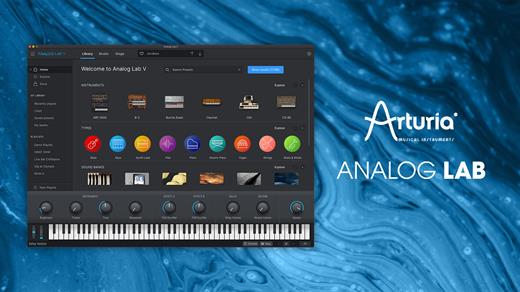
Analog Lab is a software instrument combining a world-class library of modern & vintage presets with instant-access controls and workflow integration. Choose between free and pro versions and enjoy the most inspiring sounds you’ve never heard.

Main Features

  • Over 2000 curated sounds from all the acclaimed V Collection Instruments
  • Updated browser to find sounds quickly: by Type (Bass, Pads, Leads…), by Style (bright, dark…), by Genre (Ambient, Disco, Techno, …)
  • New Studio view to add effects and combine 2 instruments (Multis)
  • Layer Multi sounds or Split 2 Presets across the keyboard

Automatic mapping of parameters for Arturia keyboards
Parameters can be mapped easily to other MIDI controllers
Stage view allows to perform on a prepared Playlist, using an Arturia keyboard or sending Program Changes from any MIDI Controller
V Collection and Pigments instruments owners can open the full instrument within Analog Lab
4 new Macro controls on all the sounds for instant sound edition

Size: 4.45 GB

What’s New

Version 5.9.1:

  • Release notes were unavailable when this listing was updated.

Compatibility

macOS 10.13 or later


Release Name: Arturia Analog Lab V Pro 5.9.1
Size: 4.5 GB
Links: HOMEPAGE – NFO – Torrent Search

Download: FiKPERNiTROFLARERAPiDGATOR

4 Comments