Feb 4

Macs Fan Control Pro 1.5.17

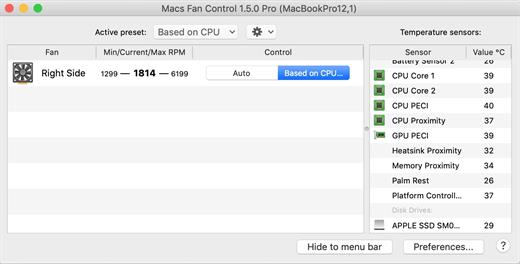
Macs Fan Control allows you to monitor and control almost any aspect of your computer’s fans, with support for controlling fan speed, temperature sensors pane, menu-bar icon, and autostart with system option.

  • Software solution to noise problems such as those caused by iMac HDD replacement, or overheating problems like those found on a MacBook Pro
  • Set any constant value to any fan (e.g., minimum)
  • Control fan speed in relation to a temperature sensor (e.g., 3rd party HDD)
  • Real-time monitoring of fan speeds and temperatures
  • Solve overheating problems like those found on a MacBook Pro
  • Solve noise problems such as those caused by iMac HDD replacement
  • Works on all Macs, both Intel & Apple Silicon

How to control your Mac fans

  • Download and install Macs Fan Control from MacUpdate.
  • Launch the app and you will then have access to the fans and be able to see the temperatures of the components inside your Mac.
  • Under “Control” click “Custom” and you can then use a slider to change the fan control on your Mac”.

What’s New

Version 1.5.17:

  • New: MacBook Air 15″ and Mac Studio 2023 support #688
  • Improved: Added CPU Core Average temperature sensor on MacBook Pro M2 #687
  • Fixed: Fixed memory leaks on Apple Silicon macs #214
  • Fixed: Fixed temperature display readings freeze on some older MacBookAir laptops #682
  • Fixed: Fixed missing Performance Core 3 on Macmini M2 #672
  • Fixed: Multiple small improvements and fixes

Compatibility

macOS 10.13 or later.
Apple Silicon or Intel Core processor


Release Name: Macs Fan Control Pro 1.5.17
Size: 22.5 MB
Links: HOMEPAGE – NFO – Torrent Search

Download: FiKPERNiTROFLARERAPiDGATOR

5 Comments
Feb 4

PDF Expert 3.9.0

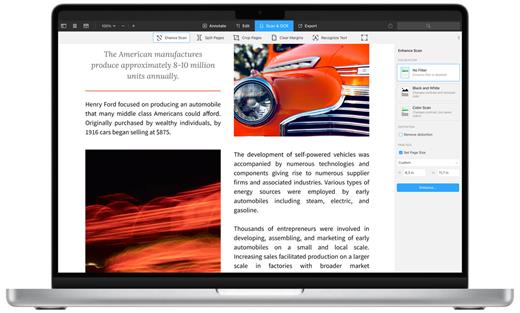
PDF Expert springs into action with smooth scrolling and fast search from the first document you select. PDFs open instantly, whether they are just small email attachments or 2000-page reports.

  • Professional Annotation Tool – From simple changes to marathon editing sessions, PDF Expert lives up to its name. Powerful yet easy-to-use tools are just a click away so you can leave your mark in record time.
  • Read – An award-winning, lightning-fast, tabbed document viewer will get you through multiple PDFs faster than ever.
  • Excellent for Form Filling – PDF Expert provides the best experience for filling out PDF forms. Text fields, checkboxes, radio buttons, and other form elements work as you expect, and all the information you enter is saved within the form. Even complex interactive forms with Javascript work impressively well.
  • An Easy Way to Sign Documents – Signing document on your Mac is as simple as it could be. Just type your name on a keyboard and PDF Expert will transform it into beautiful handwriting. Or use your Macbook’s trackpad and write with your finger. You can even use signatures already created in PDF Expert for iOS.
  • Wide Sharing Options – You don’t work alone, and neither does PDF Expert. When it’s time to send documents to clients, coworkers, and everyone in between, PDF Expert has top-notch support for your Mac’s system-wide share sheet and other apps. If an app accepts PDFs, PDF Expert can get them there.
  • Works across all your devices – Use PDF Expert on any Apple device – Mac, iPad, and iPhone. Use Apple’s Continuity and Handoff features to seamlessly transfer document from one device to another and continue editing where you left.

What’s New

Version 3.9.0:

  • Release notes were unavailable when this listing was updated.

Compatibility

macOS 10.13 or later
Support Apple silicon.


Release Name: PDF Expert 3.9.0
Size: 108.7 MB
Links: HOMEPAGE – NFO – Torrent Search

Download: FiKPERNiTROFLARERAPiDGATOR

6 Comments
Feb 4

Topaz Gigapixel AI 7.0.1

A.I.Gigapixel is the first and only desktop application to use the power of artificial intelligence to enlarge your images while adding natural details for an amazing result.

Enlarge Images by up to 600%

Create a beautiful 80 x 60 inch print from a simple iPhone photo. Or transform your DSLR photos into sharp and ultra-detailed 100MP images.

Use truly intelligent upscaling

After being trained with millions of sample images, Gigapixel can now enlarge your images with a surprising level of quality.

Get crisp and clear results.

Gigapixel performs around 2 million operations per pixel to get you results with as much detail and sharpness as possible.

No more fuzzy enlargements.

Breathtakingly sharp prints. High-resolution cropping in post-production. iPhone photos that look like they came out of a DSLR. No matter why you’re enlarging your photos, you always want the best possible quality for your results. AI Gigapixel is currently the only photo enlargement product available that can actually add detail back to your upscaled photo.

Recover real details for actual sharpness

Increasing edge contrast is the simplest way to make an image look “sharp”, and how most other upscaling software works. Gigapixel is different: it increases the actual sharpness of your upscaled photo by recovering real detail in your image. This is only possible through training and exposure to millions of test images.

Crisp photos that look like they were never upscaled

It’s hard to believe that the crisp output image above was enlarged 4x, but it was. Gigapixel AI successfully determines which image features are stars (detail) and what’s noise. Then, it naturally accentuates and recovers detail while suppressing noise in your upscaled photo.

The highest-quality image upscaling that you can get anywhere

Because of these exceptional results, Gigapixel AI is used by everyone from leading photographers, to video game modders, to major motion studios. If you ever need to upscale your photo while preserving beautiful detail, take advantage of the most modern technology in the space and give Gigapixel AI a try.

Image enlargement: interpolation vs machine learning

Interpolation-based photo enlargement software has been around for decades. Gigapixel’s new approach based on machine learning is a giant leap ahead: state-of-the-art “deep learning” methods allow it to enlarge images while actually adding new details.

Interpolation

Interpolation algorithms work by approximating new pixels from the colors of surrounding ones. This does not add any detail to the image, it just smoothes out the transition between pixels.

Neural Network (Gigapixel AI)

A neural network analyzes thousands of photo pairs to learn how details usually get lost. The algorithm learns to “fill in” information in new images based on what it has learned… effectively adding new detail to your photo.

What’s New

Version 7.0.1:

  • Release notes were unavailable when this listing was updated.

Compatibility

macOS 10.14 or later
Apple Silicon or Intel Core processor


Release Name: Topaz Gigapixel AI 7.0.1
Size: 228.7 MB
Links: HOMEPAGE – NFO – Torrent Search

Download: FiKPERNiTROFLARERAPiDGATOR

7 Comments
Feb 4

Syncovery Premium 10.11.7.167 (x64)

Description: Syncovery is a great application used to back up data and to synchronize PCs, servers, and notebooks. Users can choose the user interface that suits them best: Wizard Mode or Advanced Mode. The settings are stored in multiple profiles, and the software comes with support for FTP and secure FTP servers, SSH, WebDAV, Amazon S3, http, partial file updating, ZIP compression, data encryption, and a scheduler for automated backups. The scheduler can run as a service without users having to log on. On Windows XP or later, locked files can be copied using the Volume Shadow Service.

Here are some key features of “Syncovery”:
· Synchronizes Files and complete folder structures in different locations, such as a PC and a laptop. 64-bit I/O ensures that files sizes greater than 4GB are supported.
· Save complete sets of option settings as Profiles, with instant access to all saved settings. You can even Run Multiple Profiles with one command.
· Detect Moved Files. If you reorganized your folders by moving files to different locations, the Super Flexible File Synchronizer will detect this and quickly perform the same moves, for example, on your laptop. No extraneous copying!
· With Scheduler. Schedule the synchronization of your data on a backup hard disk at a convenient time each day or as frequently as you wish.
· Smart and Flexible. If some files cannot be copied due to other software accessing these files, the synchronizer will continue copying the remaining files, and then retry all those files that were locked, until all files have been copied successfully. A limit for the time spent on retries can be specified. However, during the retry phase, the synchronizer uses only minimal CPU resources.
· Keep Multiple Backup Versions Of Each File (optional) This feature doesn’t overwrite the backup files but renames them, until a selectable number of different backup versions is reached. You can also specify where to put these older backup versions (in the same folder as the original, or in a subfolder thereof, or in just one subfolder for the complete profile).
· Database-Aware. A special technique prevents any data corruption when copying database files, including SQL server database files. The synchronizer will wait with the copying until it has totally exclusive access to the file. During the copying process, the database server will not be able to work with the file. So, a prerequisite for using this software as a backup tool for database files is that they are occasionally not used (for example, at night).
· Can Use Recycle Bin for older versions of files that are overwritten. This is a fairly unique feature because most programs will permanently replace older versions of a file. Using Super Flexible File Synchronizer, you will have a chance of retrieving overwritten files if you select the appropriate options.
· Multiple File Masks (Inclusion and Exclusion) File Masks are transparently (and swiftly!) processed. Even if you specify redundant file masks, there will be no strange side effects.
· Select Base Folder Items. Want to synchronize only some folders? No need for separate runs for each folder. Just specify the base folder containing these folders, and then choose “Only Selected Items From Base Folders…”.
· Minimize Load Using Obsolete File Folders. If you occasionally move obsolete files to a specially designated folder, this usually causes trouble with traditional file synchronizers. They will copy the obsolete files back from your laptop right into the folders where you moved them out of. No longer! If you use the Select Base Folder Items option described above, you can place a grayed checkmark next to each folder for obsolete files. These folders are then taken into account for moving files into them, but not for copying files out. Thus, the synchronizer does the same moving of obsolete files on your laptop that you previously did on the PC, but it does not waste any time copying all obsolete files between the two machines.
· No More Trouble With Daylight Savings Time Since exact 1-hour time differences can be ignored if the file size matches, you won’t have any more problems if the file systems of two computers are off by one hour. If this is true only for some files, fine! The ignoring of the offset is done in a flexible way rather than adding a fixed number to the hours on one side.
· Easy Resuming On Disk Full. You simply make more space and ask the software to continue copying. It can pause right in the middle of a file until additional space is freed.
· Unattended Mode. In this mode, no questions are asked. You can specify beforehand which kinds of files may be overwritten.
· Optionally Create Exact Mirrors. If desired, you can optionally create an exact mirror of your data, even if this means that some files are deleted or replaced with older files.

Release Name: Syncovery Premium 10.11.7.167 (x64)
Size: 48 MB
Links: HOMEPAGE – NFO – Torrent Search

Download: FiKPERNiTROFLARERAPiDGATOR

7 Comments
Feb 4

Rons WebLynx Pro 2024.2.3.844

Description: Rons WebLynx is a Windows desktop application, for organizing and managing bookmarks. Bookmarks are stored in WebLynx documents on the local computer, so are not ‘shared’ in the cloud and do not rely on third party storage.

Ideal for research, marketing, or just organizing a lot (1000’s) of links. Nowadays, almost everyone can do with a good bookmark manager as the internet has become part of our daily lives – you typically don’t realize you need a bookmark manager until you start using one.

WebLynx combines power, elegance and ease of use, and is full of features like automatic link checking to make it a great tool for anyone who uses the Internet.

Clear and Easy to Manage
Links are organized using well known folder and tag concepts, and have additional Views to quickly check new, broken and duplicate links (and more).
Searches can be done in folders, or across tabs, or both, and folders and tags can be collected into Groups to create custom views.

Loads of Ways to get Links IN
Getting links into WebLynx could not be simpler:
Import your browser bookmarks.
Drag and drop anything – selected text from you browser or a file or directory from your computer.
Use the import to find links from pretty much anywhere including Outlook, Word documents, ‘Outertech Linkman’ or even entire websites.
Paste, or finally, just enter by hand.
The built in browsing/reading panels add convenience when checking links, and all of this is clearly presented in a logical way.

Loads of Ways to get Links OUT
Export links with their tags and folders, or export the link Content (reading view).
Export to File or Clipboard, in the following formats HTML, XML, Linker Exchange or Content.

Power and Automation
WebLynx is about automation power.
Aside from the automatic checks that are done on all links periodically, any number of selected links can be re-checked, cleaned and organized. Folders and tags have options like ‘Merge’ or ‘Remove Empty’.
Groups show collections of folders and tags, and Automatic filing performs movement or removal of links based on configurable rules.

RSS Reader Included
RSS feeds are automatically extracted from linked web pages, and listed in the Link Information panel. To make things even easier the ‘Page with Feed’ View shows all pages that contain feeds.
Feeds can be added to any folder as an Active Folder, then merged into one or more feed ‘In-boxes’ using Groups.

Browser Integration
Use the Web Browser integration available for Google Chrome, Edge, Brave and Firefox to send links directly into WebLynx so your browsing is not disturbed by switching to another application.
Links come into WebLynx in a place called the ‘Landing Zone’, which is a side panel shared between all open WebLynx windows, so that links can be filed appropriately.

Operating System Support:
Windows 11
Windows 10 (x32 and x64)
Windows 8/8.1 (x32 and x64)
Windows 7 (x32 and x64)
Windows Vista (x32 and x64)


Release Name: Rons WebLynx Pro 2024.2.3.844
Size: 21.2 MB
Links: HOMEPAGE – NFO – Torrent Search

Download: FiKPERNiTROFLARERAPiDGATOR

7 Comments
Feb 4

WinCatalog 2024.6.2.205 Multilingual

WinCatalog Crack Full Version is a software tool that allows users to organize and manage their files, documents, and media. It is designed to provide users with an easy-to-use and powerful platform for cataloging and searching their files, making it an ideal choice for those looking to improve the organization and accessibility of their data.

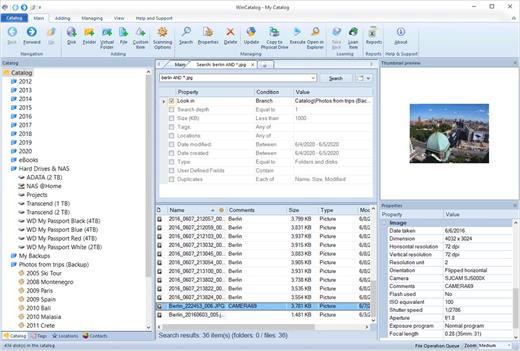
One of the main features of WinCatalog is its ability to scan and index a wide range of file types and locations. The software is able to scan and index files on a user’s computer, as well as files on external drives and network locations. It is also able to index a wide range of file types, including documents, images, audio, and video files.

Another feature of WinCatalog is its powerful search and retrieval capabilities. The software includes a range of tools for searching and filtering files, such as the ability to search by file name, type, size, and other attributes. It also includes the option to create custom tags and categories to help users better organize their files.

WinCatalog Full Version Free Download Features:

    • File scanning and indexing: The software is able to scan and index a wide range of file types and locations, including files on a user’s computer, external drives, and network locations. It is also able to index a wide range of file types, including documents, images, audio, and video files.
    • Search and retrieval: It includes a range of tools for searching and filtering files, such as the ability to search by file name, type, size, and other attributes. It also includes the option to create custom tags and categories to help users better organize their files.
    • Data management: The software includes a range of tools for managing and organizing data, such as the ability to create custom reports and charts, as well as the option to export data to other formats, such as Excel or CSV.
    • User-friendly interface: It has a user-friendly interface that makes it easy for users to navigate and access its various features and tools.
    • Wide range of supported platforms: The software is compatible with a wide range of platforms, including Windows and Mac, making it accessible to users on a variety of devices.
    • Regular updates: It is regularly updated to ensure that it is compatible with the latest versions of operating systems and to add new features and improvements.
    • Multi-language support: The software is available in a variety of languages, making it accessible to users around the world.
    • Integration with other tools: It is able to integrate with a range of other tools and software, such as Microsoft Office and Adobe Acrobat, allowing users to work seamlessly across different platforms.Here are some key features of WinCatalog:

In addition to its file organization and management capabilities, WinCatalog also includes a range of tools for managing and organizing data. It includes features such as the ability to create custom reports and charts, as well as the option to export data to other formats, such as Excel or CSV.

Overall, WinCatalog is a powerful and feature-rich software tool that offers a range of features for organizing and managing files, documents, and media. It is an ideal choice for those looking to improve the organization and accessibility of their data. You May Also Download StudioLine Photo Classic Crack

Release Name: WinCatalog 2024.6.2.205 Multilingual
Size: 102.9 MB
Links: HOMEPAGE – NFO – Torrent Search

Download: FiKPERNiTROFLARERAPiDGATOR

6 Comments
Feb 4

Y2mate Downloader 1.2.1.1 (x64) Multilingual

Description: Y2Mate supports downloading videos from more than 500 streaming platforms and 1000+ websites. Among them, around 40 are subscription-based streaming services for subscribers to view the latest movies, TVs and shows.

Download HD Videos
Download videos in 720p, 1080p, to 4k and even 8k.

High-Speed Batch Download
Save time with high-speed batch downloading with up to 32MB/s.

Enjoy 5.1 Audio Channels
Download videos with EAC3 5.1, AC3 5.1 or AAC 2.0 channels.

Save Movies in MP4 & MKV
Watch your favorite shows in universal file formats.

No Annoyance of Ads
Get a chance to watch a movie with no commercials at all.

Select & Download Subtitles
Save subtitles as SRT files or embed them in video files.

Release Name: Y2mate Downloader 1.2.1.1 (x64) Multilingual
Size: 390.8 MB
Links: HOMEPAGE – NFO – Torrent Search

Download: FiKPERNiTROFLARERAPiDGATOR

7 Comments
Feb 4

priPrinter Professional 6.9.0.2551 Beta Multilingual

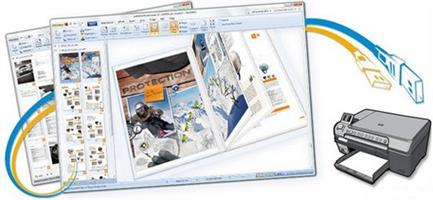
Description: priPrinter is a printer driver that allows you to manipulate printer output before it is printed. priPrinter is installed and selected in the same way as other printer drivers. After printing it automatically displays print preview where you can preview your printings, change layout, reposition pages, crop them and many more. After that you print it to the real printer or save your document for later using. With priPrinter you always will be sure how your printings will look. You may measure items on the paper, define margins and pages layout. There is no need to print again and again trying to achieve desired placement.

Features:
• Provides every feature you need to make your print easy and simple.
• Preview your printing in many ways. Explore content of your jobs.
• Print to images. You may save your prints to various image formats.
• Booklet and posters.
• Duplex printing.
• Measurements.
• Print themes
• Loupe tool.
• Margins and gutters. Change margins and gutters with mouse click and drag.
• Crop and Cut. Remove blank space and redundant information.
• Undo/Redo
• Small and fast.
• Save jobs to file.
• Tray control


Release Name: priPrinter Professional 6.9.0.2551 Beta Multilingual
Size: 4.9 MB
Links: HOMEPAGE – NFO – Torrent Search

Download: FiKPERNiTROFLARERAPiDGATOR

5 Comments
Feb 4

VueScan Pro 9.8.26 DC 03.02.2024 Multilingual

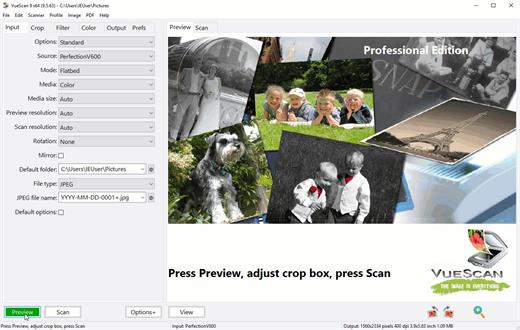
Description: VueScan, the world’s most popular scanner software, is used extensively by photographers, home users, scanning services and corporations. VueScan is a scanning program that works with most high-quality flatbed and film scanners to produce scans that have excellent color fidelity and color balance. It is very easy to use, and also has advanced features for restoring faded colors, batch scanning and other features used by professional photographers. VueScan changes nothing on your system, installs nothing in your operating system and all other scanner software will continue to function. VueScan increases your productivity and saves you money. VueScan has advanced scanning options, powerful features, and greatly improves your scans with superior color accuracy and better color balance. VueScan supports more than 700 scanners and 209 digital camera raw files and takes about 5 minutes to download and install.

Features:
• Works with 1200 flatbed and film scanners
• Runs on Mac OS X, Windows and Linux
• Improves your productivity and quality of scans
• Has been downloaded more than 5 million times
• Create raw scan files
• ICC profiles and color spaces
• IT8 color calibration

Release Name: VueScan Pro 9.8.26 DC 03.02.2024 Multilingual
Size: 72.6 MB
Links: HOMEPAGE – NFO – Torrent Search

Download: FiKPERNiTROFLARERAPiDGATOR

6 Comments
Feb 4

JP Software CMDebug 31.01.20 (x64) Multilingual

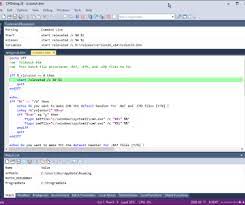
Description: JP Software CMDebug is a stand-alone version of the Take Command IDE and batch debugger component. CMDebug is intended for developers who need to develop batch files to run in CMD.EXE or TCC-RT (runtime). CMDebug allows you to create and debug your batch scripts with the integrated graphical IDE. CMDebug includes tabbed edit windows and a sophisticated debugger with single stepping, breakpoints, syntax coloring, tooltips, bookmarks, and tabbed variable and watch windows. Windows batch file programming has never been easier or more powerful!
Features:
• Create and debug your batch scripts with the integrated graphical IDE. The IDE includes tabbed edit windows and a sophisticated debugger with single stepping, breakpoints, syntax coloring, tooltips, bookmarks, tabbed variable and watch windows. Windows batch file programming has never been easier or more powerful!
• The TCC-RT scripting language is a massive superset of the Windows CMD shell, with 220+ internal commands, 367+ internal functions, and 289+ system variables. Almost all of the CMD command line commands (e.g. DIR, COPY, DEL, START, etc.) are enhanced with hundreds of additional options. And TCC adds more than 180 new commands. TCC-RT can usually do in one or two lines what requires dozens CMD commands (when CMD can do it at all).
• The scripting language includes a complete set of extended flow control structures including IF-Then-Else, DO and FOR loops, SWITCH, subroutines, batch libraries, and more.
• When using TCC-RT syntax, most interactive commands (such as COPY, DEL, DIR, MOVE, REN, START, etc.) have command dialogs that allow you to select filenames and options and see your command line before executing it. The most powerful Windows command processor is also the easiest to use!
• Monitor your system’s hardware and software events, and execute commands when an event is triggered. You can monitor directory changes, the clipboard, event logs, Ethernet and WiFi connections, services, processes, and USB and Firewire connections.
• Environment variable substitution is greatly enhanced, including nested variables, delayed expansion, indirect variables, multidimensional array variables, and direct access to the system, user, and volatile variables in the registry.
• Select or exclude files by date, time, size, owner, and extended wildcards or regular expressions for extraordinary flexibility in file management.
• Specify multiple filenames for most file processing commands (i.e., COPY, DEL, DIR, MOVE, etc.), or optionally the name of a file that contains the filename arguments. (COPY even supports multiple targets as well as multiple sources.)
Multiple types of I/O redirection are available, including redirecting and piping to STDERR, “in-process” pipes, “here-document” and “here-string” redirection, and Tee and Y pipe fittings.
• Send keystrokes to any application (console or GUI).
• TCC-RT includes internal compression and extraction commands for ZIP, 7ZIP, TAR, JAR, GZIP, and BZIP files.
• You can access FTP, TFTP and HTTP (including SSL and SSH) directories and files in all command processor file-handling commands (COPY, DEL, MOVE, etc.).
• Internal support is included for Perl, Lua, REXX, Python, Tcl/tk, and any Windows Active Scripting language. You can even combine multiple • languages in your batch scripts.
• And many thousands more — see our online help for details.

Release Name: JP Software CMDebug 31.01.20 (x64) Multilingual
Size: 50.7 MB
Links: HOMEPAGE – NFO – Torrent Search

Download: FiKPERNiTROFLARERAPiDGATOR

8 Comments