Feb 1

Nitro PDF Pro 14.20.1.0 (x64) Enterprise / Retail Multilingual

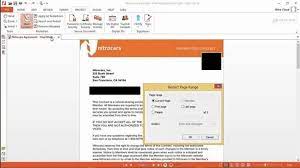
Description: Create, edit and convert PDF files effortlessly with the help of this intuitive program that also allows users to accurately extracting text from PDFs thanks to its OCR function. Nitro Pro is one of the most advanced PDF creating and editing software solutions, providing basically all the tools you would ever need to help you in this regard. Although it’s called ‘Professional,’ the application has been developed to be aimed at beginners and advanced users alike, so you won’t find it too difficult to use.
Features:
– Create PDFs and Combine Files
– Create PDFs from virtually any document, image, or file type
– Drag and drop to create and combine PDFs
– Insert, delete, and organize pages in a PDF
– Combine multiple files and file types into one PDF
– Deep integration with Office 365, SharePoint 365, OneDrive for Business, Dropbox, Box, Google Drive
– Copy and paste selected parts of a PDF file with formatting intact
– Batch-create PDF files

Convert Files to and from PDF
– Convert Word, PowerPoint, and Excel files to editable PDFs
– Convert PDFs into editable Word, PowerPoint, and Excel files
– Convert scanned documents into editable, searchable PDFs
– Convert PDFs to JPEG, TIFF, or PNG image formats
– Convert web pages to interactive PDFs, complete with links
– Convert CAD files to PDFs
– Convert any PDF file to PDF/A 1 and 2
– Extract text and images
– Postscript-based document conversion

Apply and Request Electronic Signatures
– Request secure, legally binding electronic signatures
– Lightweight eSignature workflows, designed for speed and ease of use
– Apply your own electronic signature
– Digitally sign and certify documents
– Send, track, and confirm electronic signatures with real-time notifications and analytics
– Easy mobile signing optimized for smartphones and tablets
– eSignature templates for frequently used forms
– Easily add documents and templates that your whole team can access

Edit PDF files
– Insert and edit text and images
– Insert and edit fonts, layouts, and pages
– Optimize, shrink, and repair PDF files
– Visual rotation of images and pages
– Insert and edit bookmarks, links, headers, numbering, and watermarks
– Insert and edit Bates Numbering
– Create searchable and editable PDFs from scans with OCR (Optical Character Recognition)
– Smart Alignment tool
– Copy and paste between applications
– Automatic text reflow and resize
– Scanned image detection with automatic deskew

Keep PDFs Secure
– Add password protection and permissions to PDFs
– Redact to permanently remove sensitive information from PDFs
– Create protected PDF files that restrict copying and editing
– Secure PDFs with Microsoft Rights Management Services (RMS) 2.0
– Encryption support for 64-, 128-, and 256-bit (with R6 support)
– Work with digital signatures, including Chain of Trust support
– Manage digital signature profiles and certificates
– Create and manage digital IDs
– Batch security
– Document version tracking

Build and Fill PDF Forms
– Static XFA form support
– PDF form creation and editing
– Easily create, fill, sign, send, and store forms

Review, Mark up, and Annotate PDFs
– Highlight, cross out, and underline text with annotations
– Create annotations using sticky notes, text boxes, call-outs, pencil, and shapes
– Attach entire files as annotations
– Sort, manage, filter, and summarize comments
– Apply dynamic stamp annotations, which auto-populate specific information
– Spell check
– Compare PDF files
– Advanced search allows for increased precision and contextual results
– Smart guidelines for Object Tool aligns shapes to ensure content is arranged properly

User-Friendly Interface
– Familiar Microsoft Office-style interface for easy adoption
– Access your documents from your desktop, browser, or mobile device
– Functional on touch-enabled devices
– Integrated Microsoft Office toolbar and shortcuts
– Outlook plugin to create PDFs from email
– Print reduction suggestions
– Smart Tips and onboarding product tour
– Customizable Home tab
– View Optional Content Group (OCG) layers
– Floating toolbar for easier access to editing tools
– Drag and drop documents into multiple windows
– Preview PDF files in Windows Explorer, Outlook, and web browsers

Easy IT Deployment and Management
– (Available in Business and Enterprise plans only)
– Lightweight deployment with thin, server, and desktop options
– Support for App-V and managed servers
– Nitro Analytics for insights into printing activity and document workflows
– Manage licenses, users, and services via Nitro Admin
– NIST 800-53, HIPAA, SOC2 Type 2 certified

What’s New:
– https://www.gonitro.com/nps/product-details/release-notes

System Requirements:
– Desktops: Windows 10 and 8 (64 bit)
– Servers: Microsoft Windows Server 2012, 2012 R2 (64 bit), 2016 and 2019
– Processor: 1.5 GHz or faster
– RAM: 1GB
– Available Hard Disk Space: 4.5GB
– Display screen resolution: 1024×768
– Microsoft Office Integrated Features: MS Office 2013 (32bit or 64bit), MS Office 2016 (32bit or 64bit), Microsoft Office 2019 (32bit or 64bit)
– Video hardware acceleration (optional)

Release Name: Nitro PDF Pro 14.20.1.0 (x64) Enterprise / Retail Multilingual
Size: 639.4 MB
Links: HOMEPAGE – NFO – Torrent Search

Download: FiKPERNiTROFLARERAPiDGATOR

7 Comments
Feb 1

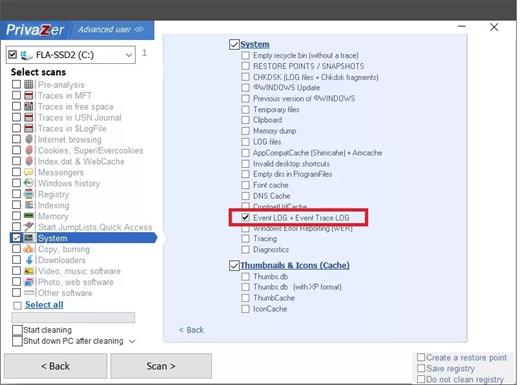
Goversoft Privazer 4.0.82 DC 31.01.2024 Multilingual

Goversoft Privazer Full Crack Download. The utility cleans the personal computer from traces of the user’s work, plus you can delete other confidential information. The program can create a detailed report, there you can find all the information about detected conflicts, registry data, history of site visits and other traces, you can download Goversoft Privazer Crack Download below.

The utility can erase history from connected external drives. The program’s interface is self-explanatory, and the convenient wizard will guide you through all the steps, so even an inexperienced user can quickly understand all the details of PrivaZer.
Dear users, the developers of this program contacted me and asked me to tell you that a user under the nickname Enigmatic, on our website claims that this program has removed Windows patches and Service Pack. However, PrivaZer only removes patch uninstallers and the Windows Service Pack to free up disk space. Only uninstallers are removed, not Windows files that remain after installing the patch and service pack. Once uninstalled, uninstallers will no longer appear in the “add/remove programs” menu, so the user may think they have been completely removed without finding them there, but they are not!

Download Goversoft Privazer Activation Key Features:

  • A powerful PC cleaner and privacy application that cleans and removes unwanted traces of your past activities.
  • It provides you the ability to delete individual files or directories that you choose in order to prevent their full or partial recovery.
  • Has a simple user interface that is very easy to use.
  • It automatically recognizes your storage device type and adapts its overwriting algorithms to the storage medium.
  • It offers the complete cleanup of any undesired traces of what you’ve done, watched, downloaded, deleted, etc.
  • See exactly what can still be recovered of your past activities on your PC at home, at work.
  • And much more….

What’s Ne in Goversoft Privazer Full crack?

  • Improved scan Shellbags

Release Name: Goversoft Privazer 4.0.82 DC 31.01.2024 Multilingual
Size: 23.7 MB
Links: HOMEPAGE – NFO – Torrent Search

Download: FiKPERNiTROFLARERAPiDGATOR

6 Comments
Feb 1

StreamFab 6.1.6.2 (x64) Multilingual

Description: The most comprehensive video downloading solution allows you to download videos from Amazon Prime, Netflix, Hulu, Disney+, HBO, and over 1000 other streaming websites.

On-demand videos come and go on streaming services
Most on-demand videos on a streaming service, including Netflix, Prime Video, HBO Max, and many others, come and go due to the licensing agreements between the streaming service and the studios that produce them.

The movies, TV shows, and other videos will be removed if the licensing agreement is due and not renewed. What’s more, if a title is gone, no one knows for sure whether or not it will come back in the future. It could be gone forever.

Save your favorite videos before they leave the service
Although streaming services offer their native offline viewing feature that actually allows you to download videos to watch offline, that feature comes with many limitations.

· The downloaded videos will expire after a certain time period, usually 30 days.
· You have to finish watching a video within 48 hours once you start watching it.
· Not all the videos are downloadable and you can only download them to mobiles.
· You cannot transfer the downloads to other devices to watch with other players.
FYI: Offline viewing limitations of Amazon Prime Video, Netflix, Hulu, and Hulu Japan.

With StreamFab, however, all of these terms and rules are gone, you can keep the downloaded videos permanently, and transfer them to any device you have to watch anytime and anywhere.

Inbuilt browser features better download experience
While other video downloaders ask you to paste the video URL copied from your desktop web browser, StreamFab features its inbuilt web browser that saves your trouble copying video URLs.

That’s to say, from browsing the target video sharing website or streaming service to downloading your target videos, you can do all things inside the StreamFab downloader software.

Download videos from all major streaming services
StreamFab is a born streaming video downloader targeted for all the major on-demand streaming services, including but not limited to Netflix, Amazon Prime video, Disney+, Hulu, HBO, and more.

Hence, as long as those streaming services are available in your country, and you’re a paid subscriber of a specific service, then you can download videos from it with this downloader.

Choose your preferred video and audio quality
Quality-wise, StreamFab downloaders give you multiple choices to choose from. So you can decide on your own what video resolution and audio quality you prefer.

To be specific, you have two options regarding video quality, 720p HD or 1080p Full HD. In terms of audio quality, EAC3 5.1, AC3 5.1, and AAC 2.0 are available. So, be your own boss.

Save the downloaded VOD videos in MP4 format
If you’re concerned about the playback compatibility issue of the downloaded videos, then you don’t have to. The downloaded streaming videos are saved as the common MP4 file.

The biggest advantage of the MP4 format is that it is compatible with almost all the operating systems, smartphones, tablets, digital media players, and game consoles out there.

That said, you still have an extra option to save the output as MKV files if necessary.Remove annoying ads while downloading videos
Movies are meant to be savored with your eyes, ears, and mind, but if you’re bombarded with a jumble of ads, a pleasant viewing experience can get totally ruined.

With StreamFab downloaders, however, your downloaded streaming videos contain no ads as they are cut out automatically during the download process. So, pure enjoyment! No ads!Download audios & subtitles in your mother tongue
Audios and subtitles are the basic means to understand the movie content. Movies and TV shows nowadays usually contain multiple audio tracks and subtitle streams of different languages.

So, when it comes to your specific needs, you can either choose to download only the audios and subtitles of your native language or, you can also download them in other languages.

Remux subtitles into videos or save as SRT files
When it comes to how the subtitles are handled, StreamFab downloaders offer two options for you to choose according to your own needs under different circumstances.

You can either remux the subtitles directly into the videos or, output the downloaded subtitles separately as SRT files. The choice is yours! So, choose freely.

Auto-download newly released episodes at scheduled time
Fans of TV shows all know that new episodes are always aired at a scheduled time, periodically. It would be nice if you can download the future episodes as soon as they are released.

With this downloader software, you can have that. Just add all your favorite TV shows to the Scheduled queue, it will download all the new episodes automatically, based on your schedules, weekly, or daily.

Download multiple videos concurrently and fast
Downloading performance matters a lot when you plan to download a TV show or, a movie series, such as the Avenger series. With StreamFab downloaders, there is no need to panic.

You can add multiple movies or even all the episodes of a TV show season to download in one go. On top of that, super-fast download speed is ensured, too. Just 10-20 minutes per movie.

Download media server friendly Meta information
Managing a myriad of media library can be tough with your media server. However, StreamFab can download all the metadata info, such as movie, season and episode title, cast, synopsis, poster, etc.

All such information can make it extremely easy for media servers like DVDFab Player 6, Plex, Kodi, and others alike to sort and organize your downloaded movies and shows in a better way.

More so, if you are using DVDFab Player 6 as your media managing and playback software, StreamFab can also import your downloads directly to your media library.

System Requirements:
– Windows 11/10/8.1/8/7
– Intel i3 or above
– 4GB of RAM or above
– 40GB of free hard disk space or above
– Live Internet connection required

Release Name: StreamFab 6.1.6.2 (x64) Multilingual
Size: 743.4 MB
Links: HOMEPAGE – NFO – Torrent Search

Download: FiKPERNiTROFLARERAPiDGATOR

8 Comments
Feb 1

EF Commander 24.02 Multilingual

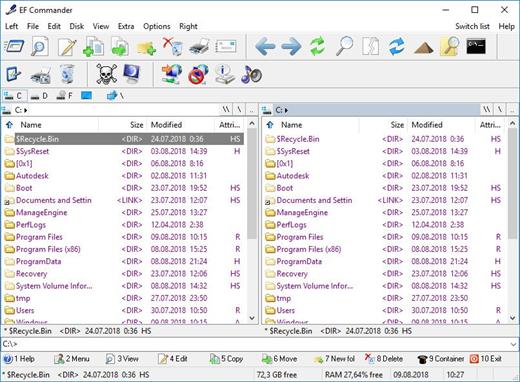
Description: EF Commander is a complex and multi-featured file manager that a wide range of users, from beginners to professionals, will find easy to use. It is the result of many requests received by the author. The first version was written in 1994, under the OS/2 operating system using Presentation Manager, as a personal replacement for the old DOS program Norton Commander™. In 1996 it was ported to the 32-bit Microsoft Windows™ operating system.

Here are some key features of “EF Commander”:
Easy to use
The modern interface helps you to have full control over your files and folders.

Tabbed interface
Define just the views you need in each pane for your folders and files.

Thumbnails
Quickly and easily get an overview your photos or other image collections.

32 bit multi-threading, parallel file operations
All long operations are run with multi-tasking. You can run any number of different operations at the same time, or several instances of the same operation — for example, you can have several “copy” commands going simultaneously.

Direct link to PDAs with Windows CE
EF Commander was the first file manager worldwide with this feature. Handle your data in the same way as on your desktop or laptop computer.

Burn CDs and DVDs direct from EF Commander
Nero Burning ROM (www.nero.com) is required.

Internal packers for more than 20 archive formats
Use EF Commander to pack files or whole folders in any of the common archive formats. No external programs are required.
Supported formats: 7-Zip, ACE, ARC, ARJ, BZIP2, CAB, CPIO, GZIP, IMG, ISO (ISO9660), LHA, RAR, RPM, SFX, SQX, TAR, TBZ, TGZ, ZIP, ZOO

Internal viewer for more than 30 file formats
View picture files and movies, and play MP3, Ogg/Vorbis, FLAC, WMA and WAV audio files, without having to use any other software.

Use XnView and IrfanView as add-ons
Enlarge the number of available formats to 400 or more. EF Commander runs quietly in the background, but remains fully available to you. Files can also be managed in the internal viewer, in the quick view mode, or as thumbnails.

Fast FTP-client
The built-in FTP client features resume download and FxP (server to server transfers).

Internal text and HEX editor
EF Commander has full text and hex editors for files that are limited only by your system resources.

Functions to split/join large files
Split large files into smaller parts, and recombine the parts.

Create/Verify checksums
Check the integrity of your data. EF Commandersupports the SFV, MD5 and SHA1 formats.

Synchronize function
Synchronize your notebook or your LAN with your work station.

Built-in media player
Play MP3, Ogg/Vorbis, FLAC, WMA and WAV.

External plug-in support for packers, viewers, file system and contents
Extend the functionality of EF Commander with external plugins. Supported formats include WLX, WCX, WFX and Winamp decode plugins.

The following languages are included in the package: English, German, Bulgarian, Catalan, Chinese, Croatian, Czech, Danish, Dutch, French, Galician, Hungarian, Italian, Korean, Latvian, Lithuanian, Macedonian, Polish, Portuguese, Romanian, Russian, Slovak, Spanish, Swedish, Taiwan, Ukrainian.

Release Name: EF Commander 24.02 Multilingual
Size: 10.7 MB
Links: HOMEPAGE – NFO – Torrent Search

Download: FiKPERNiTROFLARERAPiDGATOR

6 Comments
Feb 1

SAPIEN CIM Explorer 2024 v2.4.111 (x64)

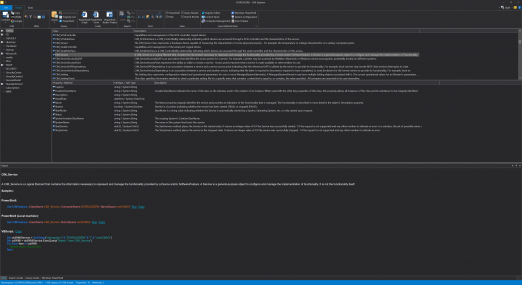
Description: CIM Explorer is the next generation tool for exploring the vast universe of the Windows Management Instrumentation database. The CIM database represents an extensive repository of information about your servers and client machines, which, as a system or network administrator, you need to utilize every day. Use CIM Explorer’s Windows PowerShell code generating abilities to create code for queries or even a GUI app with just a few clicks. The integrated PowerShell console for Windows PowerShell and PowerShell Core makes testing generated PowerShell statements instant and easy.

Superior performance using cached data and multi-threaded code gets you results fast.
Explore and query local and remote machines.
A large variety of search options enables you to access the information you need faster and more precisely.
Filters allow you to reduce noise and focus only on relevant information.
Preset and custom queries let you not only examine the classes, properties and methods but also the underlying data.
View all documentation for any CIM objects.
Generates sample code for PowerShell and VBScript, including calls to both CIM methods.
Local cache allows you to browse remote machines even when not connected.

System Requirements:
Windows Server 2016/2019 or Windows 10/11, 64-bit and ARM64 versions supported
15MB free disk space
1GB RAM
Visual Studio 2015-2022 Runtime
Windows PowerShell 5.1 and/or PowerShell 7


Release Name: SAPIEN CIM Explorer 2024 v2.4.111 (x64)
Size: 43.4 MB
Links: HOMEPAGE – NFO – Torrent Search

Download: FiKPERNiTROFLARERAPiDGATOR

3 Comments
Feb 1

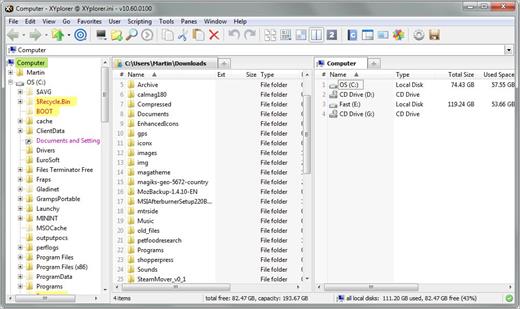
XYplorer 25.50.0000 Multilingual

Description: XYplorer is an Advanced File System Explorer targeting everybody who is looking for a real alternative to the Windows Explorer. It has the following features: Created Date, Last Accessed Date and Attributes are shown right in the file list. Extended file find supporting NT-only features, and including binary string search. Multiple location search (find files in all selected directories). Generates various sorts of file system reports (to clipboard, file, and printer — we’re talking about one-click directory print-outs here). Export extended file informations of whole directories (or even directory trees) to CSV-formatted files. [new in 3.21] Column Width Auto-Adjustment.

Copy Large/Small Icon, Multi-file Rename. Icon-extraction, multi-file time-stamping and attribute-stamping. Instant display of complete file/version information for each selected file. Instant preview of image, audio, and video files (displaying detailed media information). Instant file content view for all files (ASCII and binary), including text extraction from binaries (BTW: the fastest on the market). Full support for drag’n’drop and wheel mouse. Made to handle heavy-duty jobs. Easy to install, and easy to remove. Installing and running the program does not change your system or registry. Easy to use, start working in no time (interface closely follows Explorer standards). Small, fast, and RAM-friendly.

Features:
• Tabbed Browsing: have an unlimited number of tabs to make jumping around between folders a one-click affair. Rename the tabs, shift them around, hide them, drag-drop stuff onto the tab headers… the tabs remember their configuration individually and between sessions. You often search your system for files added in the last 24 hours? Let a “finding tab” do the job at a single click!
• High end find files engine with tremendous power and amazing speed. Find files fully supports Boolean logic (up to 256 nesting levels), advanced pattern matching, Regular Expressions, whole word and fuzzy matching, binary string search, multiple location search (find files in all selected directories) and much more…
• Instant preview of image (incl. PNG, JPEG, GIF, TIFF, ICO and many more), audio, and video files (displaying detailed media information).
• Thumbnails of image files shown right in the file list, introducing the unique “Mouse Down Blow Up” functionality.
• Instant preview of installed and uninstalled TrueType and Type-1 font files (displaying detailed font information).
• Instant preview of HTML, MHT, PHP files (including configurable server mappings) with printing option.
• Instant display of complete file/version information for each selected file.
• Various revolutionary highlighting features add more visual grip to tree and list. Highlight Folder, Boxed Branch, Favorite Folder Bold, Highlight Focused Row, Highlight Sorted Column, … all colors are fully customizable. And then there’s a wildcard-configurable Color Filter for list items.
• You have a Visual Filter for the file list. Control what you see by stating simple wildcard patterns like *.txt. The Visual Filter is per-tab and, as virtually all XYplorer settings, saved between sessions.
• File Info Tips and MP3 Info Tips: extensive file information (depending on file type and individual file up to 35 fields!) pops up when you move the mouse over a file’s icon.
• Special MP3 service: instant ID3v1.1-tag view and edit, plus automatic filename to ID3v1.1-tag routine.
• Instant file view (ASCII and HEX) for all files, including text extraction from binaries (BTW: the fastest on the market).
• Generates various sorts of file system reports (to clipboard, file, and printer — we’re talking about one-click directory print-outs here).
• Export extended file informations of whole directories (or even directory trees) to CSV-formatted files.
• Created Date, Last Accessed Date and Attributes are shown right in the file list. Optionally in the revolutionary Age format, – which immediately tells you how old a file is (as opposed to when it was born).
• Column Width Auto-Adjustment.
• Highly customizable display formats for file size and date information.
• For each file and folder, the (real!) disk space used is immediately displayed.
• Remembers last folder location, sort order, scroll position, and selected file.
• Browser-like history functionality.
• Can define favorite folders.
• A large suite of useful commands added to the standard file context menu, including Copy To, Move To, Copy Filename with – Path, Copy File Properties, Copy Large/Small Icon, Multi-file Rename (optionally using Regular Expressions).
• Icon-extraction, multi-file time-stamping and attribute-stamping.
• Full support for drag’n’drop and wheel mouse.
• Made to handle heavy-duty jobs.
• Installing (1.7 MB total) and running the program does not change your system or registry. In other words: XYplorer is 100% portable. Ideal for your USB memory stick.
• Easy to use, start working in no time (interface closely follows Explorer standards).
• Small, fast, and RAM-friendly.
• Quick 24/7 support.

Release Name: XYplorer 25.50.0000 Multilingual
Size: 6.3 MB
Links: HOMEPAGE – NFO – Torrent Search

Download: FiKPERNiTROFLARERAPiDGATOR

5 Comments
Feb 1

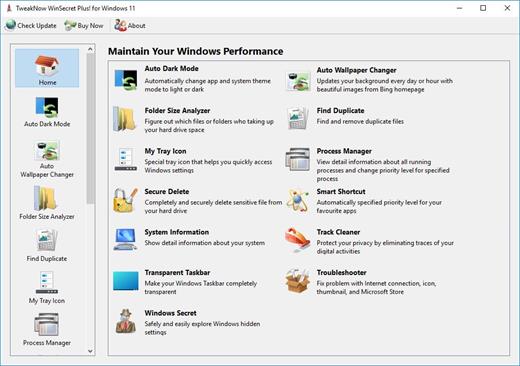
TweakNow WinSecret Plus 5.1.8

TweakNow WinSecret Plus for Windows Crack Full Version

TweakNow WinSecret Crack 2022 Free Download is a beautiful and powerful application that can be used for repairing the OS. When you are using the system and you see that the system is performing work very slowly then you can install this application to make your PC very fast. This application can work very nicely. Clear your PC from any junk and any e cases that make your PC very slow sometimes a lot of caches are used with the files in the PC and these caches make the PC very slow and this application also deletes these caches permanently and detects them automatically.

TweakNow WinSecret Plus for Windows Plus Key Features

  • Auto Dark
    Automatically change app and system theme mode to light or dark
  • Auto Wallpaper Changer
    Updates your background every day or hour with beautiful images from Bing homepage
  • Folder Size Analyzer
    Figure out which files or folders who taking up your hard drive space
  • Find Duplicate
    Find and remove duplicate files
  • Process Manager
    View detail information about all running processes and change priority level for specified process
  • Secure Delete
    Completely and securely delete sensitive file from your hard drive
  • Smart Shortcut
    Automatically specified priority level for your favourite apps
  • System Information
  • Show detail information about your system
  • Track Cleaner
    Protect your privacy by eliminating traces of your digital activities
  • Transparent Taskbar
    Make your Windows 11 Taskbar completely transparent
  • Troubleshooter
    Fix problem with Internet connection, icon, thumbnail, and Microsoft Store
  • Windows Secret
    Safely and easily explore Windows 11 hidden settings

Release Name: TweakNow WinSecret Plus 5.1.8
Size: 19.3 MB
Links: HOMEPAGE – NFO – Torrent Search

Download: FiKPERNiTROFLARERAPiDGATOR

4 Comments
Feb 1

SAPIEN PowerShell HelpWriter 2024 v3.0.65 (x64)

Description: PowerShell HelpWriter is the premier editor for Windows PowerShell XML help files. Create and edit help files for all command types, including cmdlets, functions, workflows, and CIM commands. Focus on your content and let PowerShell HelpWriter worry about the XML.

Generate help files for modules.
Create and edit about topics.
Real-time Spell checking.
Create and design module help from scratch.
Fully-featured editor helps you write accurate and complete help topics.
Edit help files using the designer or directly using the XML editor.
Supports all command types: cmdlets, functions, workflows, CIM commands.
Converts comment-based help to PSMAML files.
Generates starter help for any command or all commands in a module.
Export help to Markdown or HTML.
Refresh the content to reflect changes in the module.
Prevent loss of work with the File Recovery feature.

System Requirements:
Windows Server 2016 / 2019 or Windows 10, 64-bit versions supported
Windows PowerShell 5.0 or later
2GB RAM (Recommended for Windows PowerShell)
.NET Framework 4.8
Visual Studio 2015-2019 Runtime

Release Name: SAPIEN PowerShell HelpWriter 2024 v3.0.65 (x64)
Size: 459 MB
Links: HOMEPAGE – NFO – Torrent Search

Download: FiKPERNiTROFLARERAPiDGATOR

6 Comments
Feb 1

Radiant Photo 1.3.0.385 (x64) Multilingual

Your photos deserve to be radiant. Get superior quality finished photos with perfect color rendition, delivered to you in record time. Your photos — simply RADIANT. The way they are meant to be.

Amazing images. No sweat.
Getting great results with Radiant Photo couldn’t be easier!

The Radiant Photo image pipeline — Enhancement Tools

– Graduated Filter
A linear or a radial gradient can apply adjustments to only part of your image.

– Portrait Tools
Enhance the beauty of your subject with natural edits that enhance eyes, skin, and much more.

– Color Grading
LOOKs offer intelligent style recipes for your photos. Quickly editable for a personal style.

– Finishing Tools
Fine-tuning adjustments that can be applied last in the image pipeline.

The Radiant Photo image pipeline — Quick Edit

– Scene Detection
AI recognizes the content of the photo, as well as analyzes each pixel and chooses the ideal starting point.

– Smart Presets
A starting edit is applied to the photo from our collection, or use your own AI presets. Smart tools automatically adapt to every photo.

– Quick Edit Controls
Refine the edit quickly with seven essential controls – for most, the image is ready to print or share.

The Radiant Photo image pipeline — Detailed Edit

– Radiant Tone
Enhance the dynamic range of the scene without clipping. Get perfect exposure every time.

– Radiant Color
Photo color correction that matches how the human eye sees color — true to life.

– Radiant Details
Enhance sharpness, reveal lost details, and eliminate noise with smart tools. The Radiant Photo image pipeline — Enhancement Tools

System requirements
Hardware: Windows-based hardware PC with mouse or similar input device
Processor: CPU Intel® Core™ i5 or better
OS version: Windows® 10 or Windows® 11 (64-bit editions)
RAM: 8 GB RAM or more (minimum) / 16+ GB RAM (recommended)
Disk space: 1 GB free space; SSD for best performance
Display: 1280 x 800 display (minimum) / 1920 x 1080 display (recommend)
Plugin hosts: Photoshop CS6 or Photoshop Creative Cloud, Lightroom 6 or Lightroom Classic, Corel PaintShop Pro X6, X7, X8, or X9 V22


Release Name: Radiant Photo 1.3.0.385 (x64) Multilingual
Size: 208.2 MB
Links: HOMEPAGE – NFO – Torrent Search

Download: FiKPERNiTROFLARERAPiDGATOR

7 Comments
Feb 1

SAPIEN PowerShell ModuleManager 2024 v2.0.22 (x64)

Description: Whether you are a PowerShell beginner or expert, PowerShell modules are an important resource for your script development. PowerShell ModuleManager makes it easy to search and manage modules installed on your local or remote machine, ensuring that your modules are always up to date.

Search the PowerShell Gallery or any other repository for new modules.
Install, remove or temporarily disable modules.
Keep modules up-to-date.
Remove duplicate and outdated versions of modules to prevent version confusion.
Filter and find specific modules on your machine.
View detailed module information at a glance.
Move and organize module locations.
Manage modules on remote machines.
Publish modules to a repository.

Release Name: SAPIEN PowerShell ModuleManager 2024 v2.0.22 (x64)
Size: 451.1 MB
Links: HOMEPAGE – NFO – Torrent Search

Download: FiKPERNiTROFLARERAPiDGATOR

7 Comments