Jun 2

IINA 1.3.0

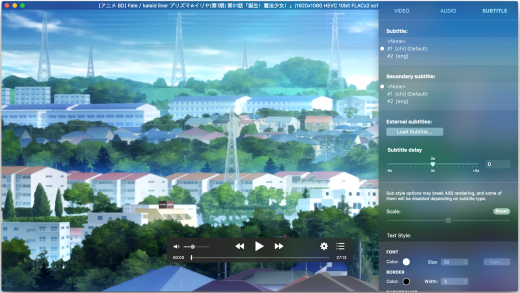
Description: IINA is the modern video player for macOS.

Features

  • For and only for modern macOS – IINA is born to be a modern macOS application, from its framework to its user interface. It adopts the post-Yosemite design language, and keeps up the pace of new technologies such as Force Touch and Touch Bar.
  • Revolutionary user experience – IINA simplifies a lot of user interactions. In addition to traditional cascaded menus, it provides interactive UI components and gestures to give you intuitive, flexible, powerful control of the playback.
  • Powerful functionality – Based on MPV, one of the most powerful media player projects ever, IINA supports almost all common media types (even GIF) and stably outputs high-quality video that is optimized for Retina screen. MPV’s config file and script system are also integrated.
  • You are the target-user – IINA is made by a user like you, who (may be) also having been expected for a powerful and elegant media player on macOS for years. Whether you just got your first Mac or are already a professional MPV user, IINA will satisfy you for its customizability and expandability.

What’s New

Version 1.3.0:

  • Native Build for Apple Silicon

Release Name: IINA 1.3.0
Size: 76.12 MB
Links: HOMEPAGE – NFO – Torrent Search

Download: UPLOADGiG – NiTROFLARE – RAPiDGATOR

4 Comments
Jun 2

WiFi Explorer Pro 3.4.6

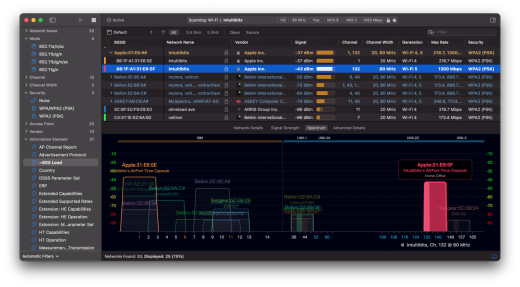
Description: WiFi Explorer Pro takes the code base of WiFi Explorer, and adds a set of features that makes it the right tool for WLAN and IT professionals. You can use WiFi Explorer Pro for preliminary assessments, to help design and validate wireless networks installations, as well as to identify channel conflicts, overlapping, poor signal quality and other issues that may be affecting the connectivity or performance of your home, office or enterprise wireless network.

Features

  • Passive and directed scan modes
  • Spectrum analysis integration
  • Custom filters
  • Support for remote sensors
  • Support for networks with hidden SSIDs
  • Additional columns with advanced information
  • Additional organization options for scan results
  • Dark and light themes

What’s New

Version 3.4.6:

  • Adds number of selected networks to footer.
  • Adds support for the Fortinet AP Name, Model, and Serial Number vendor specific information element.
  • Adds support for automatically choosing the remote sensor’s wireless interface(s) for scanning.
  • Fixes a crash that may occur when working with coloring rule sets.
  • Fixes an issue where the number of spatial streams may be incorrect for APs supporting 160 MHz channel width.
  • Fixes a file descriptor leak that occurs when reading the MCS index and other metrics from the built-in Wi-Fi adapter.
  • Improves error handling when connecting to a remote sensor.
  • Other minor fixes and improvements.

Release Name: WiFi Explorer Pro 3.4.6
Size: 15.11 MB
Links: HOMEPAGE – NFO – Torrent Search

Download: UPLOADGiG – NiTROFLARE – RAPiDGATOR

4 Comments
May 30

Allavsoft Video Downloader Converter 3.24.7.8183 (MAC)

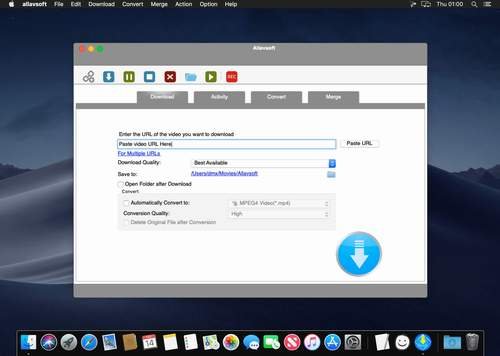
Description: Allavsoft Video Downloader Converter 3.20.0.7230 This powerful Video Downloader supports downloading movies, music videos, playlist, sport videos, lectures and more from free video sharing website like Facebook, Dailymotion, eHow, and more than 100 video sharing sites.

Besides downloading video in its original format, Allavsoft also features one-click to download as well as convert the downloaded video to popular video format like MP4, AVI, WMV, MOV, MPEG-1, MPEG-2, VOB, ASF, RMVB, DV, TS, Apple ProRes, WebM, FLV, OGV and etc.

This ideal Web Video Downloader app enables selecting among all video qualities available for downloading like download videos in ultra high definition (4K), 3D video, HD 2k, HD 1080p, HD 720p, and stand definition 480p, 360p, and 240p. This professional Video Downloading and Converting tool also helps to extract and download audio from online music video or movies as well as convert to popular audio format like MP3, WMA, WAV, AAC, AAC, Apple Lossless M4A, AIFF, RA, FLAC, OGG, AU and etc.

Mon image

This ideal Web Video Downloader app enables selecting among all video qualities available for downloading like download videos in ultra high definition (4K), 3D video, HD 2k, HD 1080p, HD 720p, and stand definition 480p, 360p, and 240p.

This professional Video Downloading and Converting tool also helps to extract and download audio from online music video or movies as well as convert to popular audio format like MP3, WMA, WAV, AAC, AAC, Apple Lossless M4A, AIFF, RA, FLAC, OGG, AU and etc.

Batch download and convert:

  • Allavsoft supports adding multiple video URLs and batch downloading and converting multiple videos at a time
  • When download web video files, this wonderful Video Downloader will automatically detects advertisements and does not download them
  • Preview and playback downloaded video files
  • There is a built-in video player in Allavsoft for us to preview and playback the downloaded video files
  • Breakpoint Resume
  • You can pause and resume downloading at any time. It is very convenient to use
  • Action after download done
  • You can set automatically shut down computer after all the download tasks are finished, if you have lots of videos to download and want to leave your Windows on to download them
  • Keep history for downloading

Release Name: Allavsoft Video Downloader Converter 3.24.7.8183 (MAC)
Size:  70.70 MB
Links: HOMEPAGE – NFO – Torrent Search

Download: UPLOADGiG – NiTROFLARE – RAPiDGATOR

6 Comments
May 30

ScopiDo – Goal & Habit Tracker 1.4

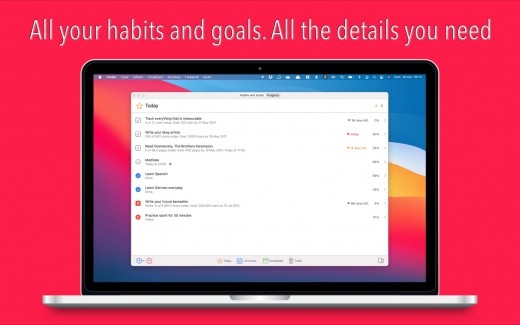
Description: ScopiDo is a simple yet powerful tracker for goals & habits for Mac. You can use it as a simple habit tracker or as a complex SMART goal tracker, which does the math for you. Insert the goal value, choose the deadline and the days of works and, voilà, you know how much work you should do to finish on time. With ScopiDo you can achieve all your goals and habits, and consequently, you can achieve excellence!

General

  • All your habits and goals are in the same window.
  • There are three states for each habit or goal: done, failed, and undecided. You can switch between them easily.
  • You can customize your dates and working days in a Settings panel.
  • You can track and view your progress through data and graphs.
  • It does the math for you and changes colours in Progress view according to the status of an item—done, failed, and undecided.

Habits

  • Display a calendar view in different colors, blue for the done days, red for the failed days, and grey for the undecided days.
  • Display percent and value of the success rate for the entire period of time.
  • Show the current and the best streak.
  • Show the current habit in top-three habits.

Goals

  • Track total progress, days left, deadline, and the number of units to go.
  • View session progress and units for a session (a day).
  • Display a total progress line graph between the start date and the deadline.
  • Display the current goal in top-three goals.

Other Key Features

  • Display app Icon Badge & Notifications.
  • Display dark mode.
  • Switch between multiple views: Today, All Active, Completed, and Trash.

What’s New

Version 1.4:

  • Release notes were unavailable when this listing was updated.

Release Name: ScopiDo – Goal & Habit Tracker 1.4
Size: 9.53 MB
Links: HOMEPAGE – NFO – Torrent Search

Download: UPLOADGiG – NiTROFLARE – RAPiDGATOR

2 Comments
May 30

start 5.7

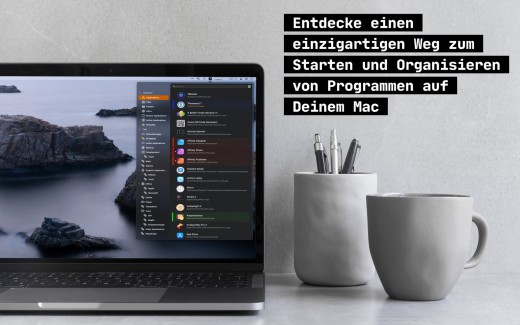
Description: innovative::bytes’ start is an unique launcher for macOS that allows you to open applications, documents or folders quickly and easily. Create tidiness in your Dock and start items with the smart launcher app start instead.

start supports you and your workflow with a well planned organizational system for your items and quick access to what you need.

Features:

  • Tag it and love it! Use tags to create collections for your applications, frequently used folders, scripts or any other file. It has never been so easy to organize and sort items on macOS. Save a lot of time – searching was yesterday!
  • Comments and notes! Add comments and small notes to your items to describe them in more detail. The comments will remind you what the items can do for you. Small notes with big effect – so you always keep track!
  • Highlight your items as you like! With just a few clicks you can highlight your items with colors and find them even faster. Choose colors for more clarity and organization – effective and visually appealing!
  • Start with a simple keystroke! Assign a key combination to your individual items and start them immediately from anywhere with a customizable keyboard shortcut. Your workflow is no longer disturbed – you’ll love the hotkeys!

What’s New

Version 5.7:

  • Small update for bug fixing and optimization.

Release Name: start 5.7
Size: 16.58 MB
Links: HOMEPAGE – NFO – Torrent Search

Download: UPLOADGiG – NiTROFLARE – RAPiDGATOR

4 Comments
May 30

UK Salary Calculator 4.3

Description: UK Salary Calculator for macOS provides a simple numerical and graphical breakdown of your income. It is intended for use by residents (or prospective residents) of the United Kingdom. Companion iOS app also available.

FEATURES

Yearly, monthly, 4-weekly, weekly, daily and hourly breakdown of income tax (20%, 40% & 45%), national insurance contributions, pension contributions, student loan, employer’s national insurance contributions, company car tax, fuel benefit charges, gross salary and net salary. It is also fully compatible with the new Scottish 5-tier tax system (19%, 20%, 21%, 41%, 46%) and ‘S’ tax codes.

It calculates your default tax allowance based on your age & income, and has facilities for using gross or net salary as an input, adding additional income, bonuses, additional allowances, customising student loan thresholds, adding salary sacrifices, childcare vouchers, marriage allowances, custom tax codes & deductions. It automatically reduces your personal allowance if you earn above the £100k income threshold.

UK Salary Calculator is fully reversible, meaning you can either enter your gross salary to see what your pay will be after deductions, or you can enter a net salary that you’d like to be your take home pay and UK Salary Calculator will tell you what you need to earn as a gross wage to make that happen. This app is therefore perfect for nannies, or individuals who employ a nanny, given their typical net-pay arrangements.

It is useful for employee’s and employer’s alike; whether you are looking to check your pay packet to ensure it’s right, or to see what your earnings should/could be. It is also useful to see what your take home earnings will be in the next financial year or in another job. All calculations are based on data made available by HMRC and the Student Loan Company.

The company car tax feature allows you to input your car’s P11D value & CO2 emissions and the app will automatically calculate the appropriate tax deductions and fuel benefit charge, if required.

Salary, salary sacrifices, allowances, and deductions can be input on a £’s/Year, £’s/Month, £’s/4-Week or £’s/Week basis. Pension can be added as a percentage or an amount.

One-click copy to clipboard function for individual calculated values, or you can quickly and easily share results via the email export option.

What’s New

Version 4.3:

  • Release notes were unavailable when this listing was updated.

Release Name: UK Salary Calculator 4.3
Size: 5.86 MB
Links: HOMEPAGE – NFO – Torrent Search

Download: UPLOADGiG – NiTROFLARE – RAPiDGATOR

5 Comments
May 30

FigrCollage Pro 3.3.2

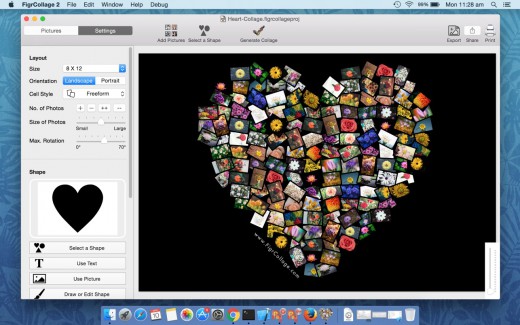
Description: Best software to make a photo collage in the form of any shape, number, word, or text. Use your pictures to make a photo collage in heart, circle, square or any other shape. Arrange your photos in the shape of number 1, 2, or any other number. Layout pictures to form any alphabet or word.

SAMPLE USAGE

• Make a collage in the shape of number 1 to celebrate your child’s first birthday.
• Make a “Thank You” or “Happy Birthday” collage by arranging photos to form these words.
• Make a heart shaped collage from your and your partner’s photos as a valentine’s day gift.

FEATURES

• Arrange pictures to form any shape
• Arrange pictures to form any number
• Arrange pictures to form any word or text
• Large number of standard shapes to choose from
• Use your own shapes
• Layout pictures in a freeform photo pile or in a grid of rectangular/hexagonal/circular photos
• Set a background color or use a transparent background
• Select from a wide range of output sizes
• Specify custom output sizes
• Landscape or portrait collages
• Export collage as JPEG, PNG, or TIFF to send it to a print shop or to print it from the local printer
• Export collage to Photos app
• Set collage as Desktop Picture
• Share photo collage on Facebook, Twitter, Flickr, Email, and AirDrop
• Save project to edit later

What’s New

Version 3.3.2:

  • Release notes were unavailable when this listing was updated.

Release Name: FigrCollage Pro 3.3.2
Size: 62.70 MB
Links: HOMEPAGE – NFO – Torrent Search

Download: UPLOADGiG – NiTROFLARE – RAPiDGATOR

6 Comments
May 30

Rhino 7 v7.18.22145.08132

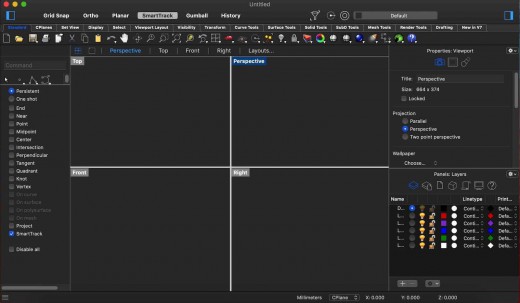
Description: Rhino – Versatile 3D modeler. Rhinoceros can create, edit, analyze, document, render, animate, and translate NURBS* curves, surfaces, and solids, point clouds, and polygon meshes. There are no limits on complexity, degree, or size beyond those of your hardware.

Special features include:

  • Uninhibited free-form 3-D modeling tools like those found only in products costing 20 to 50 times more. Model any shape you can imagine.
  • Accuracy needed to design, prototype, engineer, analyze, and manufacture anything from an airplane to jewelry.
  • Compatibility with all your other design, drafting, CAM, engineering, analysis, rendering, animation, and illustration software.
  • Read and repair meshes and extremely challenging IGES files.
  • Accessible. So easy to learn and use that you can focus on design and visualization without being distracted by the software.
  • Fast, even on an ordinary laptop computer. No special hardware is needed.
  • Affordable. Ordinary hardware. Short learning curve. Affordable purchase price. No maintenance fees.

What’s New

Version 7.18:

  • Release notes were unavailable when this listing was updated.

Release Name: Rhino 7 v7.18.22145.08132
Size: 406.78 MB
Links: HOMEPAGE – NFO – Torrent Search

Download: UPLOADGiG – NiTROFLARE – RAPiDGATOR

4 Comments
May 30

MovieSherlock Pro 6.3.6

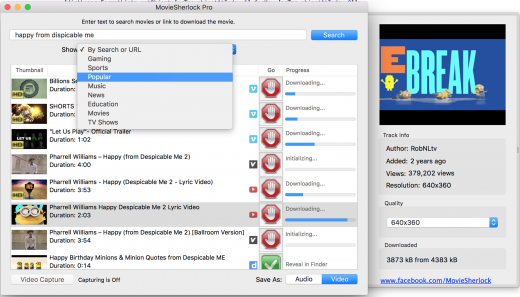
Description: MovieSherlock lets you to download videos fast, smoothly and no quality loss whats so ever! MovieSherlock is just the best way to get videos to your Mac.

Features

  • Save as MP4 and MP3: downloaded videos will be automatically converted.
  • YouTube, Vimeo, DailyMotion and thousands of websites support
  • Fast download: 15x faster than real time!
  • iTunes integration: Add to iTunes feature allows to copy downloaded video and music to any of your devices such as iPhone, iPad, iPod, etc.
  • Download video with subtitles from YouTube and DailyMotion.
  • Correct file naming: The downloaded videos will retain the original names from the source web-pages.
  • Native video format: If you get the video with MovieSherlock, be sure you can play it.
  • Simultaneous download: Get so many files you need at one time.

What’s New

Version 6.3.6:

  • Release notes were unavailable when this listing was updated.

Release Name: MovieSherlock Pro 6.3.6
Size: 19.78 MB
Links: HOMEPAGE – NFO – Torrent Search

Download: UPLOADGiG – NiTROFLARE – RAPiDGATOR

3 Comments
May 30

Cinema 4D Studio R26.015

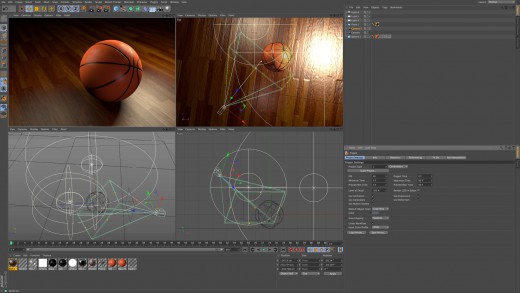
Description: CINEMA 4D offers you all you need to create high-end 3D pictures and animations – right out of the box. And CINEMA 4D’s modular design – with a total of 8 modules that you can buy individually – allows you to custom fit the application to suit your needs and your budget. The XL and Studio bundles offer groups of modules at significant savings.
EASE OF USE

Getting started in the world of 3D is a blast when you can quickly create great-looking results! Cinema 4D’s intuitive and easy to understand operation and logically arranged interface makes it easy for beginners to jump right in and take control. And it never ceases to amaze professional users just how easy Cinema 4D is to use. Countless tutorials and a global, highly-skilled community play an important role in bringing beginners to a professional level of use.

INTUITIVE INTERFACE

Cinema 4D is a pillar in our users’ everyday workflow. This is why we make sure from the start that new functions work intuitively and are exactly where users will expect to find them. The Cinema 4D layout can also be easily customized to precisely fit a user’s needs and saved for later use.

STABILITY

Cinema 4D’s stability is renowned throughout the 3D community and beyond. All new features and functions are thoroughly put through their paces by our QA and beta testers before being released. Our free service packs, which are released on a regular basis, further optimize Cinema 4D and let us rapidly respond to changes in operating systems and drivers!

POWERFUL HELP SYSTEM

Any questions about a specific function can be quickly answered by right-clicking on it and jumping straight to the integrated software documentation.

Unpack This!

If you’ve struggled with UVs in the past, you’re going to love the new workflow advancements. With unified component modes and improved selection tools, you’ll enjoy the Cinema 4D artist-centric workflow you’ve come to expect. If you’d rather not mess with UVs, you’ll really appreciate the easy new Automatic Unwrap option.

IMPROVED UV UNWRAPPING

Progressively unwrap your 3D objects by pinning points, selecting edges to use as seams in either the 3D or UV window, and clicking the new UV Unwrap Command.

AUTOMATIC UVs

Generate automatic UVs that make the most of your texture resolution – great for baking maps for export or simply getting a jump start on the 3D painting process. Thanks to the Ministry of Flat Technology developed by Eskil Steenberg of Quel Solaar, you can generate great UVs with a single click.

VISUALIZATION

See your seams in the 3D view while unwrapping, easily spot distorted or overlapping elements, and visualize your UV map with the help of multi-color islands or a UV checkerboard.

EFFICIENT PACKING

Arrange UV islands efficiently thanks to new packing options that take full advantage of texture space.

What a View!

Your window to the 3D world just got better, and is ready to take advantage of tomorrow’s technology. Get the best picture and clear the clutter with improved filter options. Enjoy more accurate display of shaders and improved performance with multi-instances. Full support for Apple Metal means the viewport is more than ready for modern Mac systems, and a new core architecture sets the foundation for more great things to come!

GLTF EXPORT

Export geometry, materials, cameras, PSR animation, PoseMorphs and Joint-based animation via GLTF for use in modern Web and Augmented Reality applications.

GOZ BRIDGE

Seamlessly exchange models, UVs and painted maps between Pixologic ZBrush and C4D. The workflow is a breeze – send a model to ZBrush, modify it and send it back with just one click. This new bridge supports millions of polygons, and even imports polypaint and polygroup information.

NODAL MATERIALS

Export a baked representation of nodal materials via Cineware or FBX, and create nodal materials when importing FBX. Additionally, your favorite third-party render engines also have the option to export a simplified version of their materials for Cineware or FBX.

MODELING

Modeling tools are faster and more robust thanks to a new core, but most importantly they’re much better at preserving UV and Vertex Maps.

ANIMATION

Copy and Paste animation tracks, select splines more easily, and enjoy a number of usability enhancements to character animation tools including Spline IK and Constraints.

Patch Instructions:

  • Install C4D
  • Allow installer to launch C4D or manually launch. Quit when licensing manager opens. → Required step to create files.
  • Now you can use the patch installer.

What’s New

Version R26.015:

  • Release notes were unavailable when this listing was updated.

Release Name: Cinema 4D Studio R26.015
Size: 1.86 GB
Links: HOMEPAGE – NFO – Torrent Search

Download: UPLOADGiG – NiTROFLARE – RAPiDGATOR

4 Comments