May 30

Grids for Instagram 8.0.5

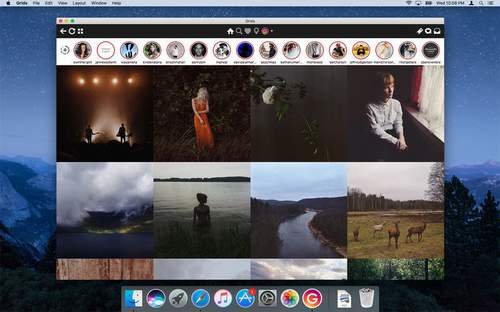
Description: Grids brings the best Instagram experience to your Mac, with Stories (first and only app that supports stories!), Direct Message and Large/Fullscreen photo and video viewing.
Mon image

As featured on TheNextWeb, AppAdvice, iDownloadBlog, DigitalTrends and many others.

  • View Stories
  • Direct message
  • Share photos/user profiles/tags/locations via message
  • Enlarged view mode allows photo viewing and video playing in large or full screen
  • Clean, adaptive UI. Works at full screen as well as widget-sized window.
  • Pixel-perfect layout and rendering. Retina display support. Your Instagram photos never looked this gorgeous.
  • 4 beautiful layout styles for the pleasure of your eyes
  • Picture size as well as spacing and background color can be adjusted to your liking.
  • Fastest Instagram browsing experience you will have!
  • Switch between multiple accounts seamlessly.
  • Like, comment, follow, search people and tags.
  • Show users tagged in photo
  • Bookmark allows you to bookmark people (without having to follow them), locations, tags and individual photos or videos (without having to like them).
  • Get notification when new feed is available and/or when there is new followers/likes/comments/mentions.
  • View latest following/news just like on your phone

Release Name: Grids for Instagram 8.0.5
Size: 47.32 MB
Links: HOMEPAGE – NFO – Torrent Search

Download: UPLOADGiGNiTROFLARERAPiDGATOR

5 Comments
May 29

DRmare Music Converter for Spotify 2.5.2

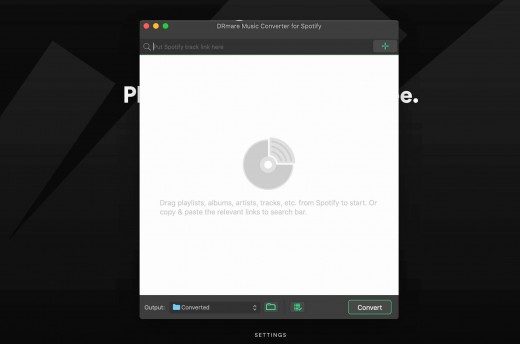
Description: DRmare Spotify Music Converter is a smart tool DRM removal for Spotify convert and save all your songs, albums and playlists from Spotify as DRM-free MP3, WAV, FLAC, AAC, MF4A, M4B, even if not subscribed the premium plan. This music converter transmission, you can freely enjoy any Spotify track on any popular device with no connection to the original quality and ID3 tags.


What’s New

Version 2.5.2:

  • Release notes were unavailable when this listing was updated.

Release Name: DRmare Music Converter for Spotify 2.5.2
Size: 9.00 MB
Links: HOMEPAGE – NFO – Torrent Search

Download: UPLOADGiG – NiTROFLARE – RAPiDGATOR

8 Comments
May 29

AudKit Spotify Music Converter 1.9.2

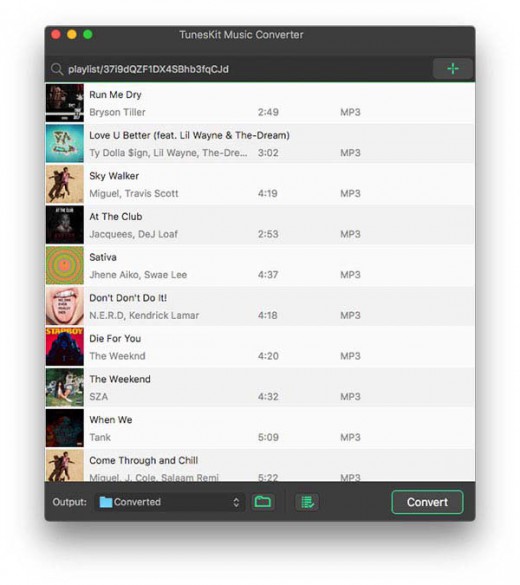
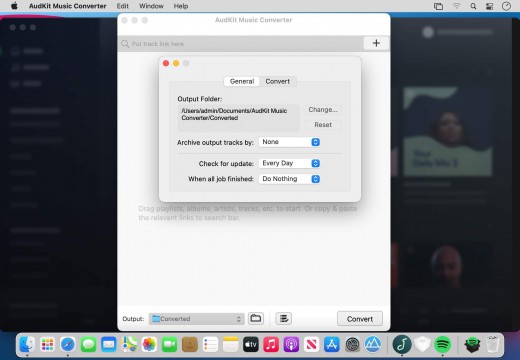
Description: Losslessly convert and download Spotify tracks and playlists for offline listening on any device. AudKit Spotify to MP3 Converter supports to convert Spotify playlist to MP3, AAC, M4A, M4B, WAV, FLAC, and other common-used audio formats.

Convert Spotify to MP3

  • AudKit Spotify to MP3 Converter supports to convert Spotify playlist to MP3, AAC, M4A, M4B, WAV, FLAC, and other common-used audio formats.

5X Conversion Speed

  • The conversion speed of AudKit Spotify Music Downloader is able to reach 5X or even faster. That means a 5-min Spotify song only takes a 1-min conversion period.

Batch Download Spotify Songs to MP3

  • AudKit Spotify Playlist Downloader supports different types of Spotify audios, which contain Spotify Songs, Playlists, Albums, Podcasts, Audiobooks, and Radio.
  • You can add up to 100 audio tracks from Spotify to AudKit Spotify Audio Downloader at once load. Besides, there is no upper limit of converting songs. So that you can batch import massive Spotify songs into AudKit Spotify Album Downloader and download them in just one click.

Keep 100% Lossless Sound Quality and ID3 Tags

  • Built-in the most-advanced converting technology, AudKit Spotify Song Downloader is able to keep 100% lossless audio quality from original Spotify songs.
  • The raw metadata also completely preserves in the output files, including artists, titles, albums, album arts, track numbers, and such basic info. Therefore, you can manage and organize the local music library with ease by viewing the intuitive ID3 tags.

Supported Input Formats

  • Spotify Audio Artists, Songs, Albums, Playlists, Podcasts, Radio

Supported Output Formats

  • Audio Formats MP3, AAC, M4A, M4B, WAV, FLAC

What’s New

Version 1.9.2:

  • Release notes were unavailable when this listing was updated.

Release Name: AudKit Spotify Music Converter 1.9.2
Size: 9.02 MB
Links: HOMEPAGE – NFO – Torrent Search

Download: UPLOADGiG – NiTROFLARE – RAPiDGATOR
8 Comments
May 29

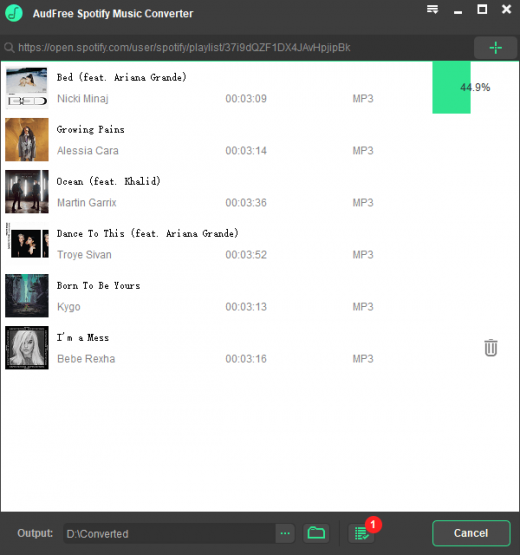
AudFree SpoDable 2.5.2

Description: A well-designed Spotify music converter to download over 70 million songs, playlists, albums, podcasts from Spotify to MP3, FLAC, WAV, AAC for offline listening on all devices and players with ease.

As the undisputed leader in on-demand streaming music service, both Spotify free and paid users can access over 70 million songs. But tracks have been applied Ogg Vorbis format in all songs and playlists, which prevents members listening to Spotify music on most popular devices, like the common MP3 players.

To make full use of songs, AudFree SpoDable for Windows and Mac is designed to help you easily convert Spotify Ogg to MP3, FLAC, AAC, WAV, M4A, M4B and other common audio formats with zero quality loss so that you can play Spotify tracks on all music players offline at any time.

What’s New

Version 2.5.2:

  • Release notes were unavailable when this listing was updated.

Release Name: AudFree SpoDable 2.5.2
Size: 8.72 MB
Links: HOMEPAGE – NFO – Torrent Search

Download: UPLOADGiG – NiTROFLARE – RAPiDGATOR

7 Comments
May 29

Cinematic Video Effects 1.4

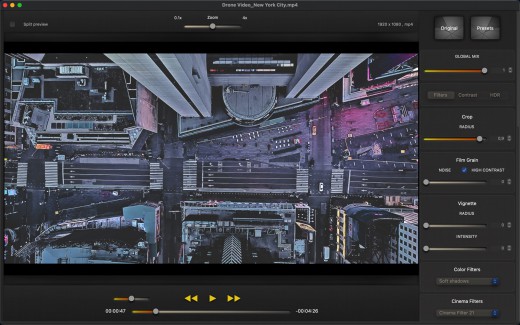
Description: Cinematic Video Effects lets you give a cinematic, colorful and original look to all your videos. You don’t need to use complex tasks, you can achieve a professional style in a simple way. Combine multiple filters, change color styles and variations with a powerful set of controls and a flexible algorithm.

Features

  • Supports all macOS/iOS video formats: MOV, MP4, M4V, HEVC, Apple ProRes and AVI with supported codecs.
  • High level of customization and flexible algorithms: emphasize details, local contrast, vibrancy, dynamics, saturation.
  • Control local contrast and give a cinematic look to your videos.
  • Transform your videos with soft shadows or high lights.
  • Different modes of contrast and vibrancy.
  • Mix multiple techniques like HDR and CLAHE.
  • Lots of color variations and color styles that you can combine and mix.
  • You can create dramatic black and white effects or vibrant tones.
  • More than 200 filters ready to use: Color Filters, Cinema Filters, Light Filters, Color Variations, Black & White…
  • Post-processing with all the needed controls: Brightness, Exposure, Saturation, Gamma, Vibrancy…
  • 18 presets, Soft, Cinema Look, Cinema Effect, Intense, Black & White…
  • You can save your own presets, all changes will always be ready to use.
  • 25/30 fps 720p/1080p real-time preview.
  • Save videos with slow-motion and time-lapse effects.

What’s New

Version 1.4:

  • This additional update fixes some bugs still present in the last version.

Release Name: Cinematic Video Effects 1.4
Size: 49.17 MB
Links: HOMEPAGE – NFO – Torrent Search

Download: UPLOADGiG – NiTROFLARE – RAPiDGATOR
6 Comments
May 29

Viwizard Spotify Music Converter 2.7.2

Description: A brilliant music downloader designed to download and convert all music songs, playlists, albums, and artists to MP3, AAC, WAV, FLAC, M4A, M4B losslessly, offering you a great experience to enjoy music offline on any player and device.

What’s New

Version 2.7.2:

  • Release notes were unavailable when this listing was updated.

Release Name: Viwizard Spotify Music Converter 2.7.2
Size: 8.84 MB
Links: HOMEPAGE – NFO – Torrent Search

Download: UPLOADGiG – NiTROFLARE – RAPiDGATOR

7 Comments
May 29

MesaExif 2.4.16

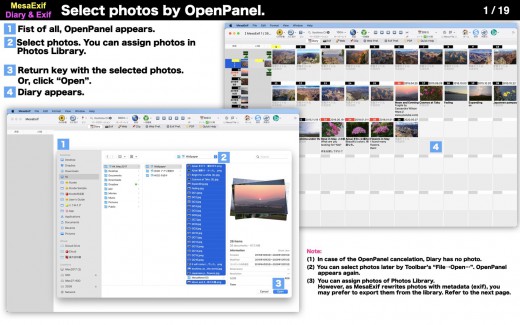
Description: MesaExif is an easy-to-use and powerful Meta Data processor. Some users want to edit all photos based on an edited photo. The request makes sense in regard to the location, the title, date and time and so on.

• Choose your photos with jpg / tiff / png. MesaExif shows thumbnails and Meta Data.
• View and edit Exif, ExifAUX, GPS, IPTC, JFIF, TIFF, Canon’s and Nikon’s.
• Manage your Base Location by searching map, and tap to set the coordinates to GPS dictionary.
• You can restore a photo and/or photos during staying in a same folder if you do not want to change the values.

• You can change all EMoji that MesaExif uses as default icons.
※ The updated values are automatically saved to the original photo file.

What’s New

Version 2.4.16:

  • Release notes were unavailable when this listing was updated.

Release Name: MesaExif 2.4.16
Size: 208.11 MB
Links: HOMEPAGE – NFO – Torrent Search

Download: UPLOADGiG – NiTROFLARE – RAPiDGATOR
8 Comments
May 29

iCompta 6.0.56

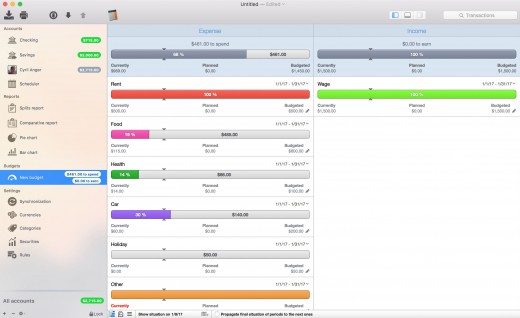
Description: iCompta is an application that lets you manage your accounts with ease. Keep track of your income and expense, schedule your bills, stay in line with your budget and finally know where all your money goes thanks to beautiful charts.

MAIN FEATURES

• Manage multiple accounts with multiple currencies
• Sort and filter your transactions to make statistics on your income and expense
• Keep track of your income and expense thanks to budgets
• Monitor your portfolio
• Manage shared expenses : you can finally know who owes what to who
• Beautiful reports and charts
• Transfers
•Download your transactions from your bank in just one click if your bank supports OFX direct download or with just a few more clicks using the embedded browser
• Easy import / export of transactions in QIF, OFX, CSV, XML and JSON formats
• Full synchronization between iCompta 6 on Mac and iCompta 6 on iPhone / iPad using iCloud, Dropbox or local network
• Modify many transactions at once using batch editing or the powerful rules engine
• Professional features : handle taxes, manage clients and make invoices
• Check transactions on your bank statements to avoid mistakes
• Password protection

Supported Operation Systems
macOS 10.10 or later (Apple Silicon compatible)

Release Name: iCompta 6.0.56
Size: 29.25 MB
Links: HOMEPAGE NFOTorrent Search

Download: UPLOADGiGNiTROFLARERAPiDGATOR

7 Comments
May 29

Cinema Effects – Video Studio 3.6

Description: With Cinema Effects you can transform your videos into masterpieces. All is easy and fast: you can compose videos, music, photos with simple operations, and apply a huge variety of effects in real time.

Features include video composition, video filters and effects, audio filters, audio mix, audio recording, animations, slow-motion, time-lapse and much more.

VIDEO COMPOSITION

  • Add videos by simply dragging them on the editor. Arrange, cut, split by just selecting the video.
  • Use the Precision Editor to select exactly the desired frames.
  • Duplicate a video and place it where you want in the timeline.
  • Trim with maximum precision: you can set a start time and an end time for every video.
  • Change the speed of every video individually. Slow down up to 1/20x or speed up to 32x.
  • Apply a Fade in transition or a fade out transition.
  • More than 40 transitions you can apply with precise timing.
  • Create a reversed version of the video and audio.
  • Select a time range and save only the desired part of the video

VIDEO FILTERS

  • You can control every aspect of the filter: parameters, start and end time, fade in, fade out. You can compose filters and add how many you want.
  • More than 80 filters, from basic to advanced.
  • All kind of adjustments: Color Controls, Exposure, Gamma, Vibrance, Shadows and Highlights, Temperature and Tint, Tone Curve, White Point Adjust, Noise Reduction…
  • All kind of transformations: Zoom, Crop, Rotate, Move, Straighten, Perspective Transform, Specular…
  • More than 200 color filters ready to use: Color Filters, Color Variations, Color Effects, Light Filters, Black & White Filters. You can customize the intensity and preview them in real time.
  • Video filters: Old Film, Grain, Night-Vision, Vignette, Tilt-Shift, advanced Depth of Field, Masked Variable Blur…
  • Advanced Filters: HSV Adjust, HSL Adjust, Level Saturation and Exposure…
  • LUT support: you can import 3D Cube LUTs or images and apply custom video filters.
  • More than 10 Distortion types: Bump Distortion, Hole Distortion, Twirl Distortion…
  • Dynamic zoom, move and zoom, Shaker.
  • Face Detector: recognize faces and apply color filters, distortion, frame or blur.
  • Chroma Key and Green Screen: compose videos or images with color defined background and create digital effects easily.
  • Compose images: more than 25 blend modes, adjust opacity, position, size, rotation, border and shadow. You can add how many watermarks, photos, pictures you want.
  • Text: add text, change opacity, angle, size, obliqueness, spacing, vertical characters, line width, color, and animate.
  • Add Video with animation: you can import a video, and move it while playing with different kinds of animation, apply shadow, border, and clip (rounded rectangle, circle, star…).
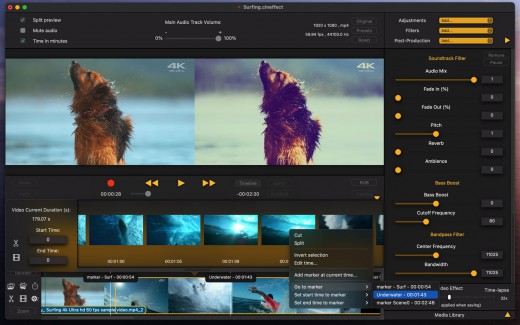
  • Use markers to precisely set filter times.
  • You can save all applied filters as a Preset and reuse them when you want.


AUDIO FILTERS

  • Duplicate soundtrack and mix changing volume, pitch, adding reverb, using the bandpass filter, or the bass boost filter.
  • 10 Band Audio Equalizer with preamplifier and audio mix.
  • Add music files and mix, trim, change speed, repeat, change pitch, fade in, fade out.
  • You can add how many audio files you want and mix them with different volumes.
  • Record audio using a microphone, add the new track to composition and apply effects.
  • Additional features: Masks, Paths, Key Frames with interpolation, Object Tracking.
  • Supports all macOS / iOS video files, MOV, MP4, M4V, Motion-Jpeg AVI, HEVC, HDR and Apple ProRes codecs.
  • Export with different sizes and quality: 1280 x 720 (720p), 1920 x 1080 (1080p), 4K…
  • Slow-motion and time-lapse effects.
  • Import videos, audio files and images to the Library and have them ready to use with filters and compositions.
  • Save a session and open it later with all settings ready.

All filters are GPU based, and use optimized macOS Frameworks.

What’s New

Version 3.6:

  • This additional update fixes a bug that could cause the video not to be exported correctly.

Release Name: Cinema Effects – Video Studio 3.6
Size: 39.54 MB
Links: HOMEPAGE – NFO – Torrent Search

Download: UPLOADGiG – NiTROFLARE – RAPiDGATOR

7 Comments
May 29

Disk Clean Pro 6.2

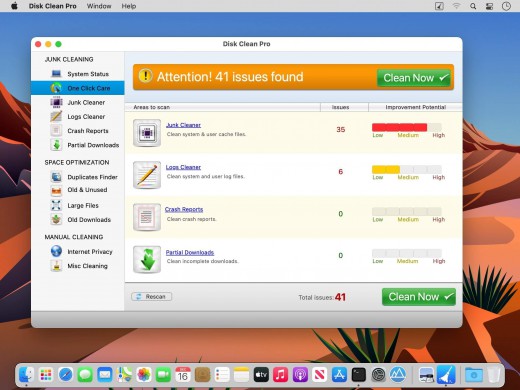
Description: With 4 special tools to clean junk, Disk Clean Pro allows you to store more data by freeing-up storage space!

Features

  • One-Click Cleaning – Just a single click for complete Junk and un-needed data cleanup
  • Junk Cleaner – Clean redundant files and data.
  • Logs Cleaner – Remove unnecessary log files
  • Crash Reports – Cleans unneeded reports to recover storage space
  • Partial Downloads – Remove incomplete downloaded files
  • Disk Clean Pro is having some useful tools that can be used to optimize the storage space and make the most of the precious disk drive.
  • Duplicate Finder – Removing duplicate makes file indexing, search and access faster
  • Old & Unused Files – Removal of redundant data frees up storage on your Mac
  • Large Files – Identifies files that impact usage of disk space the most
  • Old Downloads – Newer versions can be downloaded again when needed
  • There are 2 more great tools which are there in Disk Clean Pro.
  • Internet Privacy Protector – Remove traces of internet browsing history
  • Misc. Cleaning – Cleans files from trash, old backups and mail downloads

Release Name: Disk Clean Pro 6.2
Size: 8.13 MB
Links: HOMEPAGE – NFO – Torrent Search

Download: UPLOADGiG – NiTROFLARE – RAPiDGATOR
6 Comments