May 27

WidsMob AI Retoucher 3.10


Description:
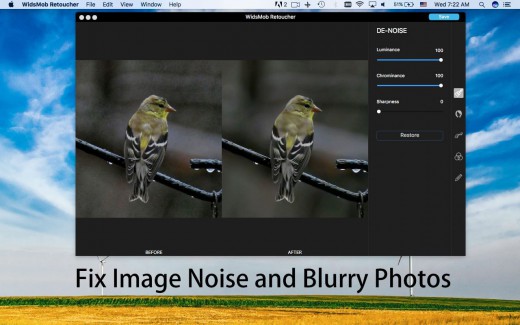
WidsMob Retoucher is a photo editor which allows you to discover the magic of artistic photo effects. It is noise reduction software to fix blurry photos first. WidsMob Retouch eliminates image noise while preserving image detail. What is more, WidsMob Retoucher also removes some selfie imperfections, such as minimize freckles, whiten teeth, and smooth skins. It also provides dozens of revolutionary camera profiles to rediscover the magic of stunning

What’s New

Version 3.10:

  • Release notes were unavailable when this listing was updated.

Release Name: WidsMob AI Retoucher 3.10
Size: 336.75 MB
Links: HOMEPAGE – NFO – Torrent Search

Download: UPLOADGiG – NiTROFLARE – RAPiDGATOR

6 Comments
May 27

iThoughtsX 9.0

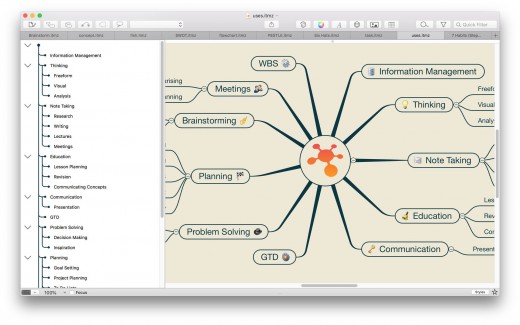
Description: iThoughtsX enables you to visually organise your thoughts, ideas and information.

Typical Uses

  • Course notes/revision
  • Summarising.
  • Project planning
  • Task lists
  • Brainstorming
  • Goal setting
  • WBS
  • Meeting notes
  • GTD

What’s New

Version 9.0

New Features:

  • Outline Layout Style

Tweaks:

  • Import/Export Browser Bookmarks

Fixes:

  • Various bug fixes and performance improvements.

Release Name: iThoughtsX 9.0
Size: 35.29 MB
Links: HOMEPAGE – NFO – Torrent Search

Download: UPLOADGiG – NiTROFLARE – RAPiDGATOR

6 Comments
May 27

Rectangle Pro 2.4.2

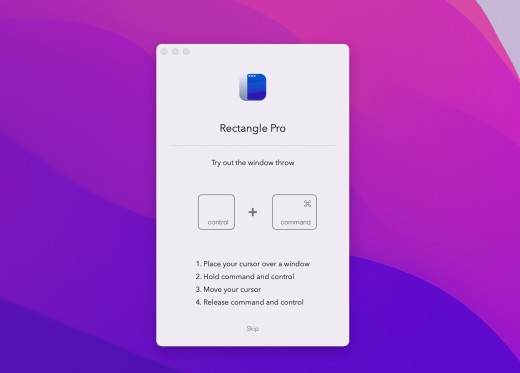
Description: (Formerly Hookshot) Snap windows faster in this featureful Rectangle superset. Toss windows in the right places with cursor movement, move multiple windows with one command, create custom shortcuts, and more.

Features

  • 16 window sizes & positions
  • Keyboard shortcuts
  • Drag windows to screen edges to snap
  • Move and resize by holding a key and moving your cursor
  • Snap windows under your cursor, even if not in focus
  • Custom shortcuts for any size & position

What’s New

Version 2.4.2:

  • Bug fix for window cascading not working properly on external displays
  • Bug fix for certain fixed size windows not moving to the proper locations when configured with custom positions
  • Bug fix for restart on wake not always working properly (only noticeable if you have that box checked in the settings)

Release Name: Rectangle Pro 2.4.2
Size: 18.77 MB
Links: HOMEPAGE – NFO – Torrent Search

Download: UPLOADGiG – NiTROFLARE – RAPiDGATOR

6 Comments
May 27

Sketch 88.1

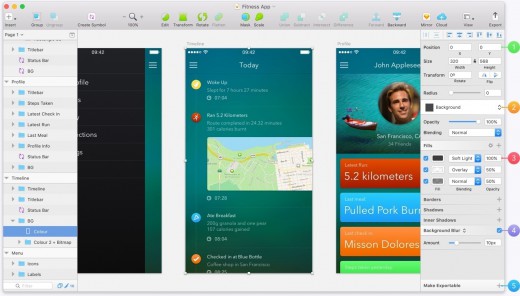
Description: Sketch is an innovative and fresh look at vector drawing for the Mac. Its intentionally minimalist design is based upon a drawing space of unlimited size and layers, free of palettes, panels, menus, windows, and controls. Though simple to use, it offers powerful vector drawing and text tools like perfect Boolean operations, symbols, and powerful rulers, guides, and grids.

What’s New

Version 88.1:

Bug fixes:

  • Fixes a crash that could occur when you worked with Symbols.
  • Fixes a bug that stopped you from being able to double-click on a nested Symbol instance to view its source.
  • Fixes a bug that caused slow performance.
  • Fixes a bug that caused the Hotspot override option in the Inspector to disappear when you set it to None.
  • Fixes a bug that caused layers or Artboards you copied from Sketch and pasted into another app to appear as a blank image.
  • Fixes a bug that stopped some Workspace document updates from processing or appearing in the web app.
  • Fixes a bug that caused Artboards to appear at a low resolution in the prototype player.
  • Fixes a crash that could occur as we determined whether to highlight an item you selected in the Layer List.
  • Fixes a bug that caused performance issues when you used Sketch Mirror to view documents.

Release Name: Sketch 88.1
Size: 70.20 MB
Links: HOMEPAGE – NFO – Torrent Search

Download: UPLOADGiG – NiTROFLARE – RAPiDGATOR

5 Comments
May 27

Cisdem ContactsMate 6.0.0

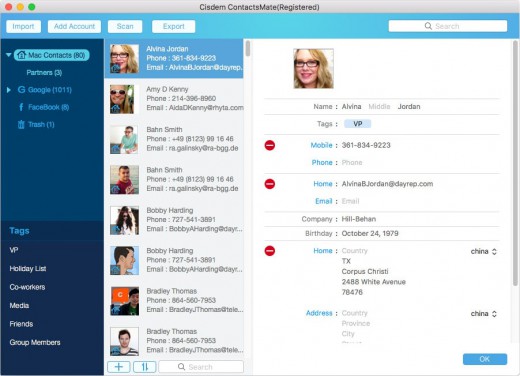
Description: Cisdem ContactsMate (was Contact Manager) is a great contacts manager. It allows you to backup everything in Contacts; edit the Contacts fields; find, analyze, report, and fix dozens of problems with OS X Contacts; and export your address book to CSV, vCard, TXT, DocX, HTML, Excel, Numbers, and Pages formats for easy Contacts backup or sync. The release of version 3 adds new functionalities: make a group for contacts, batch-fix similar problematic contacts, and manually set suffix or prefix.

New Features

  • Import Contacts – Import and combine contacts Contact manager enables you to easily import contact or contact lists directly from a .CSV or vCard file. It also syncs with the built-in Contacts app on Mac and supports all leading cloud services, including iCloud, Google, Exchange, Facebook, Twitter, and LinkedIn, etc.
  • Easily view, add, edit, group, tag, and manage contacts – It is very easy to add, enrich, and update contacts and you can manage your contacts by applying a tag to sub-categorize contacts and organize contacts by groups based on sources, interests, affinities, etc. Meanwhile, you also can quickly find what you want with the intelligent multi-conditional search feature and send group messages, emails or start a call to your assigned lists of contacts and print mailing address.
  • Delete duplicate contacts, fix formatting errors – Cisdem ContactsMate automatically scans your contacts for exact duplicates, incomplete contacts and flicts, it will find all the problems with your contacts and flag them for fix or removal. Once flagged, you have the opportunity to review one or all of the duplicate contact groups and formatting errors before processing, then you can fix them quickly.
  • Share, export and back up contacts to quickly exchange information -Share Contacts via Mail, Messages, Facebook, Twitter, etc. or export the whole or assigned contacts list to local files in different formats, including CSV, vCard, Excel, TXT, DocX, HTML, Numbers and Pages. Then you can easily backup or import it to Outlook, Yahoo, Gmail, etc.

What’s New

Version 6.0.0:

  • Optimized code structure.
  • Optimized the contact editing interface.
  • Optimized the loading speed.
  • Optimized the scan logic.
  • Added data refresh function.
  • Optimized the data display of internet accounts.
  • Added field mapping function to allow uses to manually match the fields when importing CSV file.

Release Name: Cisdem ContactsMate 6.0.0
Size: 9.89 MB
Links: HOMEPAGE – NFO – Torrent Search

Download: UPLOADGiG – NiTROFLARE – RAPiDGATOR

5 Comments
May 27

Bartender 4.1.51

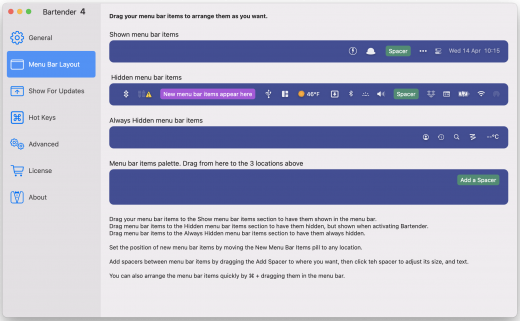
Description: Bartender lets you organize your menu-bar apps by hiding them, rearranging them, or moving them to Bartender’s Bar. You can display the full menu bar, set options to have menu-bar items show in the menu bar when they have updated, or have them always visible in Bartender’s Bar.

Features

  • Lets you tidy your menu bar apps how you want.
  • See your menu bar apps when you want.
  • Hide the apps you need to run, but do not need to see.
  • Have the clean looking menu bar you want.
  • Rearrange your menu bar items as you wish.

What’s New

Version 4.1.51:

New Features / Improvements:

  • Show all hidden items on larger screens. Allows you to show all your menu bar items on larger screens, while stil hiding them on your laptop screen etc.
  • Quick Search selection hotkeys. With Quick Search you can now select one of the visible results using ⌘+number key.
  • Quick Search speed improvements. Quick Search should now appear/display twice as fast, compared to previous versions.
  • Bartender Bar visual improvements. Bartender Bars UI has been slightly tweaked/improved on different screen setups, and should now also show a bit faster.
  • Set Show for update image trigger comparison threshold. Bartender has a percentage difference it ignores before triggering a image comparison difference, you can now adjust this threshold, this is useful for menu bar items that do not change there icon much
  • Manually set menu bar item spacers width. You can now enter the exact width you want a menu bar spacer to be, instead of having to use the slider. Great to get all your spacers exactly the same.

Bug Fixes:

  • Show all items on large screen not taking effect at launch. This has been fixed.
  • Show for updates becoming stuck. It was possible for some Show For updates to remain triggered, this has been fixed.
  • Bartender would not allow ⌘+ as a hotkey. This has been fixed.
  • Unresponsive menu bar apps prevent items being arranged. With macOS Monterey, unresponsive menu bar apps can prevent other menu bar items being arranged, this also stops Bartender being able to arrange your menu bar items, this is now detected and the user gets a prompt that there is a unresponsive menu bar item app so they can quit/restart it.
  • With Screen Sharing/remote connection to mac, Bartender would not move items. This has been fixed.
  • Show full menu bar on some multiple screen setups, quickly flashing. This has been fixed.
  • Items not hiding after showing in fullscreen apps. For a small number of users items could stop hiding after showing them in a fullscreen app. This has been fixed.
  • Accessibility > Full Keyboard Access selected first item in Bartender Bar. Work has been done to better support Full Keyboard Access in the Bartender Bar.
  • Possible crash in previous test build. This has been fixed.
  • Showing removed menu bar items. With macOS Monterey menu bar items removed by a app could still be shown in Bartender, this has been fixed.

Release Name: Bartender 4.1.51
Size: 12.05 MB
Links: HOMEPAGE – NFO – Torrent Search

Download: UPLOADGiG – NiTROFLARE – RAPiDGATOR

5 Comments
May 27

CleanMyMac X 4.10.6

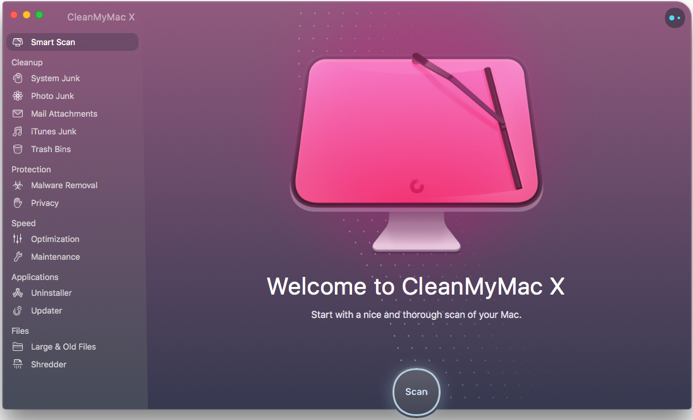
Description: CleanMyMac X is all-in-one package to awesomize your Mac. It cleans megatons of junk and makes your computer run faster. Just like it did on day one. CleanMyMac X chases junk in all corners of your macOS. It cleans unneeded files, like outdated caches, broken downloads, logs, and useless localizations. You can remove tons of clutter that lurks in iTunes, Mail, Photos, and even locate gigabytes of large hidden files. Mac cleaning tools in CleanMyMac X will cut the extra weight in seconds.

Each time your Mac stalls, you got a full deck of speedup tools: Free up RAM, Maintenance scripts, controls for Login Items, Launch Agents, and Hung Applications. This will lessen your system load and tune the Mac for maximum performance. When your machine is productive, you too are productive.

Are there viruses on Mac? Not on yours, if you try Mac cleaning with CleanMyMac X. It fights off malware, adware, ransomware, and all them -wares that are specific to the macOS. When the issue is found, the app deletes it right away. We update our malware database regularly and CleanMyMac X’s Protection module always has your back.

To make your Mac life more orderly, you got a cool duet of Uninstaller and Updater. The first fully removes apps you don’t want, and the second, instantly updates all your software. Bad apps are removed completely and new ones always arrive in time. This helps fix software conflicts and keeps your Mac forever young.
Features:

  • Easy to use, user-friendly interface
  • Drag and drop nature
  • Slims universal binaries
  • Removes useless language translations
  • Most accurate application uninstallation
  • Quick and Secure file eraser
  • Manages widgets, plugins and preference panes
  • Erases garbage left from previously removed applications and widgets
  • Monitors your Trash helping you to uninstall trashed applications correctly
  • Keeps an eye on your removable devices to clean them up from junk service files

Release Name: CleanMyMac X 4.10.6
Size: 83.78 MB
Links: HOMEPAGE – NFO – Torrent Search

Download: UPLOADGiG – NiTROFLARE – RAPiDGATOR

5 Comments
May 26

Bumpr 1.4.0

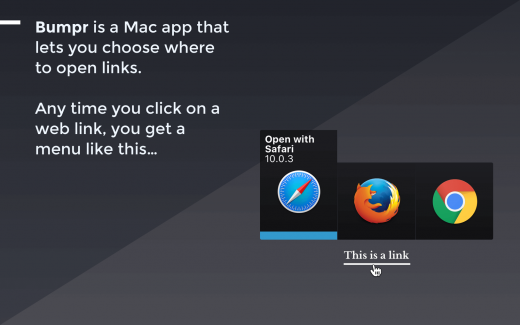
Description: Bumpr is a handy, beautiful Mac app that lets you choose where to open links. Anytime you click on a web link, a compact, elegant menu pops up right in place and lets you choose which browser to open that link with. Bumpr also works with mail links.

Bumpr is particularly effective if you use more than one browser to run separate Google accounts, for cross-browser testing, to keep certain kinds of browsing activities restricted to certain browsers, and more. Its email handling is great if you use separate email clients for different email accounts.

What’s New

Version 1.4.0:

  • Bumpr is now fully compatible with macOS Big Sur
  • Bumpr now works natively on Apple silicon
  • Support for selecting apps with arrow keys

Release Name: Bumpr 1.4.0
Size: 10.46 MB
Links: HOMEPAGE – NFO – Torrent Search

Download: UPLOADGiG – NiTROFLARE – RAPiDGATOR

4 Comments
May 26

Battery Indicator 2.13.0

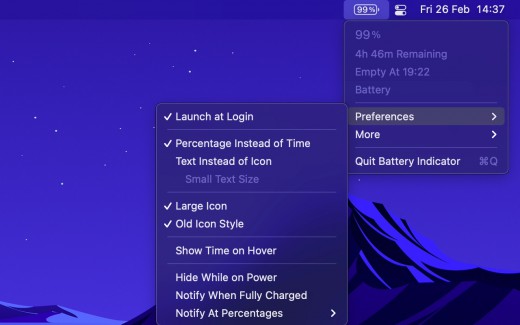
Description: Shows the remaining battery time and percentage in the menu bar.

The app has a setting to hide the menu bar icon when the power plug is connected, which can be useful if you only care about the battery time/percentage when on battery.

You can hide the system battery indicator by dragging its icon out of the menu bar while pressing the Command key. You can also reorder menu bar icons by dragging them around while pressing the Command key. That means you can place this app exactly where the system battery indicator used to live.

There’s also a preference to notify when the battery is fully charged or at certain percentages.

It also comes with support for Shortcuts (on macOS 12).

Requires a MacBook, MacBook Pro, or MacBook Air.

What’s New

Version 2.13.0:

  • Bug fixes

Release Names: Battery Indicator 2.13.0
Size: 7.95 MB
Links: HOMEPAGE – NFO – Torrent Search

Download: UPLOADGiG – NiTROFLARE – RAPiDGATOR

3 Comments
May 26

Valentina Studio Pro 12.3.3

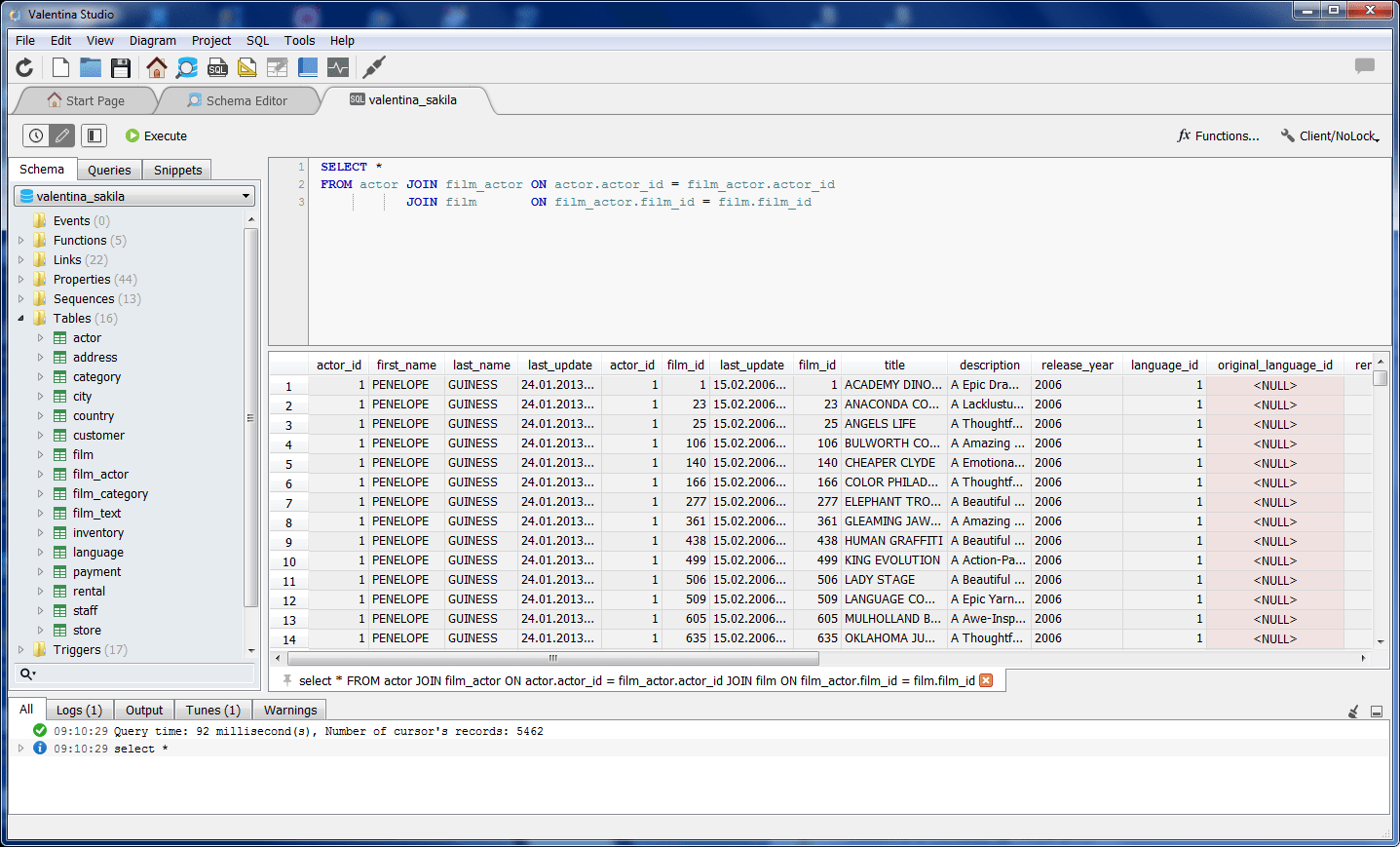
Description: Valentina Studio is the best way to transform your data into meaningful information; create, administer, query and explore MySQL, Postgre MariaDB, MS SQL Server and SQLite databases.

Report Designer:
-Visual design layout tools turn queries into reports; live preview
-Toolbox of controls, html, barcodes, charts, graphs and more
-Sub-reports, regions, groups
-Easy add macros, expressions
-Print to all standard paper formats, set gutter, margin, max records per page
-Deploy Report projects for Valentina Reports ADK applications
-Deploy Report projects to Valentina Server

Forward Engineering:
-Visual Diagram Editor generates new databases
-Toolbox of controls, labels, comments, procedures, tables, views
-Generate scripts, copy scripts into your app code
-Easy visual navigation of very large diagrams.

Release Name: Valentina Studio Pro 12.3.3
Size: 78.02 MB
Links: HOMEPAGE – NFO – Torrent Search

Download: UPLOADGiG – NiTROFLARE – RAPiDGATOR

3 Comments